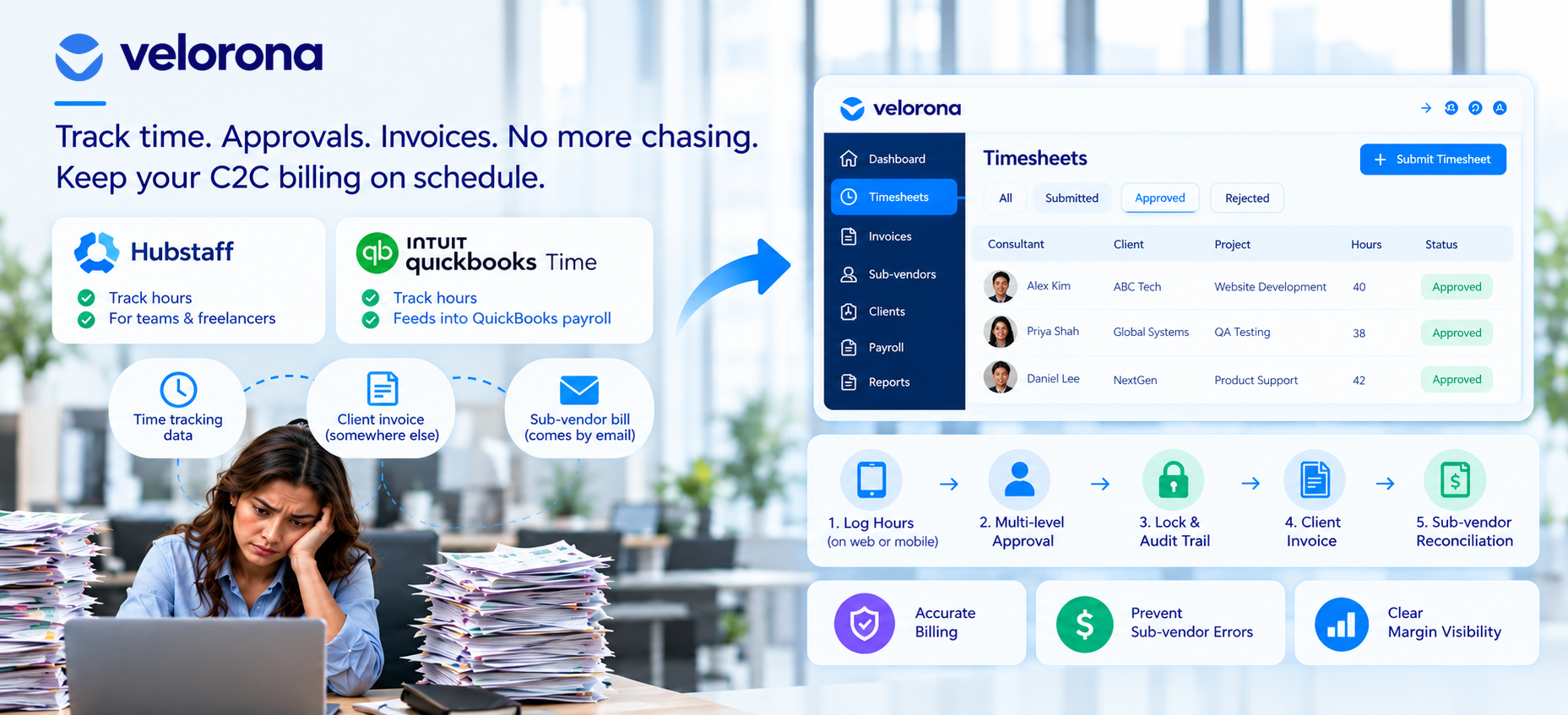
Why Don’t Hubstaff or QuickBooks Time Work for C2C Contractor Time Tracking?
Both tools handle a two-party relationship: you and the person doing the work. Specifically, Hubstaff tracks hours for teams and freelancers. QuickBooks Time tracks hours that feed into QuickBooks payroll. However, neither tool understands a sub-vendor a third party who employs the consultant and bills you separately for the same hours you bill a client.
As a result, the time tracking data sits in one tool. The client invoice gets built somewhere else. And the sub-vendor bill arrives by email, entirely disconnected from either. Someone then manually reconciles all three which is exactly the gap we cover in How Sub-Vendor Invoice Errors Cost Your Staffing Firm $12,000 to $25,000 Every Year.
What This Gap Actually Costs
That manual reconciliation carries a 3-5% error rate on sub-vendor invoices. At $500K to $1M in annual sub-vendor spend, that’s $12,000-$25,000 per year in overpayments that nobody catches because the time tracking tool and the invoicing tool never compare notes. Furthermore, your controller spends 12 or more hours a month matching the data by hand, time that should go toward margin analysis and client reporting instead.
What Should C2C Contractor Time Tracking Actually Do for a Staffing Firm?
This is where Velorona differs from generic tools. Purpose-built c2c contractor time tracking needs to do three things that Hubstaff and QuickBooks Time don’t:
First, capture hours with multi-level approval. A consultant’s hours typically need sign-off from a project manager, then an account manager, before they count as billable. Generic tools offer single-level approval at best. Velorona routes each timesheet through a configurable approval chain consultant → PM → account manager → owner so nobody bills unapproved hours.
Second, lock approved hours with a full audit trail. Once the team approves hours, nobody should quietly edit them later. Velorona’s time locking timestamps every submission, approval, and rejection. Consequently, when a wage dispute or audit question comes up, the answer sits in the system not in someone’s memory or email. The U.S. Department of Labor’s FLSA recordkeeping requirements make this documentation essential, not optional.
Third, feed those approved hours directly into both the client invoice and the sub-vendor payment. This is the critical piece generic tools miss entirely. In Velorona, approved timesheet hours automatically generate the client invoice line item (billing rate applied, PO pulled from client setup) and simultaneously serve as the source of truth for matching the sub-vendor invoice coming in. Nobody re-keys anything.
How Does Generic Time Tracking Compare to C2C Contractor Time Tracking?
The following table shows the gap between tools built for employer-employee relationships and tools built for the three-party reality staffing firms actually run:
| Dimension | Generic Time Trackers (Hubstaff, QB Time) | C2C Contractor Time Tracking (Velorona) |
|---|---|---|
| Party structure | Two-party (you and the worker) | Three-plus party (client, sub-vendor, consultant) |
| Approval workflow | Basic, single-level | Multi-level: consultant → PM → account manager → owner |
| Sub-vendor awareness | None – your controller tracks it separately | Native – the system feeds directly into sub-vendor billing and reconciliation |
| Feeds into client invoicing | No – requires manual export and re-entry | Yes – the system generates the invoice from approved hours automatically |
| Audit trail on edits | Limited | Time locking with timestamped approval history every edit logged |
| Multi-currency | Not supported | Built in – USD/INR with FX lock at setup |
| GPS-stamped clock-in | Hubstaff yes, QB Time limited | Yes – GPS on clock-in with project and client attribution |
| Multi-client attribution | Basic tagging | Hours tagged by client and project the system generates separate invoices automatically |
| Sub-vendor error detection | None | The system matches every sub-vendor invoice against approved hours flags mismatches before payment |
How Do You Set Up Time Tracking for C2C Consultants Across Multiple Clients?
Here’s the step-by-step setup:
Step 1: Capture hours on mobile and web, wherever the consultant works. Velorona’s GPS-stamped clock-in and clock-out gives you a verifiable record not just a self-reported number. Consultants log time directly against specific client projects, so attribution stays clean from the start.
Step 2: Route approvals through the right chain. A consultant’s hours go to their project manager first, then an account manager, before the system locks them as billable. Nobody sends hours straight from timesheet to invoice with no review. Furthermore, bulk timesheet approval lets managers approve 50 timesheets in one click instead of opening each one individually.
Step 3: Lock hours once approved. Once a timesheet receives approval, nobody can edit it without leaving a full audit trail. This protects you if a dispute comes up later with either the client or the sub-vendor. Every action submission, approval, rejection, edit gets timestamped and logged automatically.
Step 4: Let those locked, approved hours become the invoice. No re-entry into a separate billing tool. No separate spreadsheet for the sub-vendor side. The same approved hours drive both the client invoice and the sub-vendor reconciliation. This is Velorona’s bidirectional reconciliation: client invoices going out matched against sub-vendor invoices coming in, with mismatches flagged before payment.
Step 5: Handle consultants who work for multiple clients in the same week. Velorona supports tagging hours by client and project, so the split stays clean when the system generates separate invoices. Nobody manually divides one lump timesheet later. In addition, consultants working across multiple clients log all clock events inside one system Velorona segments by client and project automatically.
What Changes When Time Tracking Feeds Directly Into Billing?
Firms that connect c2c contractor time tracking straight through to invoicing and sub-vendor reconciliation see three immediate changes:
The Double-Entry Problem Disappears
The manual step where errors usually creep in a consultant’s hours getting mis-transcribed between the tracking tool and the invoice, or a sub-vendor’s bill not matching what the team actually approved goes away entirely. Both sides pull from the same locked, approved timesheet record.
The 3–5% Sub-Vendor Error Rate Drops
When the system matches every sub-vendor invoice against approved hours before payment, the $12,000-$25,000 per year in overpayments that manual eyeballing misses gets caught at the source. We document the full cost in the sub-vendor invoice errors deep dive.
Margin Becomes a Lookup, Not a Project
Once hours sit locked and approved in one place, and both the client invoice and sub-vendor payment come from that same record, margin per consultant becomes a straightforward subtraction instead of a reconciliation project. That’s the foundation of the live margin reporting we cover in Staffing Firm Margin: Where It Actually Disappears.
Furthermore, your controller’s workload shifts from 12+ hours of manual matching per month to about 90 minutes of exception review freeing up time for the margin analysis and AR follow-up the role should actually cover.
What Should You Honestly Expect From Velorona and What Isn’t Ready Yet?
Velorona handles timesheets, clock-in/clock-out with GPS, sub-vendor invoicing with bidirectional reconciliation, client portal auto-delivery with read receipts, multi-currency invoicing (USD/INR with FX lock), expense tracking, time-off, schedules, payroll details, bulk timesheet approval, and audit logs with 2FA.
The Team plan costs $10/month per user ($7/month on annual billing), with no setup fees and no implementation cost. Firms typically go live in 5 to 14 days. Compare that to CEIPAL ($30K–$50K/year, 12 weeks implementation) or Bullhorn ($50K+/year). Full plan details sit on the pricing page.
What Isn’t Available Today
However, Velorona does not do the following today: Kiosk attendance with photo + face match + PIN targets Q3 2026 this feature adds anti-buddy-punch verification for shared-device clock-in. QuickBooks Online integration targets Q3 2026 (until then, you export clean data via CSV). Similarly, Stripe Connect for online invoice payment targets Q3 2026. The team currently builds SSO. In addition, Public API + Zapier targets Q3 2026. Payroll execution via Gusto Embedded targets Q4 2026. Finally, 1099-NEC auto-generation also targets Q4 2026. The FAQ page covers additional details.
If you need kiosk-based biometric clock-in or QuickBooks sync today, the honest answer is to wait or evaluate alternatives. On the other hand, if your core pain is c2c contractor time tracking that feeds directly into invoicing and sub-vendor reconciliation, Velorona addresses that today.
One month free trial. No credit card required.
Frequently Asked Questions About C2C Contractor Time Tracking
Can’t I just use Hubstaff and export the data into QuickBooks?
You can, and plenty of firms do. However, every export and re-import creates a chance for hours to get mistyped or dropped. Furthermore, neither tool understands the sub-vendor side of a C2C arrangement, so your controller still performs that reconciliation by hand. The result is the 3-5% error rate that costs $12,000-$25,000 per year in sub-vendor overpayments.
Do I need GPS tracking for IT consultants who work remotely?
GPS-stamped clock-in and clock-out proves most valuable in on-site or hybrid roles. For fully remote consultants, the more important piece is usually the multi-level approval chain and the audit trail on locked hours. In other words, the verification that matters for remote work comes from the approval workflow, not the GPS pin.
What if my consultants work for multiple clients in the same week?
Velorona supports tagging hours by client and project, so the split stays clean when the system generates separate invoices. Nobody manually divides one lump timesheet later. In addition, timesheets tie directly to a specific client and project from day one no fixing attribution after the fact.
How does c2c contractor time tracking affect margin visibility?
Once the system locks and approves hours in one place, and both the client invoice and sub-vendor payment come from that same record, margin per consultant becomes a straightforward calculation instead of a reconciliation project. We cover that connection in Staffing Firm Margin: Where It Actually Disappears. In other words, accurate time tracking is the prerequisite for accurate margin visibility.
Does this only matter for large staffing firms?
It matters most once you pass a handful of consultants and a few sub-vendors since that’s when manual reconciliation between tools starts eating real hours. Specifically, most firms hit the ceiling around 50-60 consultants, which is the growth bottleneck we cover in The High Cost of Operational Fragmentation. Smaller firms can often manage with more manual processes for a while.
How does time tracking connect to the year-end 1099 fire drill?
Directly. If time tracking data stays disconnected from sub-vendor payment records all year, January becomes a scramble to untangle twelve months of scattered data before filing 1099-NECs. Keeping time tracking and invoicing connected year-round means the payment totals per sub-vendor stay accurate every month not just at year-end. We cover the fix in January Is Coming: Get Your 1099 Data Ready Now.
See Time Tracking That Actually Talks to Your Invoicing
If your time tracker and your invoicing tool don’t share data, someone on your team serves as the human connector copying numbers from one place to another, hoping nothing gets lost. That’s the gap c2c contractor time tracking built for staffing eliminates.
Book a personalized demo and we’ll show you what it looks like when time tracking, client invoicing, and sub-vendor reconciliation run from the same approved hours with your actual client and sub-vendor structure. Alternatively, Claim 2 Months 100% FREE Premium Plan, no credit card required.
Related reading:
- How Sub-Vendor Invoice Errors Cost Your Staffing Firm $12,000 to $25,000 Every Year
- C2C Invoicing Software Built for How Staffing Firms Actually Bill
- Staffing Firm Margin: Where It Actually Disappears
- The Friday Night Reconciliation Ritual: What It Actually Costs
- Your Controller Is Doing $200 Work Worth $50
- Cut Your Staffing Firm’s DSO Without Chasing Clients
- The Complete Guide to Staffing Agency Back Office Software