Why Does a Timesheet Approval Workflow for IT Staffing Need Multiple Levels?
Because more than one person holds visibility into whether the hours are legitimate:
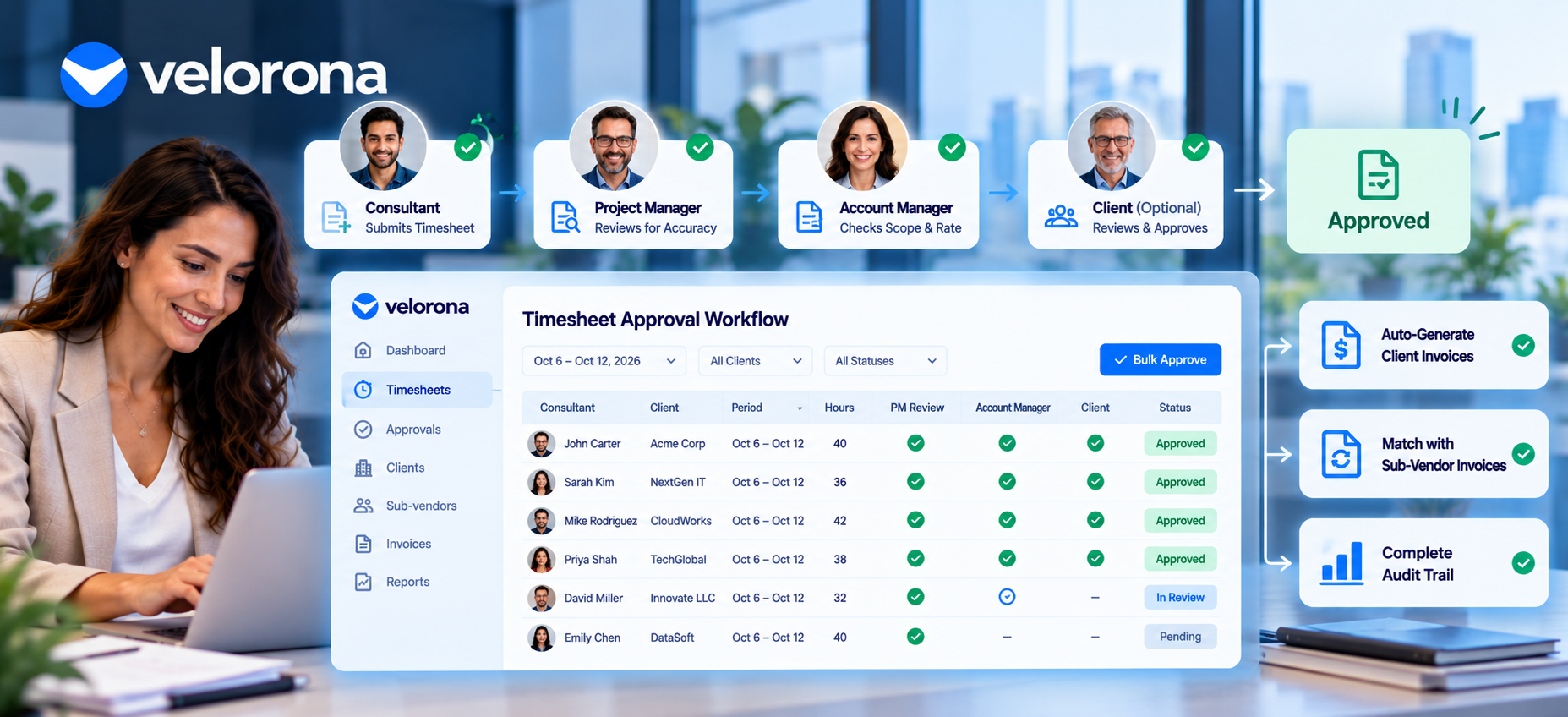
The Project Manager Check
The PM knows whether the consultant actually did the work whether the hours match the tasks assigned and whether the daily totals look reasonable. This is the accuracy check.
The Account Manager Check
The account manager knows whether the hours fall within the scope the client agreed to, and whether the billing rate matches the contract. This is the scope-and-rate check. Without it, a consultant can log legitimate hours on work the client never authorized and the dispute arrives after the invoice already went out.
The Client Review (When Required)
On some engagements, the client wants to review and approve hours themselves before you invoice them. Velorona’s client portal handles this the client sees the hours in a branded portal, approves or rejects with inline comments, and you see the decision in real time.
A single-step approval skips two of those checks. Consequently, when a dispute surfaces later over hours or scope resolving it becomes harder because nobody can point to a clear record of who signed off on what.
What Goes Wrong When Timesheet Approval Runs as a Manual, Single-Step Process?
Usually, the extra review happens in email or a phone call that never gets documented. Specifically:
A PM eyeballs a spreadsheet and gives a verbal okay. An account manager discovers a scope issue after the invoice already went out. None of it gets captured in a system. As a result, when a client questions an invoice three months later, there’s no audit trail to point to just someone’s memory of a conversation. The U.S. Department of Labor’s FLSA recordkeeping requirements make this documentation gap a compliance exposure, not just an operational inconvenience.
Furthermore, without a proper timesheet approval workflow for IT staffing, the same undocumented process creates problems downstream:
Sub-vendor invoices can’t get verified. If nobody formally approved the hours against which a sub-vendor invoice should match, your controller has nothing to match against she eyeballs it. That’s the 3-5% error rate that costs $12,000-$25,000 per year in sub-vendor overpayments.
Margin stays invisible. If approved hours aren’t locked and feeding into both the client invoice and the sub-vendor payment, margin per client requires a manual spreadsheet reconstruction instead of a lookup.
Your controller’s week gets consumed. The 12-hour weekly reconciliation burden exists precisely because timesheets, invoices, and sub-vendor bills live in separate systems with no enforced approval chain connecting them.
How Does Single-Step Approval Compare to a Multi-Level Timesheet Approval Workflow?
The following table shows the gap between generic tools and a timesheet approval workflow built for IT staffing:
| Dimension | Single-Step Approval (Generic Tools) | Multi-Level Approval Built for Staffing (Velorona) |
|---|---|---|
| Approval chain | One approve/reject button | Consultant → PM → account manager → client (if needed) |
| Audit trail | Minimal or none | Timestamped approval history on every step, every edit logged |
| Client visibility | Not built in | Branded client portal for hours review and approval |
| Locking after approval | Often editable after the fact | Time locking prevents silent edits every change logged with 2FA |
| Feeds into invoicing | Manual export and re-entry | Direct approved hours generate the invoice automatically |
| Feeds into sub-vendor reconciliation | No connection | Same approved hours serve as the match source for sub-vendor invoices |
| Bulk approval for routine timesheets | Not available | Approve 50 timesheets in one click focus review time on exceptions |
| Retroactive generation | Not supported | Generate timesheets up to 45 days back no billable period lost |
| Mobile submission | Varies | Consultants submit from iOS, Android, or web same approval chain |
How Do You Set Up a Timesheet Approval Workflow That Actually Holds Up to a Dispute?
Here’s Velorona’s approach, step by step:
Step 1: Define who signs off, in what order. Typically the consultant submits, the PM reviews for accuracy, the account manager reviews for scope and rate, and for some clients the client gets a final look through the client portal. Velorona’s multi-level approval chain makes this configurable per engagement, not one-size-fits-all.
Step 2: Use bulk approval where timesheets follow expected patterns. Not every timesheet needs line-by-line scrutiny every period. Velorona’s bulk approval lets managers approve 50 routine timesheets in one click freeing up review time for the ones that actually look unusual. This is the same efficiency gain we cover in the controller workload piece: shifting time from data processing to exception handling.
Step 3: Lock hours once every level signs off. Time locking with a full audit trail means nobody including your own team can quietly adjust an approved timesheet after the fact. Every submission, approval, rejection, and edit gets timestamped automatically. When a wage dispute or audit question comes up, the answer sits in the system not in someone’s memory.
Step 4: Let locked hours flow straight into invoicing and sub-vendor reconciliation. Once a timesheet clears every approval step, it should become the client invoice automatically billing rate applied, PO pulled from client setup, billing schedule respected. Simultaneously, those same approved hours serve as the source of truth for matching the sub-vendor invoice coming in. This is Velorona’s bidirectional reconciliation: client invoices going out matched against sub-vendor invoices coming in, with mismatches flagged before payment.
Step 5: Handle consultants across multiple clients. Velorona supports tagging hours by client and project, so the system generates separate invoices automatically. Nobody manually divides one lump timesheet later. In addition, consultants working across multiple clients log all entries inside one system Velorona segments by client and project automatically.
How Does the Timesheet Approval Workflow Connect to Sub-Vendor Reconciliation?
This is the critical connection most generic tools miss entirely.
The approval workflow itself only solves half the problem. Specifically, it ensures the hours are accurate and properly authorized. However, the other half involves matching those approved hours against a sub-vendor’s invoice to make sure the two agree.
If your timesheet approval chain runs solidly but the sub-vendor invoice still gets checked by hand, you’ve fixed accuracy but not reconciliation. In Velorona, both sides pull from the same locked, approved timesheet record:
The client invoice generates automatically from approved hours (billing rate, PO, schedule all configured).
The sub-vendor invoice gets matched line by line against those same approved hours. Numbers agree clears. Numbers don’t the system flags it before payment.
That’s the workflow that catches the $12,000-$25,000 per year in sub-vendor errors that manual eyeballing misses. We cover the full cost in How Sub-Vendor Invoice Errors Cost Your Staffing Firm $12,000 to $25,000 Every Year.
What Changes When the Full Approval Chain Gets Documented and Connected?
Three things change immediately:
Disputes get shorter. If a client questions an invoice, you point to exactly who approved the hours, when, and what the timesheet looked like at submission instead of reconstructing an email thread from three months ago.
Invoice errors drop. Because approved, locked hours feed directly into invoicing, there’s no re-entry step where a number gets mistyped between the timesheet and the bill. The 3-5% error rate that manual re-keying creates approaches zero.
Your controller’s workload shifts. The 12-hour weekly reconciliation burden drops to about 90 minutes of exception review because the system handles the matching, and the controller focuses on the flagged mismatches that actually need judgment. As a result, she has capacity for the margin analysis and AR follow-up the role should actually cover.
What Should You Honestly Expect From Velorona and What Isn’t Ready Yet?
Velorona handles timesheets with multi-level approval and time locking, clock-in/clock-out with GPS, sub-vendor invoicing with bidirectional reconciliation, client portal auto-delivery with read receipts, multi-currency invoicing (USD/INR with FX lock), expense tracking, time-off, schedules, payroll details, bulk timesheet approval, and audit logs with 2FA.
The Team plan costs $10/month per user ($7/month on annual billing), with no setup fees and no implementation cost. Firms typically go live in 5 to 14 days. Compare that to CEIPAL ($30K–$50K/year, 12 weeks implementation) or Bullhorn ($50K+/year). Full plan details sit on the pricing page.
What Isn’t Available Today
However, Velorona does not do the following today: Kiosk attendance with photo + face match + PIN targets Q3 2026 this adds anti-buddy-punch verification for shared-device clock-in. QuickBooks Online integration targets Q3 2026 (until then, you export clean data via CSV). Similarly, Stripe Connect for online invoice payment targets Q3 2026. The team currently builds SSO. In addition, Public API + Zapier targets Q3 2026. Payroll execution via Gusto Embedded targets Q4 2026. Finally, 1099-NEC auto-generation also targets Q4 2026. The FAQ page covers additional details.
One month free trial. No credit card required.
Frequently Asked Questions About Timesheet Approval Workflows for IT Staffing
Do all staffing engagements need a three-level approval chain?
Not necessarily. Some clients accept PM-level approval only. The point isn’t forcing every engagement through the same number of steps. Instead, the system should stay flexible enough to match whatever chain a given client relationship actually requires. Velorona’s approval chain configures per engagement you set the levels during client and project setup.
What exactly does bulk approval do, and does it create risk?
Bulk approval lets managers approve many routine, expected timesheets in one action instead of clicking through each individually. It saves significant time for timesheets that match normal patterns. However, anything unusual should still receive a closer look before bulk approval. The system shows outliers hours that deviate from the consultant’s typical pattern so managers can spot-check before approving.
Can clients see and approve hours themselves?
Yes, through Velorona’s branded client portal. The portal shows your firm’s branding, not a third-party vendor’s. Some clients want that extra visibility before you bill hours; others accept your internal approval chain alone. Either way, the approval gets timestamped and logged.
What happens if someone tries to edit an already-approved timesheet?
Time locking with an audit trail means an edit after approval either gets blocked or clearly logged with a timestamp. Consequently, there’s no ambiguity about what the original approved number showed. This matters especially for wage disputes the DOL’s FLSA recordkeeping requirements expect employers to maintain accurate hour records, and a locked audit trail satisfies that.
Does a good timesheet approval workflow replace the need for sub-vendor invoice reconciliation?
No, it provides the foundation for it. Specifically, clean, multi-level-approved, locked timesheet data is what a sub-vendor invoice gets checked against. Without that foundation, reconciliation still has gaps. With it, Velorona’s bidirectional reconciliation matches every sub-vendor invoice against the approved hours automatically catching the $12,000-$25,000 in annual errors that manual matching misses. We cover the full cost in How Sub-Vendor Invoice Errors Cost Your Staffing Firm $12,000 to $25,000 Every Year.
How does the timesheet approval workflow connect to year-end 1099 prep?
Directly. If timesheets stay locked and matched against sub-vendor invoices all year, the payment totals per sub-vendor stay accurate every month. Consequently, January becomes an export not a fire drill. We cover that connection in January Is Coming: Get Your 1099 Data Ready Now.
Get a Timesheet Approval Chain That Actually Holds Up to a Dispute
If your current approval process lives in email and verbal okays, that’s the gap that turns into a real problem the first time a client or sub-vendor disputes an invoice. A proper timesheet approval workflow for IT staffing documents every step, locks every approved hour, and connects everything to invoicing and reconciliation automatically.
Book a personalized demo and we’ll show you what a documented, multi-level approval workflow looks like end to end with your actual client and sub-vendor structure. Alternatively, Claim 2 Months 100% FREE Premium Plan, no credit card required.
Related reading:
- How Sub-Vendor Invoice Errors Cost Your Staffing Firm $12,000 to $25,000 Every Year
- Time Tracking for IT Consultants: Why Generic Tools Fall Short
- C2C Invoicing Software Built for How Staffing Firms Actually Bill
- Staffing Firm Margin: Where It Actually Disappears
- The Friday Night Reconciliation Ritual: What It Actually Costs
- Your Controller Is Doing $200 Work Worth $50
- Cut Your Staffing Firm’s DSO Without Chasing Clients
- The Complete Guide to Staffing Agency Back Office Software