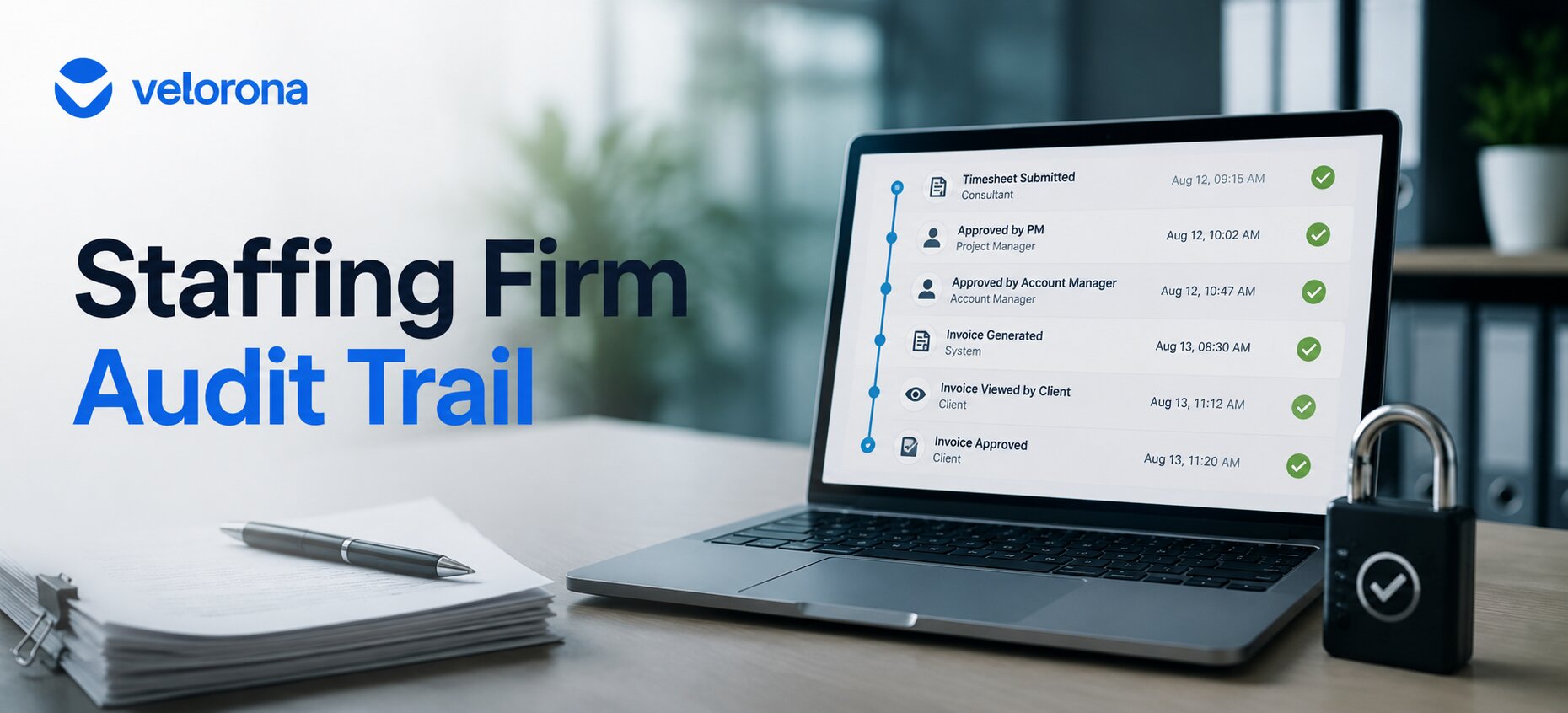
Staffing Firm Audit Trail: The Missing Layer in Your Back Office
A consultant disputes their hours. A client questions an invoice. Without a timestamped record, resolving it means reconstructing the story from memory and old emails often taking weeks. The right staffing firm audit trail logs every approval with a timestamp and 2FA verification, so most disputes resolve in minutes by pulling up the record not by piecing together who said what.
A consultant says they worked 45 hours last week. Your record says 40. Nobody remembers exactly what happened on the call where the extra hours supposedly got approved. That’s not a rare event it’s a normal part of running a staffing firm. However, without a documented trail, resolving it becomes a matter of whoever argues more convincingly, not what actually happened.
The same scenario plays out on the client side. A client questions a billed amount. Your controller searches her email, checks her spreadsheet, and tries to reconstruct a timeline from scattered messages. Three weeks later, the dispute either settles on terms that weren’t what you agreed to or it damages a client relationship you can’t afford to lose.
A proper staffing firm audit trail makes both scenarios irrelevant. Here’s what it takes to build one that actually holds up.
Why Do Wage and Invoice Disputes Take So Long to Resolve at Staffing Firms?
Because most approvals happen informally a verbal okay on a call, a quick reply in a group chat, a nod during a site visit. None of that leaves a record.
Consequently, when a dispute surfaces later, whoever tries to resolve it reconstructs a timeline from memory and scattered messages. That takes real time and rarely produces a clean answer. As a result, the dispute doesn’t get resolved so much as it gets negotiated because there’s no source of truth to point to.
The Scale of the Problem
The U.S. Department of Labor’s FLSA recordkeeping requirements require employers to maintain accurate records of hours worked and wages paid. However, most staffing firms running manual timesheet approval processes don’t produce records that meet that standard because verbal approvals and email confirmations don’t create the kind of documented, timestamped trail that holds up under scrutiny.
Furthermore, the IRS’s independent contractor classification guidance makes accurate payment records essential for 1099-NEC filing. A dispute that reveals inconsistencies in your payment documentation doesn’t just cost you time it can create tax exposure.
What Should a Staffing Firm Audit Trail Actually Capture?
Every approval action: who approved what, at what time, and what the record showed at that moment.
If a timesheet was approved on a Tuesday at 40 hours, and someone later claims it should have been 45, the audit log settles the question immediately: here’s the timestamp, here’s who approved it, here’s what the timesheet showed at approval. Similarly, if a client questions an invoice amount, the same log shows when the invoice was generated, from which approved hours, and when the client viewed and approved it through the client portal.
Specifically, a staffing firm audit trail should capture:
Timesheet submissions and approvals. Who submitted, who approved, at what timestamp, and what the hours showed at every level of the approval chain.
Invoice generation and delivery. When the invoice generated, from which approved hours, when it reached the client portal, and when the client opened, viewed, and approved or disputed it.
Sub-vendor invoice matching. When the sub-vendor invoice arrived, which timesheet hours it matched against, whether the system cleared or flagged it, and who resolved any mismatch all with timestamps.
Edits after approval. If anyone edits a record after approval, that action needs its own timestamp and documentation not a quiet change that erases what was originally agreed.
How Does a Documented Audit Trail Compare to Resolving Disputes Without One?
| Dimension | No Documented Trail | Staffing Firm Audit Trail (Velorona) |
|---|---|---|
| Time to resolve a dispute | Days to weeks reconstructing from memory | Minutes pull up the timestamped record |
| Basis for resolution | Whoever argues more persuasively | Timestamped fact |
| FLSA recordkeeping compliance | Depends on scattered records | Every approval logged automatically |
| Risk of repeat disputes | High nothing was formally settled | Low the record stands and both parties know it |
| Security around who can approve | Depends on informal trust and shared logins | 2FA ties every approval to a verified individual |
| Client confidence | Depends on your word | Backed by a verifiable portal record with read receipts |
| Sub-vendor dispute resolution | Email chains and spreadsheet comparisons | System shows matched hours vs. invoiced hours instantly |
| Wage claim exposure | High verbal approvals can’t be verified | Low every approval timestamped and non-repudiable |
What Role Does 2FA Play in a Staffing Firm Audit Trail?
Two-factor authentication on approval actions does one specific thing that matters for disputes: it ties an approval to a verified individual not just whoever happened to be logged into a shared account.
That distinction matters in two directions:
Internally. When a dispute arises over who approved a timesheet, “whoever was logged in” isn’t a defensible answer. 2FA means the approval record says “this specific person, verified at this timestamp, approved these hours.” Consequently, there’s no ambiguity about accountability.
Externally. A sub-vendor or consultant can’t credibly claim an approval was fraudulent, unauthorized, or made in error if it traces to a 2FA-verified action. Similarly, a client can’t dispute an invoice they reviewed and approved in the client portal the read receipt shows when they opened it, and the approval action shows when they confirmed it.
In other words, 2FA doesn’t just protect your system from unauthorized access. It makes your staffing firm audit trail non-repudiable meaning once an approval happens, the record can’t be argued away.
How Do You Build a Staffing Firm Audit Trail That Actually Holds Up?
Here are the four steps, in order:
Step 1: Move every approval into the system not email, not verbal. A verbal “yes, that’s fine” on a call doesn’t leave a record. An approval in Velorona does with a timestamp attached automatically. This is the single most important change, because it converts every future approval from an informal understanding into a documented fact. In Velorona, consultants submit timesheets from web or mobile, and every approval action by every level of the chain gets logged automatically.
Step 2: Lock records after approval. Once a timesheet or invoice receives approval, an edit should require a new, documented action not a quiet change that erases what was originally agreed. Velorona’s time locking means approved records stay locked, and any subsequent edit creates its own timestamped log entry.
Step 3: Protect approval actions with 2FA. This ties every approval to a verified person, which matters when a dispute hinges on who actually signed off. Furthermore, it removes the shared-account vulnerability where “someone approved it but we don’t know who” becomes the answer to a serious question.
Step 4: Make the log accessible in the moment not buried in system logs. If resolving a dispute means digging through raw database exports, you’ve only partially solved the problem. In Velorona, the approval history for any timesheet, invoice, or sub-vendor record is accessible directly from the record one click, not an IT ticket.
What Changes When Every Approval Has a Documented, Timestamped Record?
Three things shift immediately:
Disputes that took weeks now resolve in minutes. Instead of reconstructing a timeline from email and memory, you pull up the audit log. The timestamp shows what was approved, when, and by whom. The dispute settles on fact, not on whoever argues more convincingly. As a result, the conversation that used to take three weeks of back-and-forth often ends in a single call.
Fewer disputes happen at all. When everyone involved knows there’s a documented trail consultants, sub-vendors, clients the informal “I thought I approved more hours” dispute becomes much rarer. Specifically, people don’t argue records they know exist.
Year-end and tax compliance stops being a reconstruction project. The same audit trail that resolves wage disputes also feeds your 1099 prep with accurate, documented payment records. Your accountant reviews a clean log not a reconstruction of twelve months of informal approvals. The controller’s workload shrinks as a byproduct because the data that used to require manual reconstruction now exists automatically.
How Does the Audit Trail Connect to Your Broader Back-Office Operation?
The staffing firm audit trail isn’t a standalone compliance feature. It connects to every other part of the back-office workflow:
Sub-vendor reconciliation. When the system matches every sub-vendor invoice against approved timesheet hours, the audit trail documents every match and every mismatch who flagged it, who resolved it, and when. That’s why the $12,000–$25,000 annual sub-vendor error gets caught: the matching runs against a documented, locked record, not a spreadsheet someone could have edited.
Client invoicing. The client portal shows read receipts when the client opened the invoice, viewed it, and approved or disputed it. The “I never received it” dispute disappears because the portal log proves delivery. We cover the DSO impact of this in Cut Your Staffing Firm’s DSO Without Chasing Clients.
Controller transitions. When your controller leaves, the audit trail means her replacement doesn’t reconstruct twelve months of approval history from email. The log exists in the system. We cover this specific scenario in How to Cut Your Controller’s Friday Night Reconciliation From 12 Hours to 90 Minutes.
Growth ceiling. Firms that automate the reconciliation and maintain a clean audit trail scale past the 50–60 consultant ceiling because the back office doesn’t depend on any one person’s memory. We cover that in The High Cost of Operational Fragmentation.
What Should You Honestly Expect and What Isn’t Ready Yet?
Velorona handles timesheets with multi-level approval, time locking, and bulk approval. Clock-in/clock-out with GPS. Sub-vendor invoicing with bidirectional reconciliation via the vendor hub. Client portal auto-delivery with read receipts. Multi-currency invoicing (USD/INR with FX lock). Expense tracking. Time-off. Schedules. Payroll details. Audit logs with 2FA on every approval action.
The Team plan costs $10/month per user ($7/month on annual billing), with no setup fees and no implementation cost. Firms typically go live in 5 to 14 days. Full plan details sit on the pricing page.
What Isn’t Available Today
However, Velorona does not do the following today: QuickBooks Online integration targets Q3 2026 (until then, clean matched data exports via CSV). Similarly, Stripe Connect for online invoice payment targets Q3 2026. The team currently builds SSO. In addition, Public API + Zapier targets Q3 2026. Payroll execution via Gusto Embedded targets Q4 2026. Finally, 1099-NEC auto-generation also targets Q4 2026. The FAQ page covers additional details.
One month free trial. No credit card required.
Frequently Asked Questions About Staffing Firm Audit Trails
Does the audit log cover invoice approvals too or just timesheets?
It covers approval actions broadly timesheets, invoices, and edits to either after the fact. Consequently, a dispute about billed hours or invoice amounts resolves the same way a timesheet dispute does: pull up the timestamped record.
What if a consultant disputes hours that were never formally approved in the system?
That’s exactly the scenario a documented approval process prevents going forward. For a dispute rooted in an informal, undocumented approval, resolution still depends on whatever evidence exists outside the system which is the core argument for moving all approvals into it. Once the process runs through Velorona, every future approval has a timestamped, 2FA-verified record.
How does 2FA specifically help when a dispute comes up?
It removes the “I don’t know who approved it” answer. Specifically, 2FA ties every approval to a verified individual not just whoever was logged in. As a result, when a dispute hinges on who actually signed off, the record gives you a definitive answer instead of an ambiguous one.
Does this apply to client-side disputes not just consultant wage disputes?
Yes. A client questioning an invoice or a set of billed hours resolves the same way pull up the client portal record showing when the invoice was delivered, when it was opened, and when it was approved. The portal’s read receipts eliminate “I never received it” entirely.
Does keeping this level of documentation slow down approvals?
No it doesn’t add time to the approval action itself. Clicking approve on a timesheet or invoice takes the same amount of time. The difference is that Velorona records the action automatically rather than the record disappearing the moment the conversation ends.
How does the audit trail connect to year-end 1099 prep?
Directly. The same timestamped payment records that resolve wage disputes also document sub-vendor payments accurately for 1099-NEC filing. When the data stays clean and documented all year, January becomes an export not a reconstruction of twelve months of informal approvals under a hard deadline.
If a Dispute at Your Firm Usually Takes Weeks the Approvals Behind It Were Never Documented
A multi-week wage or invoice dispute isn’t a sign that someone is being difficult. It’s a sign that the approval behind it was informal, undocumented, and impossible to verify. That’s not a personnel problem it’s a systems problem.
A proper staffing firm audit trail converts every future approval from an informal understanding into a timestamped, 2FA-verified fact. Most disputes stop happening entirely. The ones that do happen resolve in minutes.
Book a 15-minute demo and we’ll show you exactly what the audit trail looks like on a real approval record — timesheet, invoice, or sub-vendor match. Alternatively, start a free 30-day trial, no credit card required.
Related reading:
- How Sub-Vendor Invoice Errors Cost Your Staffing Firm $12,000 to $25,000 Every Year
- Automate Timesheet Reconciliation: Cut 12 Hours to 90 Minutes
- January Is Coming: Get Your 1099 Data Ready Now
- Cut Your Staffing Firm’s DSO Without Chasing Clients
- Your Controller Is Doing $200 Work Worth $50
- The High Cost of Operational Fragmentation
- The Complete Guide to Staffing Agency Back Office Software