How to Verify Sub-Vendor Invoices Before You Pay
If you want to know how to verify sub-vendor invoices before you pay for hours nobody worked, the answer isn’t checking harder at month-end it’s matching every invoice against approved timesheet hours the moment it arrives. Most IT staffing firms carry a 3-5% error rate on sub-vendor spend, which costs $12,000-$25,000 per year at $500K-$1M in sub-vendor volume. Automated matching catches those mismatches before payment leaves your account.
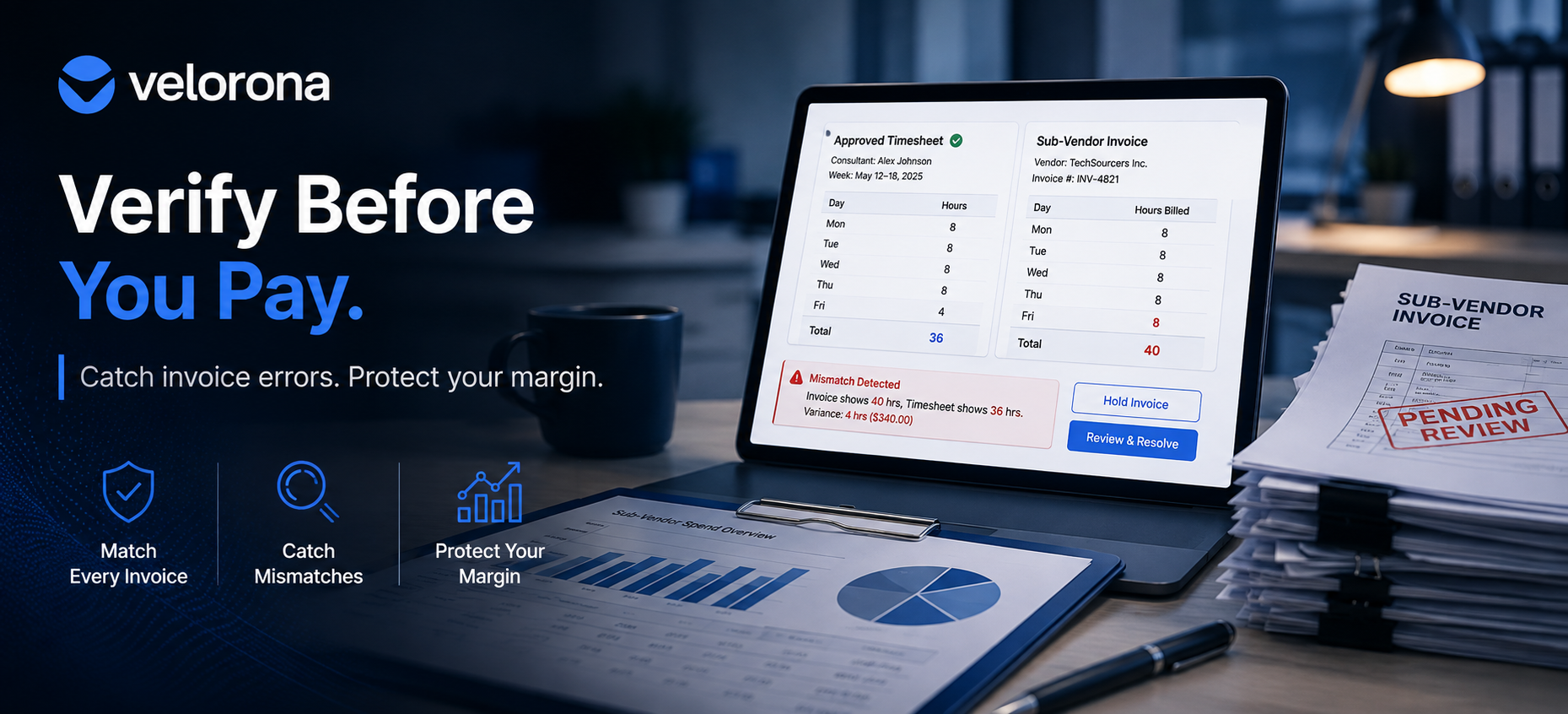
Sub-vendor B invoices you for 40 hours on a consultant this week. Your approved timesheet shows 36. That’s 4 hours at $85/hour – $340 you’re about to overpay for work that never happened.
However, your controller won’t catch it. She processes 15 to 20 sub-vendor invoices per week, and she doesn’t have time to cross-check every line against every timesheet. So the invoice gets approved, the payment goes out, and the error sits buried in your books until December if anyone finds it at all.
This happens three to five times a month at most staffing firms. Consequently, learning how to verify sub-vendor invoices before payment not after is the single highest-value back-office change a firm can make.
Why Do Sub-Vendor Invoice Errors Go Undetected at Most Staffing Firms?
Because the invoice and the timesheet live in different systems, and nothing forces them to agree.
The Three-System Gap
Your consultant logs hours in a timesheet either a spreadsheet, a basic time tracker, or an email. The sub-vendor sends an invoice usually a PDF via email, sometimes a line in a portal. Your controller enters the payment into QuickBooks. Those three records should match. However, nobody checks automatically, so they quietly drift apart.
Why Manual Checking Fails at Scale
At three or four sub-vendors, your controller can eyeball the numbers. At ten or fifteen, however, she’s spending multiple hours per week just on approvals and she’s still missing errors. Specifically, manual invoice-to-timesheet matching carries a 3-5% error rate, based on Velorona’s analysis of staffing firm invoice data during onboarding. For context, the American Staffing Association reports industry net margins of 3-7% which means a $15,000 leak erodes a meaningful share of annual profit.
We cover the full cost breakdown in How Sub-Vendor Invoice Errors Cost Your Staffing Firm $12,000 to $25,000 Every Year.
What Should You Actually Check on Every Sub-Vendor Invoice?
Before approving any sub-vendor invoice, five things need to match. Here’s the verification checklist:
1. Hours billed vs. hours approved. Does the invoice’s total match the approved timesheet for that consultant and that period? This is the most common source of errors a sub-vendor forgets to subtract a sick day, duplicates a line item, or bills for a week the consultant didn’t work.
2. Rate billed vs. rate agreed. Does the invoice rate match the contract rate in your vendor hub? Rate creep where a sub-vendor quietly bills at a higher rate than agreed accounts for a significant share of margin compression that firms don’t catch until year-end.
3. Consultant attribution. Does the invoice bill for the right consultant, on the right project, at the right client? Mis-attributed hours create billing errors downstream when your client invoice goes out.
4. No duplicate line items. Has the same consultant-week combination already appeared on a prior invoice? Duplicate billing ranks as one of the hardest errors to catch manually because it requires comparing the current invoice against previous ones.
5. Correct period. Does the billing period on the invoice match the timesheet period? An invoice that bills for hours outside the approved timesheet window should get flagged, not approved.
If any of those five don’t match, the invoice should get held not paid and corrected later.
How Does Manual Sub-Vendor Verification Compare to Automated Matching?
The following table shows the difference between checking invoices by hand and letting the system match them against approved hours:
| Dimension | Manual Verification (Spreadsheet + Email) | Automated Matching (Velorona) |
|---|---|---|
| When the check happens | After payment, at month-end or never | Before payment, the moment the invoice arrives |
| What gets checked | Whatever the controller has time for | Every line item: hours, rate, consultant, period, duplicates |
| Time per invoice cycle | 12+ hours/month across all sub-vendors | ~90 minutes/month exception review only |
| Error detection rate | Catches some misses 3-5% | System flags every mismatch before payment |
| How mismatches surface | Controller notices during a manual review (if she has time) | System flags and holds the invoice automatically |
| Audit trail | Email threads and memory | Every check timestamped and logged |
| Scales past 15 sub-vendors | Controller runs out of hours | System handles volume without adding labor |
How to Verify Sub-Vendor Invoices in 5 Steps Without Manual Line-by-Line Checking
Here’s how to set up a verification process that catches errors before payment instead of discovering them at month-end:
Step 1: Centralize sub-vendor invoice intake. Stop routing invoices through email. Instead, have every sub-vendor submit through a centralized sub-vendor portal. In Velorona, sub-vendors submit directly into the system and approve their own consultants’ hours inside their portal your controller sees the approved result, not the back-and-forth.
Step 2: Connect every invoice to the approved timesheet. The system should automatically pull the matching timesheet record the moment an invoice arrives. In Velorona, both sides reference the same approved hours so the match happens instantly, not after someone finds the right spreadsheet.
Step 3: Set matching rules that run automatically. Hours on the invoice must equal hours on the approved timesheet. Rate must match the agreed sub-vendor rate in your vendor hub. No repeated line items for the same consultant and date. Velorona’s bidirectional reconciliation runs these checks on every invoice client invoices going out matched against sub-vendor invoices coming in.
Step 4: Flag mismatches don’t auto-reject. When something doesn’t match, the system holds the invoice and shows your controller exactly what’s wrong: “invoice shows 40 hours, timesheet shows 36.” She then decides approve if legitimate, request a correction if it’s an error, or hold for follow-up. Every decision gets timestamped and logged automatically. The U.S. Department of Labor’s FLSA recordkeeping requirements make this documentation essential not just operationally useful, but legally required.
Step 5: Track resolution to closure. Disputed invoices stay visible in the invoices dashboard until resolved. As a result, nothing falls through the cracks. The audit log records who submitted, who reviewed, and when ready for tax season, wage disputes, or the 1099 filing cycle without reconstruction.
What Changes When You Verify Sub-Vendor Invoices Before Payment Instead of After?
Three things shift immediately:
The $12,000-$25,000 annual leak closes. When the system matches every sub-vendor invoice against approved hours before payment, the 3-5% error rate that manual checking misses gets caught at the source. Furthermore, catching errors before payment means you never need to chase refunds after the fact.
Your controller’s workload transforms. The 12-hour weekly reconciliation burden drops to about 90 minutes of exception review. Consequently, she shifts from data matching to the margin analysis and AR follow-up that her role should actually cover.
DSO improves as a byproduct. When sub-vendor invoices match cleanly, your controller has capacity to generate and follow up on client invoices faster. Firms making this switch typically see 15-30 days of DSO improvement within the first quarter because the same clean data that verifies sub-vendor invoices also generates accurate client invoices same-day.
Frequently Asked Questions About How to Verify Sub-Vendor Invoices
How long does it take to set up automated sub-vendor invoice verification?
If you’re moving off spreadsheets, plan on 5 to 14 days specifically, loading sub-vendor rates into the vendor hub, connecting your timesheet data, and defining your matching rules. No setup fees, no implementation cost. See the pricing page for details.
What if a sub-vendor has a legitimate reason for a mismatch?
The system flags it it doesn’t reject it. Instead, your controller reviews the context and approves if the explanation checks out (for example, a mid-week rate change or an authorized overtime adjustment). The difference is that you now have a documented, timestamped approval trail rather than an unanswered email thread.
Can I verify sub-vendor invoices that arrive in different formats?
Yes. Sub-vendors submit through their own portal in Velorona. Everything gets normalized and matched against approved timesheet hours using the same logic. In other words, no re-keying regardless of how the sub-vendor sends the invoice.
How does sub-vendor verification connect to margin visibility?
Directly. Once the system verifies every sub-vendor invoice against approved hours, the gap between what you bill the client and what you pay the sub-vendor becomes a simple subtraction not a reconciliation project. That’s the foundation of live margin-per-client reporting. In other words, knowing how to verify sub-vendor invoices is the prerequisite for knowing your real margin.
Does this work with QuickBooks?
Velorona keeps your matched, verified invoice data accurate and exportable, so whatever enters QuickBooks is already clean. However, native real-time QuickBooks Online sync targets Q3 2026. Until then, CSV export ensures the data stays correct before it reaches your accounting system. The IRS independent contractor classification guidance also makes accurate sub-vendor payment records essential for 1099-NEC filing.
Is automated verification worth it for a firm with only a few sub-vendors?
If you run three to five sub-vendors and your controller isn’t overwhelmed, spreadsheets work fine for now. However, once you pass 10 sub-vendors or once you’ve already found an overpayment error, the math works fast. Specifically, a single $5,000 overpayment that the system catches before payment covers the platform cost for years.
Your Last 90 Days of Sub-Vendor Invoices Probably Contain Errors Right Now
Most staffing firm owners believe their sub-vendor invoices match their timesheets. However, most have never actually checked line by line across a full quarter. At a 3-5% error rate, a firm with $500K in annual sub-vendor spend carries $15,000-$25,000 in overpayments that nobody catches because nobody has time to verify every invoice manually.
Now you know how to verify sub-vendor invoices before payment. The question is whether you want to keep relying on manual checking that misses 3-5% or let the system catch it automatically.
Book a free 30-minute margin audit we’ll pull your last 90 days of sub-vendor invoices and show you what’s slipping through. Alternatively, start a free 30-day trial, no credit card required.
Related reading:
- How Sub-Vendor Invoice Errors Cost Your Staffing Firm $12,000 to $25,000 Every Year
- Staffing Firm Margin: Where It Actually Disappears
- The Friday Night Reconciliation Ritual: What It Actually Costs
- Cut Your Staffing Firm’s DSO Without Chasing Clients
- Your Controller Is Doing $200 Work Worth $50
- January Is Coming: Get Your 1099 Data Ready Now