What Your Sales Team Can Actually Show About Your Staffing Back Office
A staffing sales team that can show the back office, not just call it digital, gives clients something concrete to evaluate. This guide covers seven workflows worth demonstrating, a short demo outline, and how to prepare your staffing sales team back office demo so nobody scrambles when finance questions arrive mid-pitch.
A sales team walks a prospect through the recruiting side: sourcing, screening, submittal speed, rates. The client nods along. Then comes a different question.
“How do your timesheets, approvals, and invoices work after placement?”
That question isn’t about recruiting. It’s about what happens once a consultant logs hours and the client starts getting billed. This is often where a sales conversation shifts from specifics to generalities.
Most teams answer, “We’re digitally managed.” That’s probably true, but it tells the client little. Showing a timesheet become an approval, and an approval become an invoice line, communicates more in thirty seconds than a slide does.
Why Should the Sales Team Explain What “Digital” Means?
“We have automated billing” is a claim. It says billing involves some automation, not what that looks like day to day.
Compare: “Approved hours generate the invoice at the agreed rate, and we track usage against your purchase order.” That describes a workflow.
A purchase order (PO) is the spending limit a client’s procurement team sets for an engagement. When a rep can explain how approved hours tie back to it, the client has something to picture. Vague language leaves clients to fill in the blanks, and they may assume less rigor than exists.
What Should a Staffing Sales Team Demonstrate?
Not every client needs every workflow. Knowing what’s demonstrable puts the team ahead of one reaching for a slide.
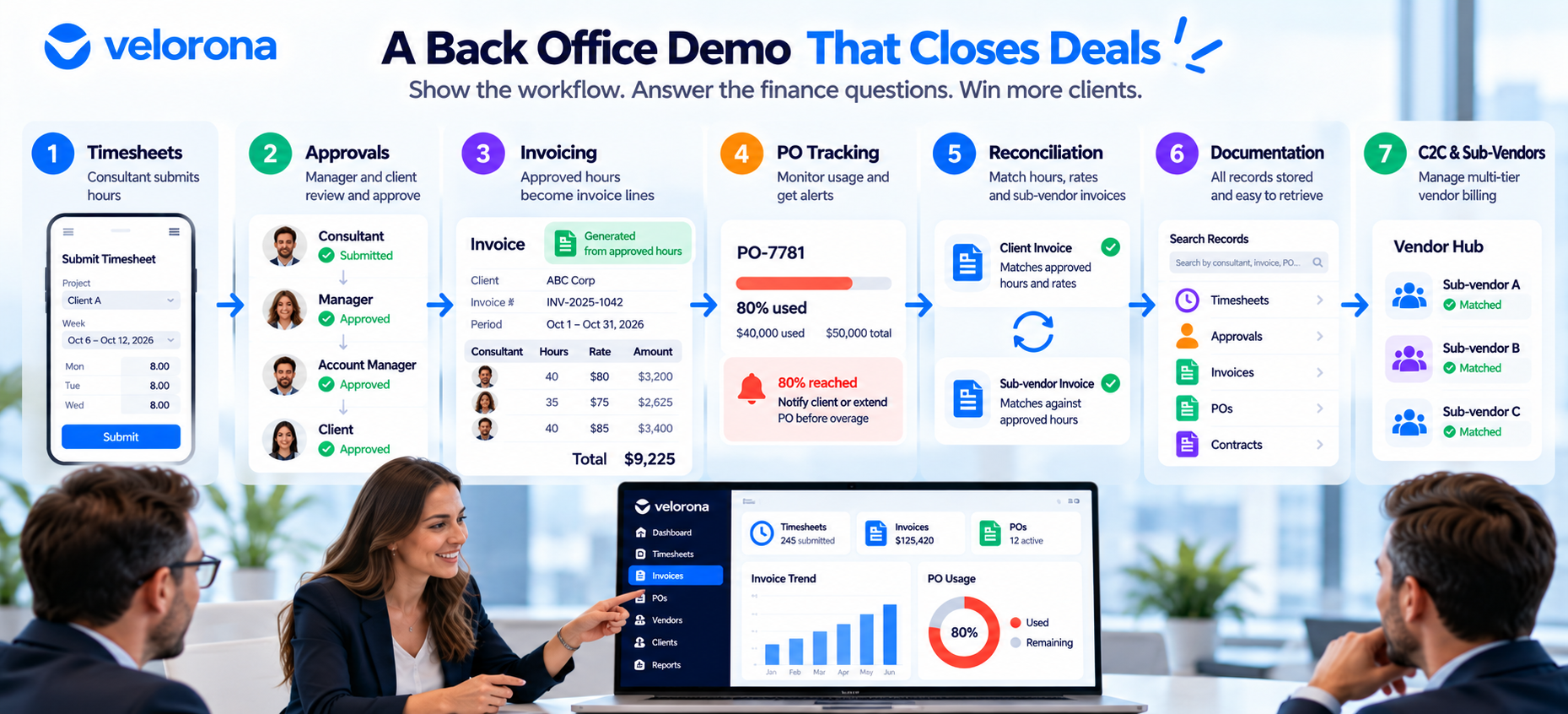
| Workflow | What the Client Wants to Know | What to Show |
|---|---|---|
| Timesheets | How consultants log hours and tie them to a project | Submission from phone or laptop, routed for approval |
| Approvals | Whether a manager signed off before billing | A multi-level chain: consultant, manager, account owner |
| Invoicing | Whether the invoice reflects approved hours and the agreed rate | An approved timesheet becoming an invoice line |
| PO tracking | Whether billing could run past the limit | The running balance and the alert at 80% |
| Reconciliation | What happens when something doesn’t match | A mismatch flagged before payment |
| Documentation | Whether records can be found quickly | A sample record retrieved, not a real client’s |
| C2C and sub-vendors | How billing stays straight across vendors | A sub-vendor invoice checked against approved hours |
See Velorona’s timesheets and invoices for the first three.
PO Tracking
Clients set a PO to control spend. They want assurance that billing won’t pass the ceiling without warning. A demo can show the running balance and where an alert appears as usage nears the limit. Velorona alerts at 80% consumption. For the full picture, read how digital PO tracking prevents billing surprises.
Reconciliation and Sub-Vendors
Reconciliation means checking that what’s billed matches what was worked and approved. For firms using sub-vendors, it also means checking each sub-vendor invoice against the approved hours through the vendor hub. Showing a mismatch caught before payment is one of the more convincing demos a team can run. We explain the mechanism in Bidirectional Invoice Reconciliation.
Corp-to-corp (C2C) means billing through another business entity, a sub-vendor, rather than employing the consultant directly. This matters most in IT staffing and isn’t relevant to every conversation. For multi-party chains, see Multi-Tier Sub-Vendor Support: Win Deals Competitors Turn Away.
Documentation
When a dispute or audit comes up, clients want records found fast. A sample record usually makes the point as well as a live one. See How to Resolve a Wage Dispute in Minutes, Not Weeks.
How Do You Plan a Short Workflow Demonstration?
A useful demo doesn’t need to be long. Treat this as an outline, not a formula:
| Time | What to Show |
|---|---|
| 0–10 sec | A consultant submitting a timesheet |
| 10–20 sec | A manager approving it |
| 20–30 sec | The approved entry becoming an invoice |
| 30–40 sec | A check of invoiced hours and rates against approved ones |
| 40–50 sec | PO usage tracked against the budget |
| 50–60 sec | A supporting record pulled up |
Pacing varies by firm and by what the client asks to see. The point is having something ready. For a fuller script, see How to Show Clients Your Staffing Back Office.
Use sample or authorized data only. Real client names, worker details, or financial figures shouldn’t appear on screen in front of a different prospect.
What Questions Might a Client Ask?
A handful come up often enough to prepare for:
- How do you make sure approved hours get invoiced? Show the link from approval to the invoice line.
- How do you check invoice accuracy? Walk through what you compare: hours and rate.
- How do you track PO usage? Show the balance and the 80% alert.
- What happens on a discrepancy? Explain how you catch and resolve it before payment.
- How do you retrieve documentation? Pull up a sample record.
- How do you handle sub-vendor billing? Describe the check against approved hours.
For the procurement view of these questions, read what clients evaluate beyond recruiting.
What If Your Company Already Uses Software?
Many firms run a time tracker, QuickBooks, a spreadsheet, and email for approvals. That’s a reasonable start. But owning software isn’t the same as having a connected process.
A common pattern: timesheets in one system, approvals in email, invoices in an accounting tool, and PO balances in a spreadsheet updated when someone remembers. Each handoff is a place for drift. A rate changes in one place but not another. An approved hour never reaches the invoice.
Those gaps don’t appear because the firm lacks tools. They appear because the tools don’t talk to each other. Try this exercise: trace one consultant’s hours from submission to payment and count each time someone copies data by hand.
For what accounting software covers and where it stops, see what QuickBooks handles well and where you need a staffing back-office platform. For the wider picture, see 15 staffing agency tools for back-office operations.
How Do You Prepare the Sales Team Before the Next Meeting?
Run this checklist with the team:
- Can they explain how timesheets get submitted?
- Can they describe the approval chain?
- Can they explain how approved hours become invoices?
- Can they show how invoice accuracy gets checked?
- Can they explain PO tracking?
- Can they describe what happens on a discrepancy?
- Can they say where documentation lives and how it’s retrieved?
- Do they know which questions go to finance or operations instead of being answered on the spot?
- Can they demo without putting real client, worker, or financial data on screen?
If the answer is “not sure” more than a couple of times, that’s useful information. It points to where sales and operations should sync before the next conversation.
How Can Velorona Help?
Velorona connects the pieces above for US IT staffing firms with 30–300 consultants:
- Consultants submit timesheets on web or mobile, and hours route through a multi-level approval chain.
- Approved hours generate invoices automatically, with PO usage tracked and an alert at 80%.
- The vendor hub matches sub-vendor invoices against approved hours and flags mismatches before payment.
- Invoices deliver through the client portal, with opened, viewed, and approved timestamps.
- Approvals and actions are timestamped, with 2FA.
None of this replaces the sales conversation. It gives that conversation something concrete to point to. See also How One Staffing Sales Call Closed on the Demo Alone.
What Should You Honestly Expect From Velorona?
The Team plan costs $10/month per user ($7 on annual billing), with no setup fees. Firms typically go live in 5 to 14 days. See the pricing page.
However, Velorona does not do the following today. QuickBooks Online synchronization sits on the roadmap, with CSV export covering the handoff. Stripe Connect payment through the portal also sits on the roadmap. SSO is in development. Payroll execution via Gusto Embedded targets Q4 2026, as does 1099-NEC auto-generation. The FAQ page has current status.
One month free trial. No credit card required.
FAQ: Sales Teams and Back-Office Demos
Should the sales team demo the real system?
Yes, with sample or authorized data. Never show a prospect another client’s information.
How long should a demo take?
About 60 seconds for the overview. Leave extra time for questions.
Who answers finance questions?
Decide ahead of time. Sales covers the workflow, and finance or operations handles detailed questions. Say so openly rather than guess.
Does showing the workflow win the deal?
Not by itself. Procurement also weighs price, experience, and references. A demo removes objections and builds understanding.
What if our tools aren’t connected?
Trace one consultant’s hours from timesheet to payment and count the manual handoffs. Close those gaps first.
What should we show for C2C placements?
How a sub-vendor invoice gets checked against approved consultant hours before payment.
The Bottom Line
Demonstrating a back-office workflow isn’t about impressing a client with software. It helps them understand what happens to their money and budget after a consultant starts. A clear walkthrough using sample data turns “we’re digitally managed” from a phrase into something the client can see and question.
Book a 15-minute demo to walk through timesheets, approvals, invoicing, and PO tracking end to end. Or start a free 30-day trial, no credit card required.
Related reading:
- How Digital PO Tracking Prevents Billing Surprises for Staffing Firms
- Staffing Back Office: What Clients Evaluate Beyond Recruiting
- How to Show Clients Your Staffing Back Office (Instead of Just Telling Them)
- 15 Staffing Agency Tools for Back-Office Operations
- QuickBooks for Staffing Agencies: What It Handles Well and Where You Need a Staffing Back-Office Platform
- How One Staffing Sales Call Closed on the Demo Alone