How to Show Clients Your Staffing Back Office (Instead of Just Telling Them)
A client who asks “how does your process work after placement?” is testing your staffing back office. Saying “we have a digital process” proves nothing. Showing the workflow does. This guide covers what to show, a 60-second walkthrough script, and a checklist to prepare before the next presentation.
You’re on a sales call. Your team has covered candidate quality, track record, rates, and timeline. The conversation is going well.
Then the client asks: “After the candidate starts, how do you manage timesheets, invoicing, and billing disputes?”
Most firms answer with assurances. “We have a digital process.” “Operations handles it.” “We’ll send our onboarding deck.” None of these gives the client a concrete picture.
What if you showed them instead?
Why Should You Show the Workflow Instead of Describing It?
There’s a gap between a claim and proof.
The claim: “We have a fully digital back office with automated invoicing and real-time reporting.”
The proof: “When a consultant submits hours on Monday, their manager approves by Wednesday. Approved hours become the invoice. If you give us a PO, we track usage against it and flag when it nears the limit.”
The second answer is concrete. It answers the question the client actually asks: “Will I see what I’m being billed for?”
This isn’t about impressing anyone with software. It makes your operational integrity visible. A client needs to believe four things:
- Hours get tracked accurately
- Bills reflect actual work
- Problems surface before payment
- Records exist when needed
Saying you’re digital proves none of them. Showing the workflow does.
You don’t need to give clients access to internal systems. A team member or a short recorded walkthrough can demonstrate the flow without exposing sensitive data. For the sales effect of a live portal, see How One Staffing Sales Call Closed on the Demo Alone.
What Should You Actually Show?
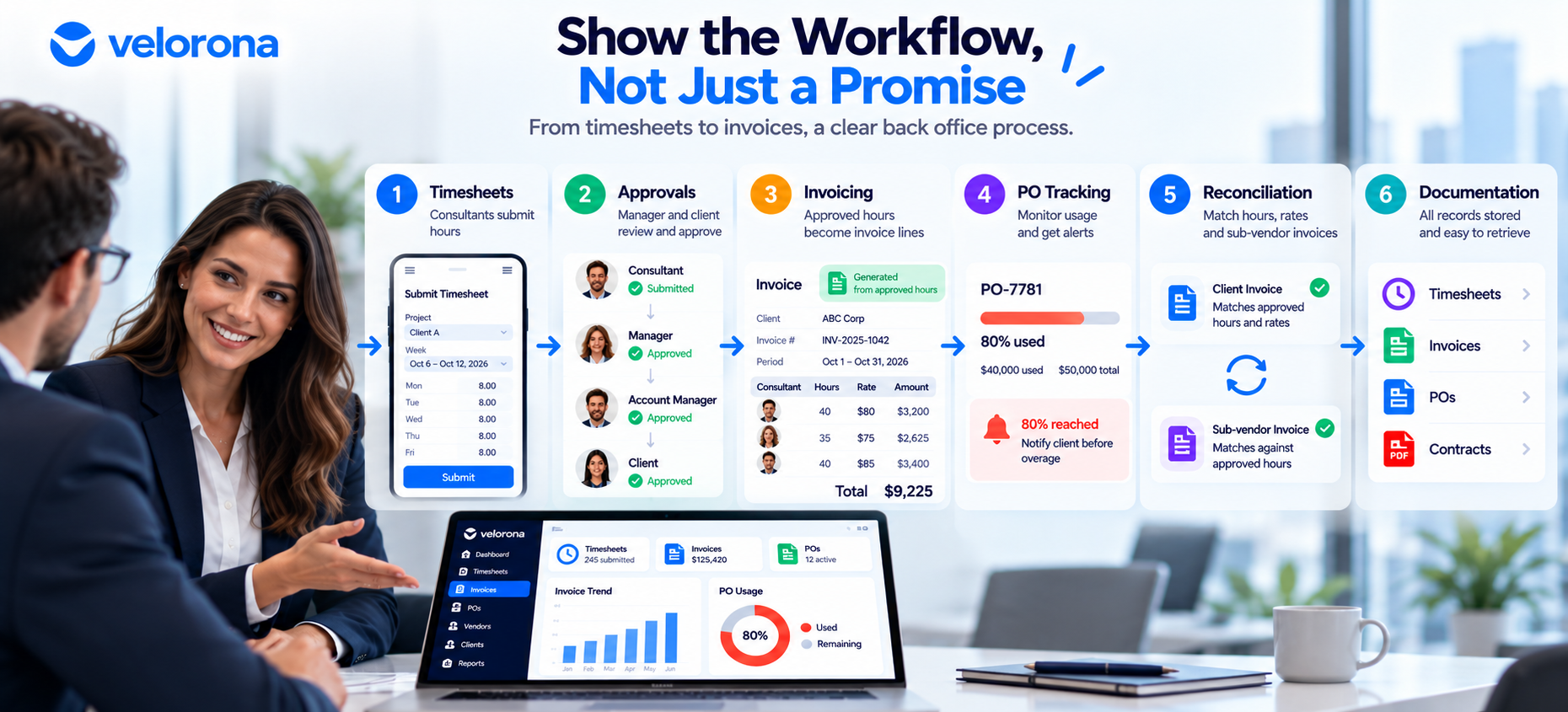
Focus on the six parts clients care about.
1. Timesheets
The client’s question: How do consultants track hours, and can I see them?
Show how a consultant submits hours, from web or mobile. Explain the submission window. Show that hours are timestamped and locked after approval. See Velorona’s timesheets for how this works.
Why it matters: Clients want confidence that hours can’t change after the fact.
2. Approvals
The client’s question: How do I know hours are accurate before I’m billed?
Show the approval chain, such as consultant, project manager, then account manager. Show the typical timeline, and show that approvers can reject or request corrections. At volume, bulk approval cuts review from hours to minutes. We cover it in How to Turn a 12-Hour Friday Into 90 Minutes With Bulk Approval.
Why it matters: Approvals are where errors get caught.
3. Invoicing
The client’s question: When do I get the bill, and how is it calculated?
Show how approved hours become a line-item invoice. Explain the schedule, whether weekly, biweekly, semi-monthly, or monthly. Show that the invoice reflects approved hours and the agreed rate. Velorona’s invoices generate directly from approved hours.
Why it matters: A line-item invoice is harder to dispute than a lump sum.
4. PO Tracking
The client’s question: Am I staying within my purchase order?
A purchase order (PO) is the spending limit your client sets for a project. Show how usage is tracked against it. Velorona alerts when a PO reaches 80% consumption. Explain what you do at the limit, such as pausing, notifying, or renegotiating.
Why it matters: Clients have budgets. Flagging overruns early removes billing surprises.
5. Reconciliation
The client’s question: What happens if something doesn’t match?
Show what you compare: invoiced hours against approved hours, and billed rates against agreed rates. Explain how mismatches get flagged and resolved. For C2C placements, sub-vendor invoices match against the same approved hours before payment, through the vendor hub. See Bidirectional Invoice Reconciliation.
Why it matters: A client who sees errors caught before payment trusts your billing.
6. Documentation
The client’s question: If a dispute comes up later, do you have the records?
Show where timesheets, approvals, and invoices are stored. Explain how fast you can retrieve them. Show that records are timestamped. A strong audit trail resolves disputes in minutes. We explain how in How to Resolve a Wage Dispute in Minutes, Not Weeks.
Why it matters: Disputes happen. Organized records show accountability.
What Does a 60-Second Workflow Walkthrough Look Like?
This is an example, not a requirement. Adjust it to your timeline.
- 0–10 seconds, timesheets. “Consultants submit hours by web or mobile. The system records name, project, hours, and a timestamp.”
- 10–20 seconds, approval. “The team lead reviews hours. If something looks off, we ask for clarification before approving.”
- 20–30 seconds, invoicing. “Approved hours create the invoice lines: consultant, project, hours, your rate, and the total.”
- 30–40 seconds, reconciliation. “Before an invoice goes out, we check hours and rates against what was approved. For C2C placements, we also match the sub-vendor’s invoice against those same hours.”
- 40–50 seconds, PO tracking. “We track usage against your PO and flag it at 80% of the limit.”
- 50–60 seconds, records. “Timesheets, approvals, and invoices sit in one place with timestamps. A record from three months ago takes seconds to pull.”
What Questions Might the Client Ask?
| Client Question | What to Show |
|---|---|
| How do you make sure approved hours get billed? | The flow from approval to invoice, with no re-entry |
| How do you check invoice accuracy? | One recent invoice, compared against approved hours and rates |
| How do you track our PO? | The usage view and the 80% alert |
| What happens on a billing discrepancy? | An example mismatch and your resolution steps |
| How do we receive invoices? | Delivery through a client portal, with opened, viewed, and approved timestamps |
| How do you handle sub-vendor billing for C2C? | The match of sub-vendor invoices against approved consultant hours |
| How fast can you provide documentation? | Where records live and how you search them |
Each answer gets more credible when you point to a system and not only a process. For multi-party chains, see Multi-Tier Sub-Vendor Support: Win Deals Competitors Turn Away.
Why Is Showing the Workflow Better Than Another Sales Slide?
Decks are full of claims: accurate billing, automated processes, operational excellence. A prospect has heard them from ten other firms.
A short demonstration turns a claim into something the client can see and question. Instead of nodding along, they can ask, “What happens if the hours don’t match?” Those are better conversations. They move the client from skepticism to understanding.
One caveat: showing the workflow doesn’t guarantee a win. It removes objections, and understanding builds trust. For the evaluation side, see The Staffing Firms Winning RFPs Aren’t Winning on Price.
What If You Already Have Software?
Many firms think they’re digital while running a scattered setup: timesheets in one tool, approvals in email, invoicing in QuickBooks or Excel, PO tracking in a spreadsheet, and sub-vendor invoices in an inbox.
You have software, but the workflow isn’t connected. When you try to demonstrate it, you realize it involves switching between four tools. You can only explain it.
The goal isn’t more software. It’s a connected workflow, where:
- Timesheet data isn’t re-entered into invoicing
- Sub-vendor invoices match against consultant hours
- Records live in one searchable place
Many firms hit this wall around 50 consultants. We cover why in The Staffing Firm Growth Ceiling at 50-60 Consultants.
What Should You Check Before the Next Client Presentation?
Use this checklist:
- Timesheets. Can we show how consultants submit hours, with a timestamp?
- Approvals. Can we show who approves, how long it takes, and how corrections work?
- Invoicing. Can we show a sample invoice and how it generates from approved hours?
- Invoice accuracy. Can we explain what we check and show one example?
- PO tracking. Can we show PO usage and the 80% alert?
- Discrepancies. Can we walk through a mismatch?
- Documentation. Can we show where records live and how fast we retrieve them?
- Sales knowledge. Can the sales team explain the workflow without finance on the call?
If you can’t check them all, that tells you where your workflow has gaps. Remove real client or consultant data from any sample you show.
How Does Velorona Connect These Workflows?
Velorona is back-office software for US IT staffing firms with 30–300 consultants, and for companies managing 20+ contractors. It connects these steps in one system:
- Consultants submit hours by web or mobile.
- Approvers route hours through a multi-level chain.
- Approved hours generate the client invoice, with no re-keying.
- PO usage is tracked, with an alert at 80%.
- Sub-vendor invoices match against approved hours before payment.
- Invoices deliver through the client portal with opened, viewed, and approved tracking.
- Approvals and actions are timestamped, with 2FA.
What Should You Honestly Expect From Velorona?
The Team plan costs $10/month per user ($7 on annual billing), with no setup fees. Firms typically go live in 5 to 14 days. See the pricing page.
However, Velorona does not do the following today. QuickBooks Online synchronization sits on the roadmap, and CSV export covers the handoff until it ships. Stripe Connect payment through the portal also sits on the roadmap. SSO is in development. Payroll execution via Gusto Embedded targets Q4 2026, as does 1099-NEC auto-generation. The FAQ page has current status.
One month free trial. No credit card required.
FAQ: Showing Clients Your Back Office
Do I need to give clients access to my systems?
No. A team member or a short recorded walkthrough can show the flow without exposing sensitive data.
How long should a workflow demonstration take?
About 60 seconds for the overview. Allow more time for questions.
Does showing the workflow guarantee a win?
No. It removes objections and builds understanding. Procurement also weighs price, experience, and references.
What if my tools aren’t connected?
Start by tracing one consultant’s hours from timesheet to payment and counting each manual handoff. Those handoffs are the gaps to close first.
What should I show for C2C placements?
Show how a sub-vendor invoice gets matched against the consultant’s approved hours before payment.
Can I show a live portal on a call?
Yes, if your system has one. We cover the effect in How One Staffing Sales Call Closed on the Demo Alone.
When a Client Asks How Your Process Works, Say “Let Me Show You”
Your back office doesn’t need to stay hidden. When a prospect asks how you handle timesheets, invoicing, or disputes, that’s an opportunity. Start with the checklist, find what you can demonstrate confidently, and close the gaps.
Book a 15-minute demo to see a connected staffing back-office workflow end to end. Or start a free 30-day trial, no credit card required.
Related reading:
- The Staffing Firms Winning RFPs Aren’t Winning on Price
- How One Staffing Sales Call Closed on the Demo Alone
- How to Pass a Vendor Security Review as a Staffing Firm
- How to Stop Losing Clients Over Lost Invoices
- Multi-Tier Sub-Vendor Support: Win Deals Competitors Turn Away
- The Complete Guide to Staffing Agency Back Office Software