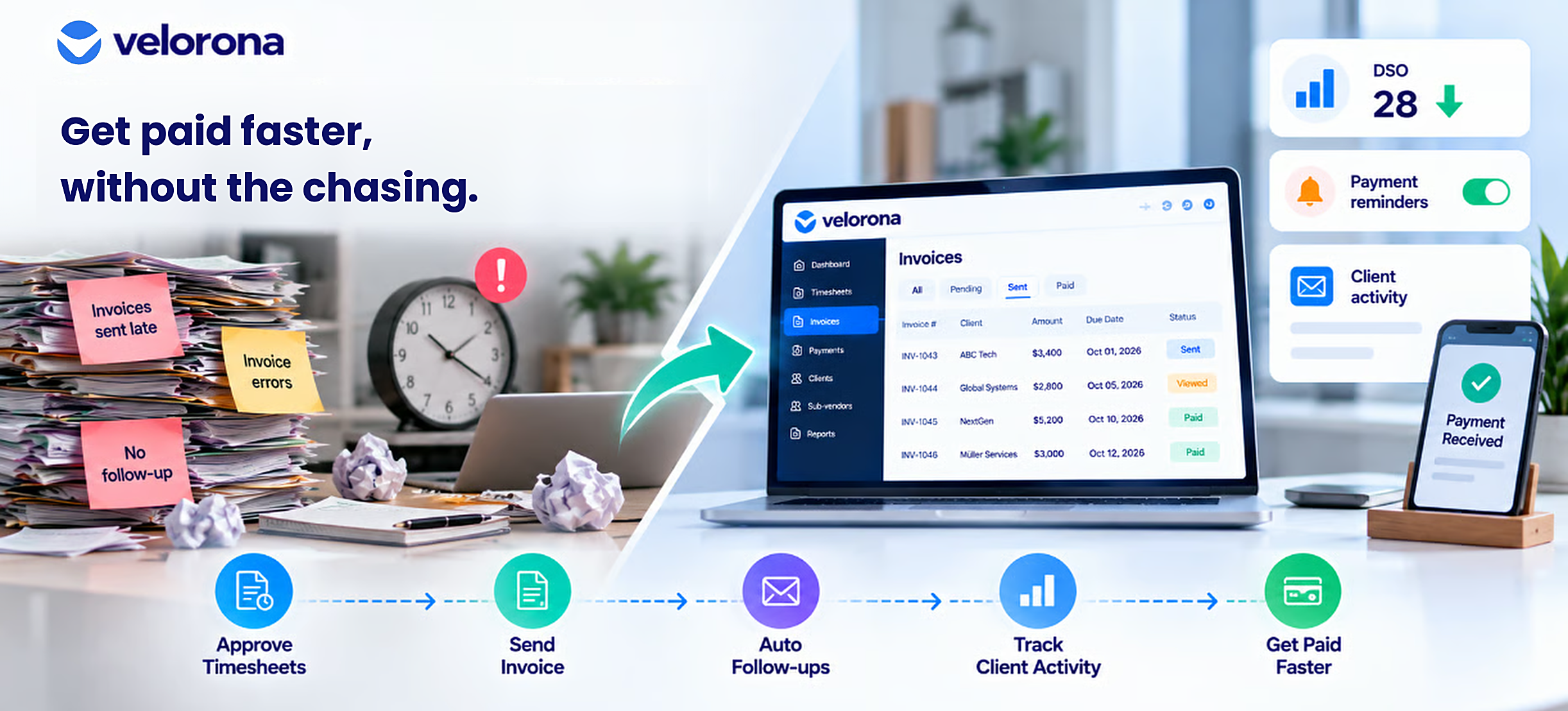
How to Reduce DSO at a Staffing Firm: A Practical Guide to Faster Payments
Staffing firms can lose valuable cash flow simply because invoices go out late, contain errors, or sit without follow-up.
For a staffing firm, every extra day between approved hours and payment puts more pressure on cash flow. Your team still needs to cover payroll, sub-vendor payments, and operating expenses while waiting for clients to pay.
The good news: many DSO problems come from internal processes you can fix.
This guide explains what drives DSO at staffing firms, where invoice delays happen, and how automation can help you get paid faster.
What Is DSO for a Staffing Firm?
Days Sales Outstanding (DSO) measures how long it takes a business to collect payment after it makes a sale.
For staffing firms, DSO starts with the billing process. Your consultants work their hours, your team approves the timesheets, you generate the client invoice, and the client eventually pays it.
Every delay between those steps can increase your DSO.
For example, imagine a client has NET 30 payment terms. Your team takes two days to generate and send the invoice after approving the consultant’s hours. The client still has 30 days from invoice receipt to pay.
That two-day internal delay effectively pushes your cash collection two days further out.
At scale, those small delays compound across every billing cycle.
Why Does DSO Matter So Much for Staffing Firms?
Staffing firms operate on thin margins while carrying significant payroll and contractor costs.
You may need to pay consultants or sub-vendors before your client pays you. When clients take longer to pay, your firm has to finance that gap.
A high DSO can create several problems:
- More cash tied up in outstanding invoices
- Greater pressure on payroll and sub-vendor payments
- More time spent chasing overdue accounts
- Increased reliance on short-term working capital
- Less visibility into which clients create cash-flow problems
- More controller and finance-team workload
The problem becomes especially painful when your team creates delays that you could prevent internally.
What Causes High DSO at Staffing Firms?
Three common process problems create unnecessary delays.
Late Invoice Generation
Invoices often go out late because someone has to manually pull approved hours and build the invoice.
Every day between timesheet approval and invoice delivery adds another day to your DSO before the client even enters the picture.
A two-day internal delay on a NET 30 client effectively pushes collection two days further out. That delay compounds across every billing cycle.
Invoice Errors That Trigger AP Rejections
Your team may send an invoice with a wrong PO number, mismatched rate, or missing attachment. The client’s AP team then rejects the invoice and sends it back for correction.
One rejection can add another two to three weeks to the collection cycle.
According to Investopedia’s DSO analysis, invoice accuracy is one of the controllable factors businesses can address when they want to reduce days sales outstanding.
For staffing firms, generating invoices directly from approved timesheet data can remove many opportunities for manual entry errors.
No Consistent Follow-Up
Your team sends an invoice, but nobody reliably follows up after the due date.
A slow-paying client can then remain slow because nobody consistently reminds them.
These delays do not always come from a difficult client. Gaps in your own process can give a slow-paying account more time to stay slow.
How Do You Chase Staffing Invoices Without It Becoming a Full-Time Job?
Manual invoice collection requires someone to remember which invoices are overdue, find the right client contact, write a follow-up email, and repeat the process when the client still does not pay.
At 20 or 30 open invoices, that creates a meaningful workload.
It also creates a reliability problem. Your team may handle follow-up well during a normal week, then skip it when month-end, payroll, or another urgent task takes priority.
The better approach is to automate routine follow-up.
Instead of asking your controller to remember every overdue invoice, configure the system to send reminders automatically at defined intervals.
Velorona’s invoicing automation includes scheduled late-payment reminders. The system can handle routine reminders without requiring your controller to manually check every invoice.
Deliver Invoices Through a Client Portal
Velorona’s client portal delivers invoices directly instead of relying on email attachments.
You can see when the client opens, views, and approves an invoice.
That visibility helps address one common source of delay: the client saying they never received the invoice.
The updated Velorona positioning identifies automated client-portal delivery as a core moat because it removes the lost-invoice cycle and gives staffing firms visibility into invoice status.
What Does an AR Aging Report Tell You About Your DSO Problem?
An AR aging report groups outstanding invoices by how overdue they are, such as current, 30 days, 60 days, and 90-plus days.
It gives your team a quick view of where collection risk sits.
Without that visibility, a staffing firm can appear cash-healthy while several clients quietly move into the 60-day or 90-day buckets.
For context, the American Staffing Association reports industry net margins of 3-7%. When overdue invoices tie up your cash, even a healthy margin on paper does not solve the immediate cash-flow problem.
DSO is therefore both a cash-flow and profitability concern.
How Does Manual Invoicing Compare With Automated Invoicing for DSO?
The following comparison shows where manual processes create delays and how automation can address them.
| Dimension | Manual Invoicing + Chasing | Automated Invoicing + Portal Delivery |
|---|---|---|
| When invoices go out | Whenever someone has time to build them | Same day your team approves the hours |
| Invoice errors | Common; can cause AP rejections and 2-3 week delays | Velorona pulls data directly from approved timesheets |
| Invoice delivery | Email with PDF attachment and no read receipt | Client portal with opened, viewed, and approved visibility |
| “I never received it” disputes | Common; can add 7-15 days | Portal delivery provides tracking |
| Follow-up | Manual, inconsistent, and easy to skip | Automated reminders at defined intervals |
| AR visibility | Requires someone to pull a report | AR aging available through the invoices dashboard |
| Typical DSO impact | 45-75 days | 15–30 day improvement within the first quarter |
How Do You Reduce DSO at a Staffing Firm Step by Step?
Step 1: Generate Invoices From Approved Hours
Velorona pulls invoice data directly from approved timesheets.
That removes the manual re-keying step where someone could enter the wrong rate, PO number, or billing detail.
The invoice can generate as soon as your team approves the hours, with the appropriate billing rate and schedule applied.
This removes the internal delay that increases DSO before the client even receives the invoice.
Step 2: Deliver Invoices to a Portal, Not Email
When your team emails a PDF invoice, you cannot easily tell whether the client opened it, lost it in spam, or sent it to the wrong person.
Velorona’s client portal delivers the invoice directly and shows when the client opened, viewed, and approved it.
That visibility helps prevent the familiar “I never received it” cycle.
Step 3: Put Late-Payment Reminders on Autopilot
Set reminders at 7, 14, and 30 days past due and let the system send them automatically.
Your controller no longer needs to remember which invoices require follow-up that morning.
Automated reminders also make collection follow-up feel routine rather than personal. Your team can reserve direct calls for accounts that actually need human intervention.
Step 4: Watch AR Aging Weekly, Not Monthly
Review your AR aging every week.
A client that has just entered the 60-day bucket needs a different response from an account that has remained there for another month.
Early visibility gives your team more time to act.
Velorona’s invoices dashboard provides AR aging visibility on demand, so your team does not need to create a separate report every time it wants to review overdue invoices.
Step 5: Fix Rejected Invoices and Find the Cause
If the same client repeatedly rejects invoices for the same reason, fix the process instead of accepting the delay.
For example, if a client always requires a PO number or specific billing detail, configure that information during client setup.
Future invoices can then use the correct information instead of relying on someone to remember it manually.
What DSO Improvement Can You Realistically Expect?
Staffing firms that move from manual, email-based invoicing to automated generation with portal delivery typically see a 15–30 day DSO improvement within the first quarter.
Three changes drive most of that improvement.
Same-Day Invoice Generation
Your team sends invoices as soon as it approves hours instead of leaving them in a manual queue for one to three days.
That removes internal delay from every billing cycle.
Portal Delivery
The client receives the invoice through a tracked portal instead of relying on an email attachment.
The client can open, view, and approve the invoice, giving your team better visibility into its status.
Automated Follow-Up
Scheduled reminders keep overdue invoices from slipping through the cracks.
Your team can focus its time on accounts that need direct intervention instead of manually checking every invoice.
Velorona’s updated positioning specifically identifies a 15–30 day DSO improvement within the first quarter as the expected impact of automated invoicing and client-portal delivery.
What About Online Invoice Payments?
Stripe Connect for online payment through the client portal is planned for Q3 2026.
Once available, clients will be able to pay invoices directly through the portal. This should remove another source of payment friction.
Until then, Velorona’s core DSO improvement comes from faster invoice generation, portal delivery, invoice visibility, and consistent follow-up.
How Does DSO Connect to Other Staffing Back-Office Problems?
DSO does not exist in isolation.
It connects to the same fragmented processes that create margin leakage, sub-vendor overpayments, and controller workload.
Sub-Vendor Invoice Reconciliation
If your team does not reconcile sub-vendor invoices against approved consultant hours, your controller can spend hours matching invoices instead of managing overdue client payments.
Velorona’s bidirectional invoice reconciliation matches client invoices going out with sub-vendor invoices coming in and flags mismatches before payment. This is one of the platform’s primary moats.
Read more: How Sub-Vendor Invoice Errors Cost Your Staffing Firm $12,000 to $25,000 Every Year
Invisible Client-Level Margin
If you cannot see margin by client and consultant, you may not know which slow-paying clients also generate weak margins.
That means your firm could fund payroll and sub-vendor costs for a client without realizing how much profit the account actually produces.
Read more: Staffing Firm Margin: Where It Actually Disappears
Controller Workload
If your controller spends hours every week reconciling timesheets and invoices, that leaves less time for proactive AR management.
Velorona’s automated matching reduces that reconciliation workload and gives the controller more time to focus on exceptions and overdue accounts.
Read more: The Friday Night Reconciliation Ritual: What It Actually Costs
In other words, reducing DSO and reducing reconciliation workload often belong to the same back-office improvement project.
What Should You Honestly Expect From Velorona and What Isn’t Ready Yet?
Velorona currently handles timesheets, sub-vendor invoicing with bidirectional reconciliation, client portal auto-delivery, multi-currency invoicing, expense tracking, time-off, schedules, payroll details, bulk timesheet approval, and audit logs with 2FA.
The Team plan costs $10/month per user, or $7/month per user with annual billing.
There are no setup fees or implementation costs, and firms can typically go live in 5-14 days.
For comparison, the updated Velorona positioning places CEIPAL at $30K-$50K/year and Bullhorn at $50K+/year, with implementation times measured in weeks rather than days.
What Isn’t Available Today?
Velorona does not yet provide every planned back-office capability.
- Stripe Connect: Planned for Q3 2026
- QuickBooks Online integration: Planned for Q3 2026
- SSO: In progress
- Public API + Zapier: Planned for Q3 2026
- Payroll execution via Gusto Embedded: Planned for Q4 2026
- 1099-NEC auto-generation: Planned for Q4 2026
Until QuickBooks Online integration becomes available, firms can export clean data through CSV.
See the FAQ page for additional details.
Frequently Asked Questions About How to Reduce DSO at a Staffing Firm
What’s a Good DSO for a Staffing Firm?
It varies by client mix, contract terms, and payment practices.
Many healthy staffing firms operate in the 30-45 day range. If your DSO consistently exceeds 60 days, start by reviewing invoice accuracy, invoice timing, and follow-up consistency.
The American Staffing Association provides broader staffing-industry information, but your most useful benchmark is your own DSO trend over time.
How Do I Chase an Invoice Without Damaging the Client Relationship?
Use automated reminders for routine follow-up.
Reminders at defined intervals, such as 7, 14, and 30 days, keep the process consistent without requiring your controller to send every message manually.
Save the personal phone call for accounts that genuinely need intervention, particularly invoices that have moved well beyond their payment terms.
Can Bad Invoices Really Cause a Big Chunk of My DSO Problem?
Yes.
A client’s AP team can reject an invoice because of a missing PO number, incorrect rate, or other billing detail.
That rejection can add weeks to the collection cycle.
Generating invoices directly from approved timesheet data and pulling billing details from client setup can reduce these preventable errors.
Does Automated Invoicing Replace Collections Calls Entirely?
No.
Automation handles routine invoice delivery and scheduled follow-up. A genuinely stuck 90-day invoice still needs a human conversation.
The difference is that your team can focus that conversation on the accounts that actually need it instead of manually chasing every invoice.
How Does DSO Connect to Margin, Not Just Cash Flow?
Slow-paying clients tie up cash that your firm could use for payroll, sub-vendor payments, or other operating expenses.
That makes DSO a cash-flow issue.
However, the same client may also have poor margins. If you cannot see client-level profitability, you may not know whether the cash-flow burden makes the account worth keeping.
Read more: Staffing Firm Margin: Where It Actually Disappears
How Much DSO Improvement Should I Realistically Expect?
Based on Velorona’s operational data, staffing firms that move from manual email-based invoicing to automated generation with portal delivery typically see a 15–30 day DSO improvement within the first quarter.
The three biggest drivers are:
- Same-day invoice generation
- Portal delivery with invoice visibility
- Consistent automated follow-up
Stop Waiting on Invoices Your Process Delayed
If you do not know how much cash currently sits in overdue invoices, that is often the first sign that DSO has increased without anyone noticing.
The solution is not to ask your controller to work harder.
It is to remove the delays your process creates.
Generate invoices from approved hours. Deliver them through a portal. Automate routine reminders. Review AR aging every week. Fix recurring invoice errors.
Those changes turn invoice collection from a manual chase into a repeatable process.
Book a personalized demo and see how Velorona can help identify the biggest, most fixable delays in your billing workflow.
Alternatively, Claim 2 Months 100% FREE Premium Plan, with no credit card required.
Related Reading
- How Sub-Vendor Invoice Errors Cost Your Staffing Firm $12,000 to $25,000 Every Year
- Staffing Firm Margin: Where It Actually Disappears
- The Friday Night Reconciliation Ritual: What It Actually Costs
- The Real Cost of Manual Payroll Prep
- Closing the Staffing Cash Gap
- January Is Coming: Get Your 1099 Data Ready Now
- The Complete Guide to Staffing Agency Back Office Software