Staffing Audit Readiness: Can You Produce 12 Months of Records?
If a client controller asked your staffing firm for the last 12 months of invoices, approved timesheets, billing rates, and purchase order (PO) records today, how quickly could your team produce them?
Not just find them somewhere. Produce them together, matched, complete, and ready for review.
For many staffing firms, the honest answer is: “It depends on who’s in the office this week.”
That uncertainty highlights a key challenge in staffing audit readiness. Storing records and retrieving a complete, organized set of records are two different capabilities. Many firms discover the difference only when a client or another reviewer requests documentation by a specific deadline.
Having a shared drive full of invoices does not necessarily mean your team can retrieve every invoice for a particular client, connect it to the approved timesheet and applicable billing rate, and provide the supporting records without searching through multiple systems.
When documentation is spread across accounting software, time-tracking tools, spreadsheets, folders, and email threads, having records and being able to produce them become two very different things.
This article explains which records staffing firms may need to produce, why retrieving them can be difficult, and how to assess whether your documentation process is ready before a request arrives.
What Documentation Might a Staffing Firm Need to Produce?
The records requested depend on who is asking and why. A client’s accounts payable (AP) team reconciling a quarter may need different information from a controller investigating a billing discrepancy. Both requests may differ from a formal compliance review.
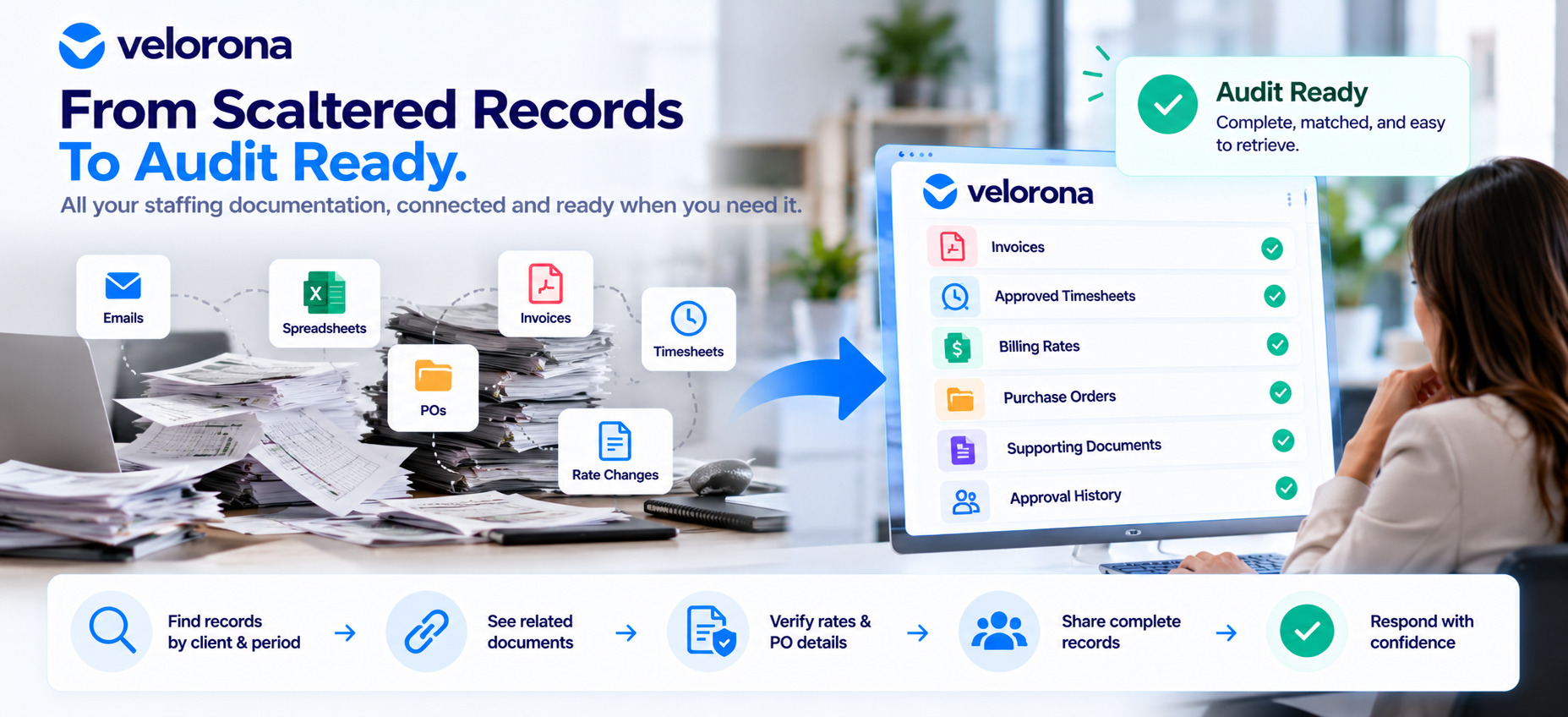
There is no single universal checklist for every situation, but common record categories include:
- Invoices and invoice corrections: The original invoice, revised versions, and an explanation of any changes.
- Approved timesheets and supporting time records: Hours submitted for approval, the approved hours, and available records showing who approved them and when.
- Applicable billing rates and approved rate changes: The rates that applied during the relevant period and documentation supporting authorized changes.
- Purchase orders and authorization records: The PO covering the work and records that help confirm whether billing stayed within its authorized scope or amount.
- Supporting billing documentation: Expense records, time-off adjustments, or other documents needed to explain an invoice total.
- Approval histories and relevant correspondence: Records of decisions involving rates, scope changes, billing exceptions, or other approvals relevant to the request.
Not every request will involve every category. An individual invoice dispute may require only a timesheet and the applicable rate, while a broader client review may cover every contractor on an account over a full year.
The objective is not to prepare every possible document package in advance. It is to know where each record type lives, how it connects to the others, and how quickly your team can retrieve it.
Why Can Retrieving 12 Months of Records Become Difficult?
Many documentation problems are not caused by missing files alone. They arise because records are stored separately and there is no consistent process for connecting them.
Several patterns are worth checking:
- Invoices and timesheets live in different systems. Matching an invoice to its supporting hours requires staff to open multiple tools and compare records manually.
- Rate changes are documented in email. A client may approve a new billing rate in an email thread, but the message becomes difficult to locate months later.
- PO tracking is disconnected from invoicing. A spreadsheet may not reflect the latest invoice or adjustment, making it harder to confirm the remaining balance.
- Supporting documents use inconsistent naming conventions. Files may be saved in different folders or under names that make the current version difficult to identify.
- Invoices and timesheets are not linked. Staff must cross-reference contractor names, dates, hours, and billing periods to establish which records belong together.
- One person holds the process knowledge. If the person who knows where everything is stored is unavailable or leaves the company, retrieving the records becomes harder.
These issues do not affect every staffing firm equally. Some firms have strong practices in certain areas and gaps in others. The useful exercise is to identify which problems actually exist in your operation rather than assuming every process is broken.
What Is the Difference Between Record Retention, Retrieval, and Traceability?
“We keep our records” is often the starting and ending point of a documentation discussion. But record retention is only one part of being able to respond to a request.
Record retention
Record retention means keeping relevant documents for the required period and ensuring they remain available rather than being lost or deleted.
The applicable retention period can vary by jurisdiction, contract, document type, and other requirements.
Record retrieval
Record retrieval means finding the specific records someone requests within a reasonable amount of time, without relying entirely on one person’s memory of where files are stored.
For example, your team should be able to identify the invoices issued to a particular client during a specified period without searching every folder and email account individually.
Record traceability
Record traceability means connecting a transaction to the supporting information behind it.
For an invoice, that may include the approved hours, applicable billing rate, relevant PO, and records explaining any subsequent correction or adjustment.
A firm might retain every invoice but struggle to retrieve all invoices for a requested period. It might also retrieve a folder of invoices without being able to demonstrate which approved hours and rates support each amount.
That is why documentation readiness involves more than retaining files. It also requires an organized way to retrieve and connect them.
Specific record-retention requirements should be confirmed with your legal or accounting adviser. This article provides operational guidance, not legal or compliance advice.
What Might a Client Documentation Request Look Like?
The following scenario is hypothetical and illustrative only. It does not describe a real Velorona customer or event.
Imagine that a client’s controller emails your staffing firm requesting 12 months of invoices and supporting records for eight contractors as part of a routine vendor review.
There are two possible approaches.
Approach A: Records are disconnected
Finance exports a year’s worth of invoices from the accounting system.
Operations then searches for the approved timesheets that match those invoices. Some contractors’ records are in one tool, while others are tracked in spreadsheets because the process was not consistent throughout the year.
Another team member searches old emails to reconstruct the billing rates that applied at different points. Someone else checks whether the invoices were billed against the relevant PO limits.
Several people have now spent time finding and comparing documents—before anyone has confirmed that the requested set is complete.
Approach B: Records are organized and connected
The team uses consistent client, contractor, and invoice identifiers to retrieve the relevant invoices and their supporting records.
It checks the results against the requested period and contractor list, then reviews exceptions before sending the package. For example, the team may identify a rate that does not match the available agreement or a week with incomplete approval records.
The difference is not a guaranteed number of hours saved. The time required depends on the size of the firm, the number of records, and the condition of its existing processes.
The real difference is whether responding to a documentation request becomes a repeatable process or a new investigation every time.
How Can You Prepare 12 Months of Documentation Before It Is Requested?
Documentation readiness is easier to maintain when it is part of routine operations rather than a project started after a client asks for records.
Use these steps to assess your current process.
- Identify the record types your firm needs to maintain. Start with invoices, approved timesheets, billing-rate records, POs, and relevant supporting documents.
- Establish consistent naming conventions and identifiers. Use reliable references for clients, contractors, invoices, and POs so that records can be matched across systems.
- Keep approved timesheets associated with the correct billing period. Make it straightforward to identify which approved hours support a particular invoice.
- Maintain the history of applicable billing rates. Record not only the current rate but also the rate that applied during each relevant period and the documentation supporting approved changes.
- Keep invoice corrections connected to the original invoice. Preserve the original record and the explanation for any revision rather than storing the correction as an unrelated file.
- Assign responsibility for each record type. Define who maintains the records and who is responsible for assembling a requested documentation package.
- Test a sample of previous transactions. Select invoices from a past period and check whether you can retrieve all the records needed to explain them.
- Document the retrieval process. Write down how a request should be handled so that the process does not depend on one person’s memory.
Requirements vary according to applicable law, client policies, and contract terms. Use this list as a starting point for internal process improvement, not as a substitute for professional compliance advice.
A 12-Month Documentation Readiness Checklist
Use this checklist to assess your current process. Mark each item as Ready, Needs Review, or Missing.
| Readiness question | Status |
|---|---|
| Can we retrieve invoices for a requested period without searching through multiple systems manually? | Ready / Needs Review / Missing |
| Can we locate the approved timesheets supporting those invoices? | Ready / Needs Review / Missing |
| Can we identify the billing rates that applied during the relevant periods and their effective dates? | Ready / Needs Review / Missing |
| Can we retrieve the relevant PO records and check invoices against them? | Ready / Needs Review / Missing |
| Can we connect supporting documents to the correct client, contractor, and invoice? | Ready / Needs Review / Missing |
| Can we explain invoice corrections and identify the relevant supporting records? | Ready / Needs Review / Missing |
| Can we identify missing or incomplete records before a client asks about them? | Ready / Needs Review / Missing |
| Is someone clearly responsible for assembling and reviewing a documentation request? | Ready / Needs Review / Missing |
A checklist is useful only when it reflects what your team can actually do. Mark an item “Ready” after testing the process, not simply because you believe the relevant files exist.
If several items are marked “Missing,” use those results to prioritize the next steps.
How Do Disconnected Systems Affect Documentation Readiness?
Moving from paper records to digital tools does not automatically create a connected audit trail.
A staffing firm might store timesheets in one application, invoices in another, and billing rates and POs in spreadsheets. The information is digital, but the team may still have to match the records manually every time someone asks a question.
What helps close this gap is a combination of:
- Consistent identifiers across systems.
- Clear ownership of each record type.
- Reliable links between invoices and supporting records.
- Documented processes for corrections and exceptions.
- Fewer disconnected steps where consolidating workflows makes sense.
This does not mean every spreadsheet is a problem or that every firm needs to replace all its tools. Some businesses already have effective processes using their existing systems.
The purpose of a readiness review is to establish where the real gaps are and whether those gaps create unnecessary work when records must be retrieved.
How Does Velorona Fit Into Documentation Readiness?
Velorona connects several staffing back-office workflows, including timesheets, client invoicing, and sub-vendor invoice matching through Vendor Hub.
The following capabilities relate directly to the recordkeeping and retrieval challenges discussed above.
Structured timesheet approvals
Velorona’s timesheet workflow uses the statuses Open, Submitted, Approved, and Rejected. The source documentation states that approval and rejection actions are timestamped automatically.
This provides a structured approval history and helps prevent unapproved hours from reaching billing.
Invoices generated from approved hours
Velorona generates invoices from approved timesheet hours, connecting billing to the underlying approved work rather than requiring the team to recreate that connection later.
The invoicing workflow also supports invoice lifecycle management. According to the supplied product information:
- Draft invoices can be edited before finalization.
- Finalized invoices lock key details.
- Invoices can be resent while preserving send history.
- Records can be archived without deletion.
- PO balances are tracked, with alerts triggered at 80% of the authorized amount.
These features can help teams maintain a more organized record of invoice creation, delivery, and PO usage.
Sub-vendor invoice reconciliation
For staffing firms working with sub-vendors, Velorona’s Vendor Hub matches incoming sub-vendor invoices against approved consultant hours and flags mismatches before payment.
The supplied product information also describes an audit trail for invoice matching. This can help the team investigate discrepancies without relying entirely on separate spreadsheets and email exchanges.
What does this mean for documentation readiness?
Connecting timesheet approvals, client invoicing, and sub-vendor invoice matching can make it easier to trace an invoice to the records behind it.
However, these capabilities are organizational and retrieval aids, not a guarantee that every documentation request will be complete or satisfy a particular legal, contractual, or compliance requirement.
Velorona does not automatically assemble a complete 12-month audit package. A staffing firm still needs to determine what a specific request requires, check for missing information, and review the records before sending them.
A connected system can reduce the amount of work that depends on separate tools, manual comparisons, and one person’s knowledge of where documents are stored. The firm’s own procedures and review remain essential.
Be Ready Before Someone Asks
Keeping records and being able to produce them on request are not the same thing. The difference often becomes visible only when a client asks a specific question and expects an answer by a deadline.
Here is a practical test you can run today.
Choose a recent month and one client. Try to retrieve the invoices, approved timesheets, applicable billing rates, and relevant PO records for that period without waiting for another person to tell you where everything is.
Then review what happened.
Did the records come together quickly? Were the supporting documents linked to the right invoices? Could you explain any corrections or discrepancies? Or did one missing approval, unclear file name, or unavailable colleague slow everything down?
The exercise will help you identify where attention is needed, whether that means improving record organization, clarifying ownership, or connecting steps that currently depend on manual work.
If the test reveals gaps, explore how your current timesheet, invoice, and vendor records connect. You can explore Velorona’s staffing back-office platform or book a 15-minutes demo to review the workflows it supports.
Related Reading
- Staffing Firm Audit Trail: The Missing Layer in Your Back Office — Explore how timestamped approvals and documented invoice activity can help teams investigate billing questions and disputes.
- Staffing Back Office: Client Experience After Placement — Learn how timesheet approvals, invoice accuracy, PO tracking, and accessible documentation affect day-to-day client operations.
- Staffing Client Invoice Portal: Stop Losing Cash to Lost Invoices — Read about invoice delivery and activity visibility, including why it matters to know when a client receives and reviews an invoice.
- Timesheet Software for Staffing: Turn Hours into Invoices — Understand how approved timesheets connect to billing and sub-vendor reconciliation.
- Multi-Tier Staffing Vendor Management: Control C2C Chains — Explore the documentation and recordkeeping challenges involved in managing multi-tier staffing vendor relationships.
e.