Beyond Talent: What Clients Expect From a Staffing Vendor
The Client Experience Doesn’t End at Placement
Your team found the right candidate. The client interviewed them, made an offer, and the consultant started on Monday. From a recruiting standpoint, the job is done.
Then, three weeks later, the client’s accounting team emails about an invoice that doesn’t match the approved timesheet. Or a hiring manager asks why last month’s purchase order balance looks off. Or someone in procurement wants a copy of the signed timesheet before they’ll release payment.
None of this is about the candidate anymore. It’s about whether your firm can answer a billing question quickly, produce documentation on request, and keep timesheets and invoices in sync without a scramble.
This is the part of the relationship clients experience most often. A placement happens once. Invoicing, approvals, and reporting happen every week, for as long as the engagement runs. If that process feels disorganized, it shapes how the client sees your firm, even if the consultant is doing great work.
This article looks at what happens after placement, where the friction usually comes from, and what it takes to make that part of the relationship easier to work with.
Winning the Placement Is Only the Beginning
For most staffing firms, the operational work after placement runs for the life of the engagement. A single consultant on a long assignment can generate months or years of recurring back-office tasks, including:
- Timesheet collection and approval. Someone has to submit hours, a manager has to approve them, and a staffing back-office operations team has to make sure nothing slips through without sign-off.
- Invoice preparation and correction. Rates, hours, and line items have to match what was actually approved. When a client flags a discrepancy, someone has to track it down and fix it.
- Purchase order tracking. Many client engagements run against a PO with a fixed dollar ceiling. Someone needs to know how much of that PO has been used and how much is left.
- Billing and supporting documentation. Clients may ask for signed timesheets, rate confirmations, or proof of hours before they release payment.
- Communication across teams. Recruiters, account managers, accounting staff, and the client’s own AP or project team all touch pieces of this process, often without a shared view of where things stand.
None of this guarantees a renewal or a new contract by itself. But it is the part of the relationship the client interacts with most consistently. A client who gets a clear invoice on time, with no back-and-forth, has a very different day-to-day experience than one who has to chase down answers every billing cycle. Over the life of an engagement, that pattern becomes part of how the client thinks about working with your firm.
Where Manual Processes Create Friction
Not every staffing firm runs into every problem below. But when timesheets, invoices, and client records live across spreadsheets, email threads, and disconnected tools, a few patterns show up often:
- An invoice needs to be checked against an approved timesheet. If the two live in separate files, someone has to manually compare hours and rates line by line before they can answer a client’s question with confidence.
- A billing question requires searching through multiple files. A client asks why last month’s invoice was higher than usual, and the answer is scattered across a timesheet spreadsheet, an email thread, and a separate billing file.
- A PO balance takes time to confirm. Without a live view of what’s been billed against a purchase order, confirming the remaining balance can mean reconstructing it from past invoices.
- Missing documentation delays a response. A client requests a signed timesheet or supporting record, and it takes a day or more to track down because it isn’t stored in one place.
Individually, these are small delays. But they add up, especially for firms managing several active clients and sub-vendors at once. Manual processes don’t mean a firm is poorly run. They’re common, especially for growing staffing firms. The issue is that they make the back-and-forth slower, and that back-and-forth is exactly what shapes the client’s ongoing experience of working with a staffing vendor.
What Larger Clients Need From a Staffing Vendor
Candidate quality is still the starting point for any staffing relationship. But as firms pursue larger enterprise clients, operational reliability tends to matter more, not less. These clients often have their own AP, procurement, and vendor management processes, and they expect a staffing vendor to fit into those processes smoothly. In practice, that can include:
- Clear billing and supporting records. Invoices that match approved hours and rates, with documentation available if a client’s finance team asks for it.
- Timely responses to accounting questions. When a client’s AP team flags a discrepancy, they generally want an answer in days, not weeks.
- Visibility into timesheets, invoices, and PO balances. Some clients want to see this themselves rather than requesting it each time.
- Consistent processes across teams and engagements. If a client works with multiple account teams or consultants from your firm, they may notice when billing practices vary from one engagement to the next.
- An organized way to provide documentation when requested. Audits, compliance reviews, and routine AP checks all come with document requests, and a quick, complete response reflects well on the firm.
These aren’t universal procurement checkboxes, and meeting them doesn’t guarantee a contract award. But for firms trying to move upmarket, operational reliability is often one of the practical things a larger client can observe directly, well before the next renewal conversation happens.
What a Digitally Organized Staffing Operation Looks Like
A lot of staffing firms already use some kind of software: a time-tracking app, QuickBooks, maybe a separate tool for scheduling. The gap usually isn’t a lack of tools. It’s that the tools don’t talk to each other, so someone still has to move data between them by hand.
A connected back-office workflow looks different. Depending on what’s supported, it can include:
- Digital timesheet submission and approval, so hours are captured once and routed through approval without emailed spreadsheets.
- Invoice generation based on approved time, so invoices reflect what was actually signed off rather than being rebuilt manually.
- Invoice checks and reconciliation, so mismatches between billed hours and approved hours are easier to catch before an invoice goes out, not after a client questions it.
- PO tracking and balance visibility, so a team can check what’s left on a purchase order without rebuilding it from past invoices.
- Centralized records and documentation, so a billing question or an audit request doesn’t turn into a search across several files.
- Visibility across clients, contractors, and sub-vendors, where the platform supports it, so account teams aren’t relying on one person’s spreadsheet to know where things stand.
It’s worth being direct about what this does and doesn’t solve. Connecting these workflows reduces the number of manual handoffs and makes information easier to find. It doesn’t automatically fix every operational problem, and it still requires a firm to set up its billing rules, approval chains, and client records correctly. Software replaces the manual transfer step. It doesn’t replace the work of running a disciplined operation.
Already Using Staffing Software? Check for Workflow Gaps
Many firms have already digitized part of their operation. That’s a reasonable starting point, but it can still leave gaps if timesheets, approvals, invoicing, PO tracking, and reporting live in separate tools that don’t connect. A time-tracking app that doesn’t feed billing, or a billing tool that doesn’t reflect PO balances, still leaves someone doing manual transfers between systems.
A short checklist can help identify where those gaps are:
- Do approved timesheets flow directly into invoices, or does someone re-enter the hours?
- Can your team see a client’s PO balance without checking a separate spreadsheet?
- If a client disputes an invoice, how many systems does someone have to check to resolve it?
- Is sub-vendor or contractor billing reconciled against approved hours automatically, or manually?
- If the person who manages this process were out for a week, could someone else step in without a long handoff?
If several of these point to manual work, the gap usually isn’t the absence of software. It’s the absence of a connected workflow between the tools already in place.
Five Questions to Assess Your Client-Facing Operations
It helps to assess this plainly, rather than guessing. A few direct questions can surface where the current process holds up and where it doesn’t:
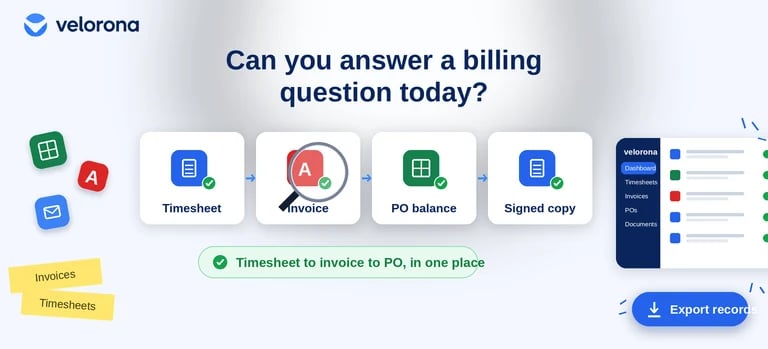
- Can we show how an approved timesheet becomes an invoice, step by step?
- Can we quickly explain an invoice discrepancy if a client flags one today?
- Can we check a PO’s recorded usage and remaining balance without digging through old files?
- Can we retrieve the supporting documentation for a billing question on short notice?
- Can our team explain the workflow consistently, without relying on one person to find everything?
The answers won’t tell you whether you’ll win the next contract. But they will tell you where the process needs attention before a client has to point it out first.
How Velorona Fits Into This Process
Velorona is back-office software built for US staffing firms, with a focus on connecting timesheets, invoicing, and sub-vendor billing into one workflow rather than separate tools. A few relevant pieces of the platform map directly onto the gaps covered above:
- Timesheets. Consultants submit hours, managers approve in bulk, and approved hours flow into billing without a separate re-entry step. See the timesheet feature for how approvals are structured.
- Invoicing. Invoices are generated from approved hours, delivered through a client portal rather than email, and tracked through to payment. The invoices page also covers purchase order tracking, including balance alerts as a PO approaches its limit.
- Vendor Hub. For firms working with sub-vendors, the Vendor Hub is built around matching inbound sub-vendor invoices against approved consultant hours, so mismatches can be flagged before payment rather than discovered afterward.
- Client records. The clients feature centralizes billing rates, payment terms, and invoice history per client, so account teams aren’t rebuilding that context from spreadsheets each billing cycle.
These capabilities are relevant to the operational friction points covered earlier in this article: timesheet-to-invoice accuracy, PO visibility, and having documentation available when a client asks for it. Using a connected platform doesn’t guarantee a better client relationship or a won contract on its own. What it can do is reduce the number of manual steps between an approved timesheet and a delivered invoice, which is where a lot of the friction described above tends to start.
Make the Entire Staffing Experience Easier
Clients experience a staffing firm throughout the relationship, not only at the moment of placement. The invoice that arrives on time, the PO balance that’s easy to confirm, the documentation that shows up without a week of searching: these are ordinary parts of the job, and they shape how easy a firm is to work with long after the candidate starts.
Finding good talent will always be the foundation of this business. But a connected, digital back-office process is what makes the rest of the relationship run smoothly.
A practical next step: walk through how timesheets, approvals, invoices, POs, and documentation actually move through your business today, and identify the one or two gaps that cause the most friction. That’s usually a clearer starting point than trying to fix everything at once.
If you want to see how Velorona supports staffing back-office workflows, including timesheets, invoicing, PO tracking, and sub-vendor reconciliation, you can explore the platform overview or look at the IT staffing industry page for a closer look at how it applies to C2C billing.