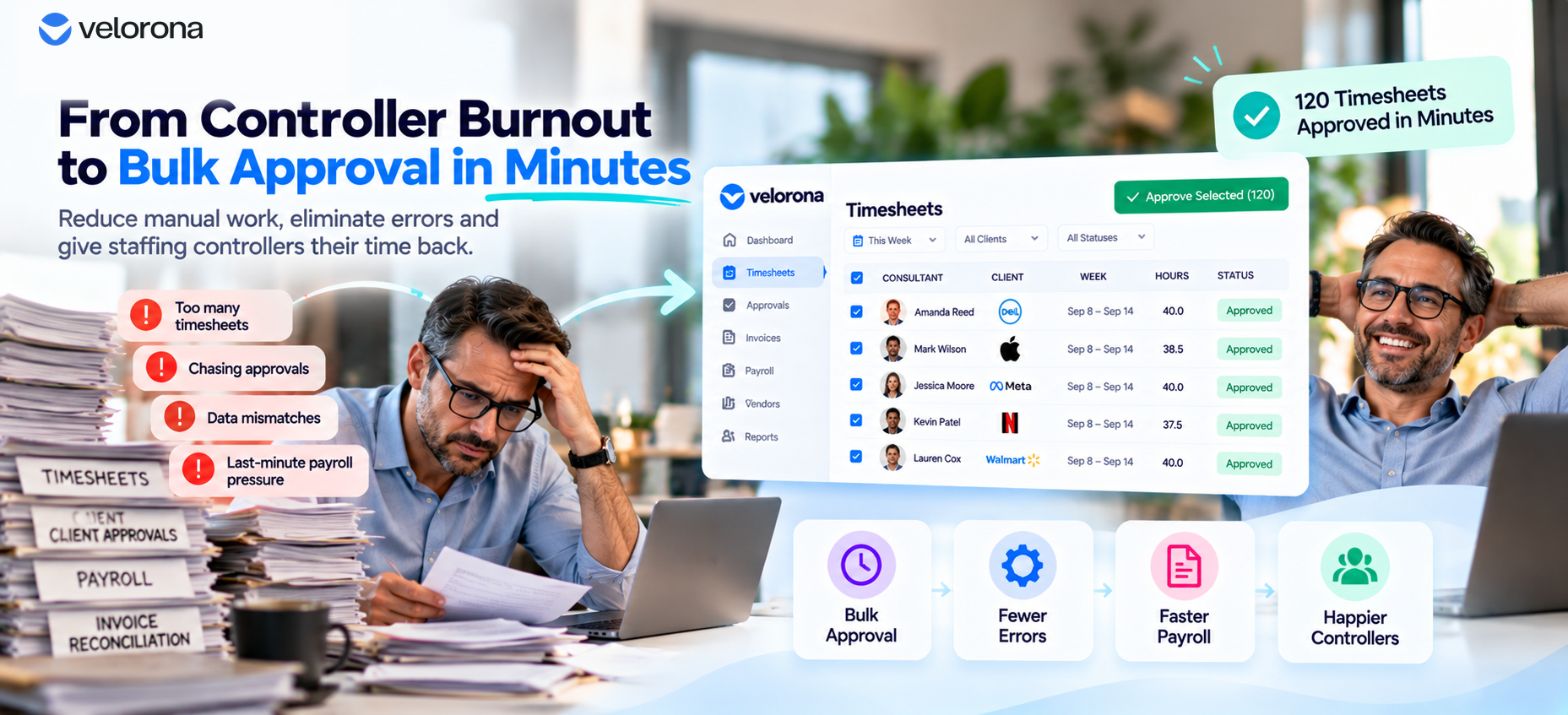
How Bulk Timesheet Approval Reduces Controller Burnout
Staffing firm controllers spend an average of 12 hours a week chasing timesheet approvals manually often on Friday nights, after everyone else has logged off. That workload is one of the most common reasons controller burnout drives departures, taking irreplaceable institutional knowledge with them. Automating bulk approval cuts that to roughly 90 minutes.
It was a Friday night, a little after 8pm, and the controller was still at her desk. Not because anything was on fire. Because it was the same thing every week: 40-some timesheets to review, cross-check against sub-vendor invoices, chase down two consultants who hadn’t submitted hours yet, and get it all approved before Monday’s payroll cutoff.
She’d done this every Friday for three years. This particular Friday, she sent an email to the owner. It wasn’t a resignation letter, exactly. It said: “I need to talk about my workload next week.”
The owner knew what that meant. He’d seen it happen at two other firms he knew. A controller who holds the whole operation together in her head who knows which sub-vendor always pads hours, which client always disputes rates, which consultant needs a reminder every single week reaches a point where the job isn’t sustainable. Either the workload changes, or she leaves.
Why Do Staffing Firm Controllers Quit More Often Than Other Roles?
Because the specific bottleneck almost never shows up on an org chart. It’s not really a staffing problem. It’s a matching problem, repeated dozens of times a week.
Every timesheet has to be checked. Every sub-vendor invoice has to be checked against the timesheets it’s billing for. Every discrepancy has to be chased down individually, usually by email, usually more than once.
What Actually Makes This Job So Heavy
The following table breaks down where the hours actually go in a typical week:
| Task | Manual Process | Time Cost (Typical Week) |
|---|---|---|
| Reviewing individual timesheets | One at a time, cross-checked by eye | 4–6 hours |
| Chasing missing/late submissions | Individual emails or calls | 2–3 hours |
| Cross-checking sub-vendor invoices | Manual comparison against approved hours | 3–4 hours |
| Resolving discrepancies | Back-and-forth until resolved | 1–3 hours |
Add it up, and a controller at a firm running 60–80 consultants can easily spend 10–12 hours a week on exactly this a second part-time job, layered on top of everything else she’s responsible for.
Why Does This Become a Client-Retention Problem, Not Just an HR One?
Here’s the part that’s easy to miss: the controller isn’t just an internal cost center. She’s frequently the person who catches billing errors before they reach a client, resolves sub-vendor disputes before they become payroll delays, and keeps the whole operation invisible to the client meaning the client never sees the mess, only the smooth result.
What Happens When She Leaves
When that person burns out and leaves, the mess becomes visible. Invoices go out late. Errors that used to get caught quietly start slipping through. A new hire takes months to rebuild the same institutional knowledge which sub-vendor to double-check, which client is particular about invoice formatting, which consultant chronically forgets to log hours.
During that gap, clients notice. A firm that looked buttoned-up for years can look shaky within a single bad quarter, right when a controller departure collides with the busiest parts of the calendar.
What Changes When Bulk Approval Replaces One-by-One Review?
The fix here isn’t hiring a second controller. It’s removing the one-by-one nature of the review itself.
Instead of opening 40 individual timesheets and checking each manually, an approver reviews a single consolidated view. Flagged discrepancies surface automatically. Clean timesheets get grouped together. She approves in bulk, with one action instead of forty.
What the Time Savings Actually Look Like
Per Velorona’s analysis of staffing firm workflows, firms that move from individual timesheet review to bulk approval with automatic discrepancy flagging typically see the weekly approval workload drop from roughly 12 hours to about 90 minutes. This isn’t because less work gets reviewed. It’s because the matching and flagging that used to require manual cross-referencing now happens before the controller ever opens the screen.
That’s not a marginal improvement. That’s the difference between a job that eats every Friday night and one that fits inside a normal workday. We cover the mechanics of exactly how bulk approval achieves this in How to Turn a 12-Hour Friday Into 90 Minutes With Bulk Approval.
Is This Really About Software, or About Keeping People?
It’s both. However, the software serves the retention problem not the other way around.
Where the Freed-Up Time Actually Goes
A controller who isn’t spending her Friday nights on manual matching has bandwidth for the things that actually require a person: judgment calls on a disputed rate, a conversation with a client about a billing question, catching the kind of anomaly a system alone wouldn’t flag.
This connects to the pattern covered in How to Catch the Sub-Vendor Invoice Errors Quietly Draining Your Margin. The same manual cross-checking that burns out a controller is exactly the process most prone to letting drift slip through unnoticed. Fixing the workload and fixing the leak are often the same fix.
How Does This Connect to Institutional Knowledge and Turnover Risk?
A controller’s departure doesn’t just create a hiring problem. It creates a knowledge gap because most of what she knows about which sub-vendor to watch, which client disputes rates, and which consultant forgets to log hours lives in her memory, not in any system.
What Changes When That Knowledge Lives in the System Instead
When discrepancy flagging and audit history exist automatically rather than depending on one person’s memory, a replacement controller can see the same patterns which sub-vendor has triggered flags before, which client’s invoices get questioned most often without needing months to rebuild that institutional knowledge from scratch. We cover this transition risk directly in How to Resolve a Wage Dispute in Minutes, Not Weeks, where the same principle timestamped, retrievable records instead of one person’s memory resolves a different but related problem.
What Should You Honestly Expect and What Isn’t Ready Yet?
Velorona handles timesheets with multi-level approval, bulk approval, and time locking, sub-vendor invoicing with bidirectional reconciliation via the vendor hub, client portal auto-delivery with read receipts, multi-currency invoicing (USD/INR with FX lock), expense tracking, time-off, schedules, payroll details, and audit logs with 2FA.
The Team plan costs $10/month per user ($7/month on annual billing), with no setup fees and no implementation cost. Firms typically go live in 5 to 14 days. Full plan details sit on the pricing page.
However, Velorona does not do the following today. QuickBooks Online integration targets Q3 2026; until then, use CSV export for clean matched data. Stripe Connect for online invoice payment also targets Q3 2026. SSO is currently in development. Public API and Zapier integration target Q3 2026. Payroll execution via Gusto Embedded targets Q4 2026. 1099-NEC auto-generation targets Q4 2026 as well. The FAQ page covers additional details.
One month free trial. No credit card required.
FAQ: Controller Workload and Timesheet Approval
How much time does manual timesheet approval typically take?
For a firm running 60–80 consultants, controllers commonly spend 10–12 hours a week on review, chasing, and reconciliation often concentrated into a single stressful day before a payroll cutoff.
Does bulk approval mean less oversight, not just less time?
No. Automatic discrepancy flagging means the controller’s attention goes specifically to what’s actually unusual, rather than being spread evenly and thinly across every timesheet regardless of whether something’s wrong.
Is controller turnover really connected to this specific workload?
It’s one of the most commonly cited factors we’ve heard directly from staffing firm owners not the only reason someone leaves, but a consistent, avoidable contributor.
How long does it take to move from manual to bulk approval?
Typically live within 5 to 14 days, since it works from the same timesheet and invoice data already being generated. There’s no separate system to migrate into.
What happens to institutional knowledge if a controller does eventually leave?
A system that surfaces flags and history automatically rather than relying on one person’s memory of which sub-vendor to watch makes the transition to a new hire considerably less disruptive, since the knowledge lives in the data, not just in someone’s head.
How does fixing controller workload connect to catching sub-vendor errors?
Directly. They share the same root cause: manual cross-checking repeated dozens of times a week, under time pressure, with no automatic flagging to catch what gets missed. We cover the margin-leak side of this in How to Catch the Sub-Vendor Invoice Errors Quietly Draining Your Margin.
The Email That Said “I Need to Talk About My Workload” Doesn’t Have to Happen
A controller reaching her breaking point isn’t a personal failing or a sign she wasn’t cut out for the job. It’s what happens when a matching problem gets repeated manually, dozens of times a week, for years, with no system absorbing any of it.
Fixing the workload isn’t about asking her to work harder or hiring a second person to split the load. It’s about removing the one-by-one review entirely so the job that used to eat every Friday night fits inside a normal workday instead.
Claim 2 Months 100% FREE Premium Plan and see what a 90-minute Friday looks like instead of a 12-hour one.
Or book a 15-minute demo to see the bulk approval and discrepancy flagging work against your actual timesheet and sub-vendor data.
Related reading:
- How to Turn a 12-Hour Friday Into 90 Minutes With Bulk Approval
- How to Catch the Sub-Vendor Invoice Errors Quietly Draining Your Margin
- How to Resolve a Wage Dispute in Minutes, Not Weeks
- Your Client Said They Never Got the Invoice. Again.
- How to Stop FX Drift From Quietly Eating Your Staffing Margin
- The Complete Guide to Staffing Agency Back Office Software