How to Automate Payment Reminders for Staffing Agencies
Who Has to Make the Awkward Follow-Up Call?
Someone on your finance team is staring at a spreadsheet, trying to remember whether an invoice from three weeks ago has been paid. They search old emails, check the client portal if one is available, and try to recall the last conversation with the client’s accounts payable contact.
Then comes the decision: Is it time to follow up, or should the client get another day?
This decision can happen dozens of times a month inside a staffing firm. Often, there is no written process. The next step depends on whoever notices the overdue invoice and feels responsible for contacting the client.
The question isn’t simply whether your invoices eventually get paid. It’s whether your payment follow-up process runs according to defined rules or depends on someone remembering to check.
For staffing firms managing multiple clients, payment terms, consultants, and invoices, a repeatable process can make overdue receivables easier to monitor and follow up on consistently.
Why Do Manual Payment Follow-Ups Become Inconsistent?
When reminders depend on people rather than a defined process, several gaps can appear:
- Overdue invoices are easy to overlook. Someone must remember to check a spreadsheet, filter an inbox, or review an aging report.
- Follow-up timing varies. One account manager might contact a client five days after the due date, while another waits until day 20.
- Clients receive inconsistent communication. A familiar client might not receive a reminder for weeks, while another receives several messages in quick succession.
- Payment status gets checked repeatedly. Finance staff may need to verify whether a payment has arrived before sending a reminder.
- Account context is scattered. Finance might not know that an account manager has already discussed a payment date or invoice dispute with the client.
- Absences create gaps. If the person responsible for an account is traveling, unwell, or occupied with month-end work, the follow-up may be missed.
Not every staffing firm experiences all these problems. However, when payment follow-up relies on spreadsheets, email threads, and individual memory, it becomes harder to maintain a consistent process as the workload grows.
Why Does Consistency Matter?
A late payment does not always mean a reminder was missed. A client may have longer payment terms, an unresolved billing question, or an internal approval process that takes time.
However, inconsistent communication can make the situation harder to manage. Without a clear record of when an invoice was due, which reminders were sent, and what the client said in response, the finance team may struggle to determine the appropriate next step.
A documented process helps the team distinguish between invoices that need a routine reminder and those that require personal attention.
What Is the Hidden Cost of Chasing Payments Manually?
Manual accounts receivable follow-up consumes time even when the process appears to work.
The effort is spread across small tasks rather than appearing as one obvious expense.
| Manual task | What it requires |
|---|---|
| Finding overdue invoices | Reviewing aging reports, spreadsheets, or inboxes |
| Confirming payment status | Checking the accounting system or payment records |
| Writing reminders | Drafting individual emails or adapting existing messages |
| Coordinating internally | Asking account managers about client conversations and payment promises |
| Tracking responses | Recording who replied, what they said, and when to follow up again |
| Managing exceptions | Identifying disputes, payment arrangements, and cases that need escalation |
These tasks can interrupt other finance responsibilities, including reconciliation, reporting, and reviewing discrepancies. The workload can be especially frustrating when several people need to exchange information before anyone can act.
Velorona’s finance manager page is relevant to this operational challenge.
There is also a consistency issue. If one client receives a reminder promptly and another receives it much later, the difference may reflect internal workload rather than a deliberate account policy.
A structured follow-up process cannot control every client’s payment behavior, but it can make the staffing firm’s own actions more predictable.
What Does an Automated Payment Reminder Cadence Look Like?
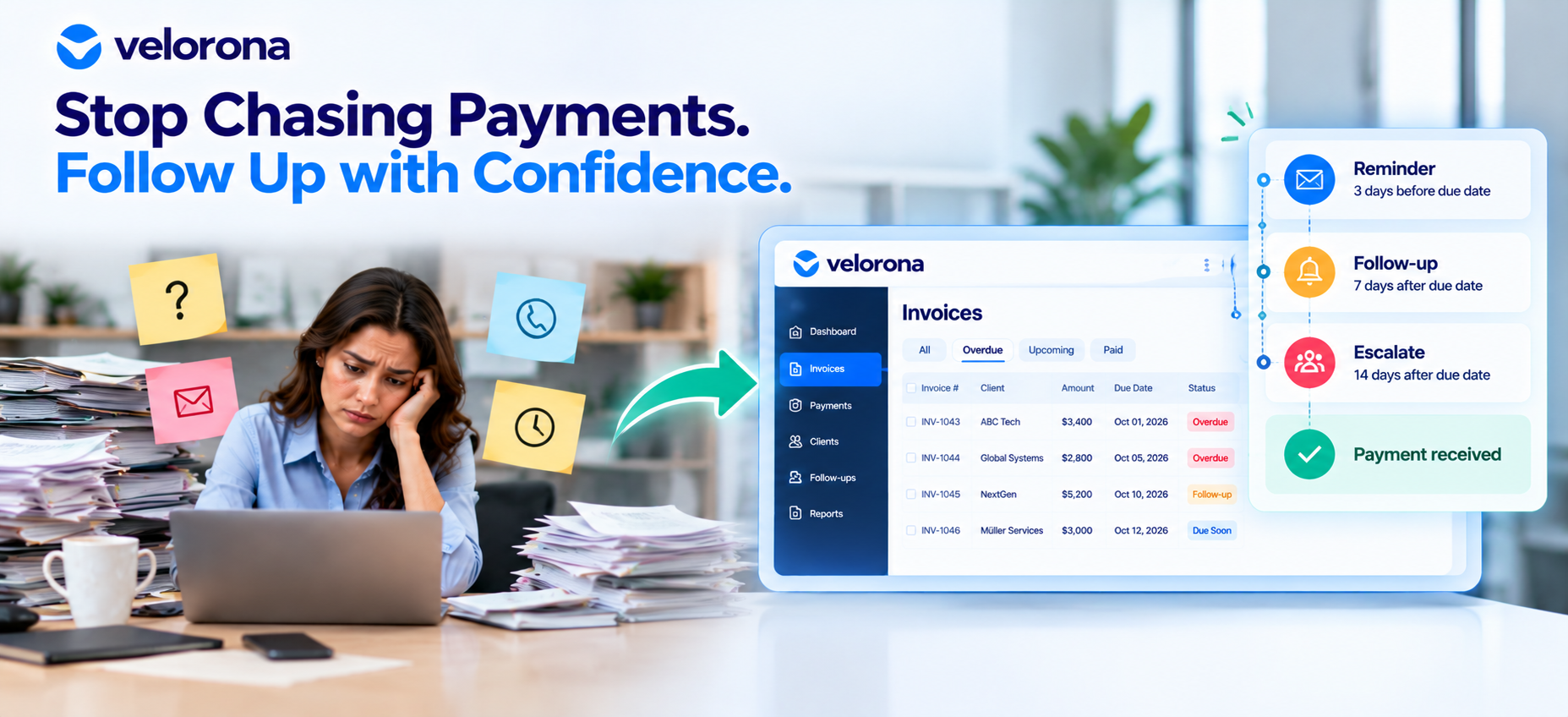
A payment reminder cadence is a predefined sequence of communications linked to an invoice’s due date and payment status. It replaces ad hoc decisions with a process the team can review and manage.
For example, a staffing firm might establish the following workflow:
- Before the due date: Send a courtesy reminder where appropriate under the firm’s policy and client relationship.
- Around the due date: Check whether payment has been recorded and send a reminder if necessary.
- After the invoice becomes overdue: Send a polite follow-up that states the invoice details and asks whether the client needs clarification.
- If the invoice remains outstanding: Continue according to the firm’s documented escalation policy.
- When human intervention is needed: Route the case to the finance manager or account owner.
This is an illustrative framework, not a universal schedule. The appropriate timing depends on the contract, agreed payment terms, client circumstances, and internal policy.
A client on NET 15 terms should not automatically follow the same timeline as a client on NET 60 terms. The process should reflect the actual due date rather than applying one schedule to every invoice without context.
When Should Automated Reminders Stop?
Automation should not mean sending messages regardless of what has happened.
A reliable process needs clear rules for handling:
- Payments that have been recorded.
- Invoice disputes or requests for clarification.
- Agreed payment plans.
- Client responses that require a person to review the situation.
- Incorrect invoice details or changes to the agreed terms.
Once a payment or dispute is recorded, the reminder sequence should stop or be adjusted as appropriate.
The goal is not to send more messages. It is to send the right message when it is still relevant.
How Can Staffing Firms Keep Automated Payment Reminders Professional?
Payment reminders are part of the client relationship. They should sound like normal business communication rather than aggressive collection notices.
A professional reminder should:
- Use a polite, direct tone.
- State the invoice number, amount, and due date accurately.
- Make the requested next step clear.
- Give the client an easy way to ask a question or report an issue.
- Reflect the latest payment status and previous communication.
- Pause or change when a dispute or payment arrangement requires attention.
- Route sensitive situations to a person rather than relying on automated messages alone.
Example A: A Polite Payment Reminder
Illustrative example only; this is not an actual Velorona customer communication.
Subject: Invoice #4521 – Due October 20
Hi [Client Name],
Just a quick note that invoice #4521 for $8,400 is due on October 20. No action is needed if payment is already scheduled; this is simply a courtesy reminder.
If you have any questions about the invoice, reply here and we’ll take a look.
Thanks,
[Firm Name] Accounts Receivable
Example B: An Overdue Invoice Follow-Up
Illustrative example only; this is not an actual Velorona customer communication.
Subject: Invoice #4521 – Status Check
Hi [Client Name],
Our records show that invoice #4521 for $8,400, due October 20, hasn’t been marked as paid yet. If payment is already on its way, please disregard this note.
If there’s a question about the invoice or a delay on your end, just let us know. We’re happy to work it out.
Best,
[Firm Name] Accounts Receivable
These examples use the invoice details from the original draft. In a real workflow, the amount, due date, and payment status should be checked before any message is sent.
How Can a Staffing Firm Build a Reliable Payment Follow-Up Process?
Automation works best when the underlying process is clear. Before introducing automated reminders, establish how invoices will be recorded, monitored, and escalated.
1. Maintain Accurate Invoice and Client Records
Make sure invoice amounts, due dates, payment terms, and client contact details are correct. Inaccurate records can lead to reminders being sent to the wrong person or for the wrong amount.
Velorona’s client records page provides information about its client and billing workflow.
2. Track Invoice Status in One Trusted Place
Your team should have a reliable way to identify which invoices are outstanding, which are overdue, and which have received a response.
If staff members maintain separate trackers, define which record is authoritative and how changes are updated.
3. Document the Reminder Schedule
Specify when reminders should be sent, what each message should say, and when a case needs escalation. The schedule should reflect client payment terms and the firm’s internal policy.
4. Use Approved Message Templates
Templates reduce repetitive writing and help maintain consistent language. They should still allow for relevant differences, such as a disputed invoice or an agreed payment arrangement.
5. Assign Ownership for Exceptions
Decide who handles unresolved disputes, promised payment dates, clients who have stopped responding, and cases that require a relationship-sensitive conversation.
Automation can handle routine steps, but someone still needs responsibility for exceptions.
6. Stop or Adjust Reminders When Circumstances Change
A reminder should not continue simply because it was scheduled. Payment records, client responses, and disputes must be considered before the next message goes out.
7. Review Results Regularly
Review overdue invoices and follow-up outcomes weekly or biweekly, rather than waiting until month-end. Use the review to identify missing records, repeated delays, unresolved disputes, and cases that need intervention.
The central principle is straightforward: automation should follow accurate records and defined rules. If the information is wrong, automation can repeat the mistake more consistently rather than solve it.
What If Your Team Already Uses Accounting Software?
Many staffing firms already use QuickBooks, spreadsheets, or another finance system. Having digital records is useful, but it does not automatically mean that invoice follow-up is fully automated.
A team may still need to identify overdue invoices manually, draft messages, confirm payment status, and remember when the next follow-up is due.
Review your current setup against these questions:
| Question | What to check |
|---|---|
| Can the team identify overdue invoices quickly? | Whether current invoice status and due dates are easy to access |
| Are reminders scheduled automatically? | Whether someone still needs to initiate each follow-up |
| Is payment status updated reliably? | Whether the invoice record reflects the latest known status |
| Can staff see previous reminders? | Whether communication history is recorded |
| Are disputes handled separately? | Whether a disputed invoice is removed from the routine reminder sequence |
| Are exceptions assigned to an owner? | Whether someone is responsible for cases requiring a decision |
Velorona’s invoicing workflow is relevant to reviewing how invoice creation, delivery, status visibility, and reminders fit together.
Not every accounting system lacks reminder functionality. Some already offer automation. The important question is whether your existing setup closes the loop from identifying an outstanding invoice to recording follow-up and handling the response.
How Can You Measure Whether the Payment Follow-Up Process Is Working?
A consistent process should be evaluated using several measures rather than one headline number.
Useful measures include:
- Number of overdue invoices: How many invoices remain unpaid past their due dates?
- Total overdue value: How much money is tied up in those invoices?
- Follow-up coverage: What percentage of overdue invoices received a follow-up according to policy?
- Time spent on reminders: How much staff time goes into preparing, sending, and tracking messages?
- Days sales outstanding (DSO): How long does the business take, on average, to collect its receivables?
- Reminder-related errors: How often are reminders sent with incorrect details or after payment has been recorded?
- Manual escalations: How many cases require individual intervention?
Why Should DSO Be Read in Context?
DSO can help a staffing firm monitor its receivables, but it does not explain every payment delay on its own.
A change in DSO may reflect differences in client payment terms, client mix, invoice disputes, or other parts of the billing and collection process. It should not automatically be attributed to the reminder process.
Review DSO alongside overdue invoice values, follow-up coverage, payment terms, and the time spent managing receivables. Together, these measures provide a more useful picture of what is changing and where further investigation may be needed.
How Does Velorona Fit Into the Payment Workflow?
A payment reminder depends on having accurate invoice information: the correct amount, due date, client, and payment status. Velorona’s invoicing workflow is designed for staffing firms managing consultant billing and C2C arrangements.
According to Velorona’s invoicing page, the platform supports the following:
- Invoice generation from approved timesheets: Client invoices are generated from approved hours, reducing the need to re-enter billing information manually.
- Client payment terms: Payment terms are used to calculate invoice due dates.
- Client portal delivery: Invoices are delivered through the client portal alongside email.
- Invoice activity visibility: Teams can see when an invoice was sent, opened, reviewed, and approved.
- Receivables visibility: Receivables aging updates in real time.
- Automated reminders: Velorona lists automatic client reminders at 7, 14, and 30 days.
These capabilities address parts of the invoicing and follow-up workflow. They do not guarantee that a client will pay by a particular date, and teams still need a process for disputes and other exceptions.
Velorona also offers Vendor Hub, which addresses a related but distinct back-office issue: matching incoming sub-vendor invoices against approved consultant hours and flagging discrepancies before payment.
Client-side payment follow-up and sub-vendor invoice reconciliation are different tasks. However, both depend on accurate records and clear visibility into the underlying billing workflow.
For staffing firms assessing their current process, the practical questions are whether invoice due dates are accurate, payment status is visible, and the team can see what has already been sent. These are useful foundations to establish before relying on automated reminders.
What Should a Staffing Firm Fix Before Automating Payment Reminders?
Before introducing or expanding automation, check whether the underlying process is ready.
Start with the records. Confirm that invoice amounts, due dates, payment terms, and client contacts are accurate.
Define the rules. Decide when reminders should be sent, when they should stop, and which situations need personal attention.
Clarify responsibility. Assign an owner for disputes, payment arrangements, and overdue cases that do not follow the standard process.
Check the communication history. Make sure the team can identify reminders already sent and responses already received.
Review the exceptions. Test what happens when a client disputes an invoice, reports a payment, or requests a change to the agreed arrangement.
Measure the results. Track overdue amounts, follow-up coverage, staff time, and DSO in context.
Automation is most useful when it makes a sound process more consistent. It is not a substitute for accurate information, clear ownership, or judgment when a situation falls outside the normal workflow.
Frequently Asked Questions About Automated Payment Reminders
What are automated payment reminders?
Automated payment reminders are messages scheduled or triggered according to invoice dates, payment status, and defined rules. They can reduce the need for staff to remember every routine follow-up manually.
Do automated reminders guarantee faster payments?
No. Reminders can help make communication more consistent, but payment timing also depends on agreed terms, client processes, invoice accuracy, disputes, and other factors. Their impact should be assessed using receivables data rather than assumed.
Should every client receive the same reminder schedule?
Not necessarily. A firm’s policy should account for payment terms, client agreements, and the circumstances of individual invoices. A NET 15 invoice and a NET 60 invoice should not automatically be treated as if they have the same due date.
What should happen when a client disputes an invoice?
The routine reminder sequence should be paused or adjusted as appropriate. The dispute should be recorded and routed to the person responsible for reviewing it. Sending repeated generic reminders without addressing the underlying issue can create unnecessary friction.
Can accounting software already handle payment reminders?
Some accounting systems include reminder features. Before adding another tool, check whether your existing system can identify overdue invoices, schedule reminders, record communication history, reflect payment status, and handle exceptions.
How does Velorona support payment follow-up?
Velorona’s invoicing workflow includes invoice generation from approved timesheets, client payment terms, client portal delivery, invoice activity visibility, receivables aging, and automated reminders. See the Velorona invoicing page for the published feature details.
Give Payment Reminders a Routine, Not a Person to Remember Them
The difference between a staffing firm that follows up inconsistently and one with a defined accounts receivable process is often structure.
A process built on accurate records, clear rules, and assigned ownership can continue even when the person who normally handles an account is unavailable. A process built on memory is more vulnerable to missed reminders, repeated checks, and inconsistent communication.
Review how your team identifies overdue invoices, schedules follow-ups, records responses, and handles exceptions. If any of those steps depend on one person remembering what to do next, that is a practical place to start improving the process.
Does your payment follow-up process run on a schedule, or does someone have to remember who needs a reminder?
If you want to see how Velorona handles staffing-firm invoicing, receivables visibility, and automated reminders, Book a 15-minute demo.
Related Reading
- Staffing Client Invoice Portal: Stop Losing Cash to Lost Invoices — Learn how client portal delivery and invoice activity visibility address questions about whether an invoice was received.
- Automated Invoicing for Staffing Firms: How to Cut DSO by 15 to 30 Days — Explore the relationship between approved timesheets, invoice generation, delivery, and the staffing firm’s cash cycle.
- Staffing Cash Gap: How to Stop Being Your Clients’ Involuntary Lender — Read about the timing gap between staffing payroll obligations and collecting payments from clients.
- Staffing Back Office: Client Experience After Placement — Explore how timesheet approvals, invoice accuracy, purchase order tracking, and accessible documentation affect the client experience.