Staffing Rate Card Errors: How to Prevent Billing Mismatches
Two Documents, Two Different Rates
A staffing firm agrees to a new bill rate with a client. Someone updates the rate card, but a week later, the invoicing team generates an invoice using the old rate.
The rate card shows the new amount. The invoice shows a different one. Both documents may look correct when reviewed separately, but together they reveal a mismatch.
This is how staffing firms can end up billing contractors at outdated or incorrect rates. The issue is not always that a rate was never approved. Sometimes, the approved rate simply fails to reach every record and system involved in billing.
The consequences can go in either direction. The firm may charge less than agreed and lose potential revenue, or charge more than agreed and give the client a reason to dispute the invoice. Both problems can occur within the same firm, even during the same month.
The important question is not whether your firm has a rate card. Most staffing firms maintain some record of their billing rates.
The real question is: How do you know the rate on this week’s invoice matches the rate currently approved for that client and contractor?
Preventing staffing rate card errors requires a reliable process for recording rate changes, applying the correct effective dates, and verifying invoice rates before billing.
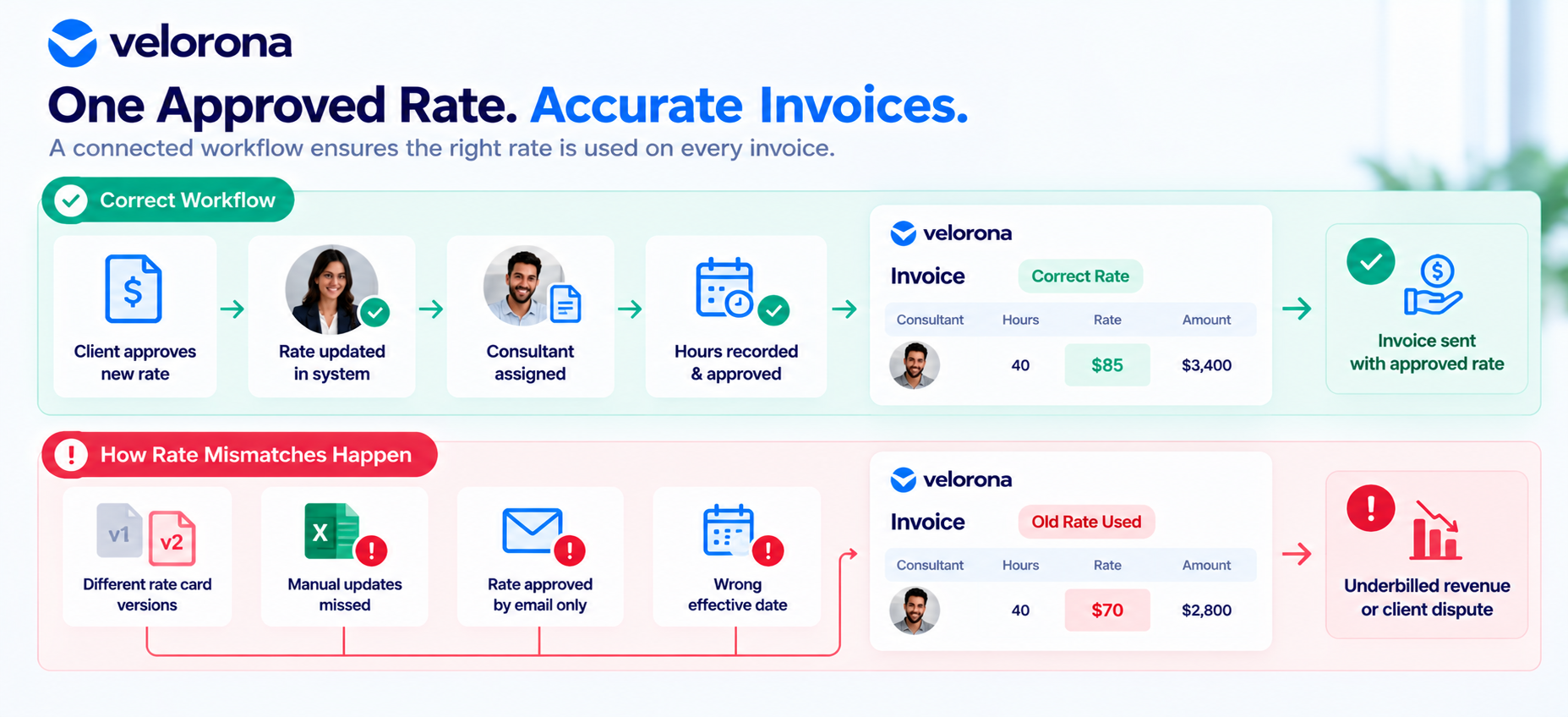
How Rate Card Mismatches Happen
Rate mismatches rarely require one dramatic process failure. They often arise from small gaps between where a rate is approved, where it is recorded, and where it is used.
1. A Rate Change Is Recorded in One Place but Not Another
An account manager updates a master rate-card spreadsheet after a client negotiation. However, the billing system or invoice template remains unchanged.
The updated rate exists, but the invoicing team continues using the previous amount because the record they rely on was never updated.
2. An Outdated Rate Gets Copied Into a New Invoice
Some teams prepare invoices by duplicating the previous month’s document and replacing the hours or dates.
If the contractor’s rate has changed, the old rate may remain in the copied invoice. Unless someone checks it against the current approved record, the discrepancy can go unnoticed.
3. Different Rate Card Versions Circulate Between Teams
Sales may have a document showing a proposed rate, while finance has an older version containing the last confirmed rate.
Without a clear source of truth, different teams can work from different figures. A proposed rate may also be mistaken for an approved one if its status is not clearly documented.
4. Rates Are Updated Manually Across Multiple Systems
A rate may need to be recorded in a client agreement, contractor assignment record, billing spreadsheet, and invoicing system.
If each record requires a separate update, one can be missed. The result is a mismatch between the approved rate and the rate used to calculate the invoice.
5. Rate Changes Are Confirmed by Email but Never Updated in Billing Records
A client confirms a new rate in an email thread. The team acknowledges the message, but nobody updates the record used for the next invoice.
The approval exists, but the operational process does not carry it through to billing.
6. The Rate’s Effective Date Is Applied Incorrectly
A rate change may be approved to take effect on a specific date. If the new rate is applied to hours worked before that date, the client may be overcharged. If the old rate remains in use for hours worked after the effective date, the firm may undercharge.
This is why checking the rate alone is not enough. The applicable rate must also match the period in which the work was performed.
Not every staffing firm experiences all these problems. Firms using spreadsheets may be more exposed to version-control issues, while firms using disconnected systems may face the risk of updating one record but not another.
The common thread is that a rate card is only as reliable as the process connecting rate approval to invoicing.
The Financial Impact of Incorrect Staffing Rates
Rate mismatches can create costs in two directions: underbilling and overbilling.
Underbilling: Charging Less Than the Agreed Rate
When a contractor is invoiced at an outdated, lower rate, the staffing firm charges less than the agreed amount.
This error can be easy to miss. The invoice is sent, the client pays it, and the billing cycle closes without anyone questioning the difference.
The gap becomes visible only when someone compares the invoice against the applicable approved rate.
Whether the difference can be recovered later depends on the contract terms, supporting documentation, and circumstances of the error. A client may not agree to a retroactive correction, particularly after an invoice has already been approved and paid in good faith.
For that reason, verifying rates before invoices are sent is preferable to relying on later corrections.
Overbilling: Charging More Than the Agreed Rate
When an invoice applies a rate higher than the approved amount, the staffing firm charges more than the agreement supports.
If the client identifies the discrepancy, the invoice may be disputed, delaying payment while the issue is investigated and resolved.
Repeated overbilling can also raise questions about the reliability of the firm’s billing process. Clients with strict procurement or audit requirements may have additional concerns about unexplained rate differences.
The solution is not simply to avoid charging too much. It is to verify that every invoice reflects the correct approved rate for the relevant work period.
An Illustrative Example: How a Small Rate Difference Adds Up
Consider this hypothetical scenario. The figures below are illustrative only and are not a claim about typical staffing firm losses.
A contractor’s approved bill rate increases from $65 per hour to $70 per hour, effective on the first day of the month. However, the invoicing team continues billing at $65 per hour for two full months before discovering the error.
The calculation is:
- Difference per hour: $70 − $65 = $5
- Hours billed per month: Approximately 160 hours
- Potential underbilling per month: 160 × $5 = $800
- Potential underbilling over two months: $800 × 2 = $1,600
For one contractor over a short period, the difference may appear manageable. Across multiple contractors, clients, and staggered rate changes, similar discrepancies could accumulate.
The actual financial impact depends on the firm’s rates, hours, agreements, and frequency of errors. This example illustrates how an unnoticed rate difference can add up; it does not establish that every firm experiences a particular amount of revenue loss or that every discrepancy can be recovered.
Why Manual Updates and Disconnected Systems Create Risk
The same approved rate may need to appear in several records:
- The client rate card or agreement
- Contractor or assignment records
- Billing spreadsheets used by finance
- Accounting or invoicing software
- Purchase order records, when a PO specifies applicable rates
Updating one record does not necessarily update the others.
A rate change documented in a contract amendment does not automatically flow into a billing spreadsheet. Similarly, correcting a spreadsheet does not guarantee that the invoicing system will use the updated figure.
Every manual handoff introduces another opportunity for the approved rate and the billed rate to diverge.
This risk can exist even when a staffing firm already uses digital invoicing or time-tracking software. Software alone does not resolve the issue if someone still needs to re-enter the rate into another system.
The key question is whether the approved rate carries through to the invoicing workflow consistently—or whether the process depends on someone remembering to update multiple records.
What a Reliable Rate Verification Process Looks Like
A rate card is a record of approved rates. A rate-verification process helps ensure that the correct rate is actually applied when an invoice is prepared.
A practical process should include the following steps.
1. Maintain One Authoritative Record of Approved Rates
Establish a clearly defined source of truth for approved billing rates. Teams should know which record is authoritative and how to distinguish approved rates from proposed or outdated versions.
2. Record Every Rate Change and Its Effective Date
Document the approved rate, the date the change takes effect, and the supporting approval. This helps prevent the wrong rate from being applied to work performed before or after the change.
3. Update the Records Used by the Invoicing Team
When a rate changes, update the systems and records that actually feed invoice preparation. Updating only the master rate card is insufficient if the invoice still draws from an older record.
4. Verify Invoice Rates Against Approved Records
Before sending an invoice, compare each applicable rate with the approved record for the client, contractor, assignment, and billing period.
Do not rely on memory or assume that a copied invoice contains the current rate.
5. Flag Differences for Review
A mismatch does not automatically establish which record is wrong. The invoice, rate card, or supporting documentation may need to be checked.
Assign someone to investigate the discrepancy before making a billing adjustment.
6. Keep an Audit Trail of Changes and Corrections
Retain the relevant approval records, effective dates, and correction details. This gives the team evidence to refer to if a client questions a rate or a past invoice needs to be reviewed.
7. Investigate Recurring Mismatches
If the same type of error keeps occurring, examine the underlying workflow. The cause might be an outdated template, unclear ownership of rate changes, or a disconnected billing record.
Correcting the process can help prevent the same problem from recurring.
Important: A newly approved rate should not automatically be applied to historical invoices. Each invoice must be checked against the rate that was approved and effective when the relevant work was performed.
A Pre-Invoice Rate Card Checklist
- Use this checklist before sending an invoice to help identify rate and billing mismatches.
2. Confirm the correct client and contractor appear on the invoice.
3. Verify the applicable approved rate for the client, contractor, and assignment.
4. Check that the rate’s effective date matches the billing period.
5. Confirm that approved hours match the invoiced quantity.
6. Recalculate the invoice total to verify the arithmetic.
7. Review relevant PO terms and remaining balance, where applicable.
8. Confirm that documentation supports any recent rate change.
9. Resolve or formally approve previously flagged discrepancies before sending the invoice.
A checklist is useful only when the supporting records are accurate and someone is responsible for completing the checks. Make it part of the actual billing workflow rather than an optional final review.
How to Identify Rate Mismatches in Existing Records
You do not need to redesign your entire billing process before investigating whether rate mismatches already exist. A review of recent invoices can help reveal where the current workflow needs attention.
Step 1: Gather Approved Rate Records
Select a sample of clients and contractors. Collect the applicable rate cards, agreements, amendments, and approval records.
Step 2: Compare Approved Rates With Billed Rates
Review recent invoices line by line. Compare the rate charged with the rate approved for the relevant contractor, client, assignment, and work period.
Step 3: Prioritize Higher-Risk Records
Start with records where discrepancies may be more likely, such as:
- Contractors or clients with recent rate changes
- Contractors with multiple concurrent assignments where different rates may apply
- Clients with several billing rates across different contractors
- Invoices prepared using manually maintained spreadsheets
- Rate records with unclear or undocumented effective dates
Step 4: Verify Each Discrepancy Before Taking Action
Check every identified difference against the underlying agreement and approval records before changing an invoice or requesting an adjustment.
A mismatch is a signal to investigate, not an instruction to change the amount in one direction or the other.
This review can also reveal process weaknesses. For example, if several invoices contain outdated rates after approved changes, the firm may need a clearer process for communicating and recording rate updates.
How Velorona Fits Into a Connected Billing Workflow
Rate accuracy depends partly on how information moves between approval, timesheet processing, and invoicing. Velorona supports staffing firms by connecting parts of this workflow and reducing manual re-entry.
Generate Client Invoices From Approved Consultant Hours
Velorona’s invoicing workflow generates client invoices from approved consultant hours, reducing the need to rebuild invoice line items manually in a separate spreadsheet.
The platform’s timesheet workflow supports recording and approving consultant time before it is used for billing. Using approved timesheet records as the basis for invoice generation can reduce the risk of hours being omitted or re-entered incorrectly during invoice preparation.
Reconcile Incoming Sub-Vendor Invoices Against Approved Hours
The Vendor Hub matches incoming sub-vendor invoices against approved consultant hours and flags mismatches before payment is processed.
This supports reconciliation on the money-out side of staffing operations. It helps the team identify differences between submitted sub-vendor invoices and approved hours that need review before payment.
Review the Limits of the Workflow
It is important to distinguish between reducing manual handoffs and automatically synchronizing every rate change.
Velorona supports a timesheet-to-invoice workflow and flags certain mismatches, including discrepancies between incoming sub-vendor invoices and approved consultant hours. However, it does not automatically synchronize rate changes made in external contracts, client emails, or separate systems.
It also does not replace the review needed to determine which rate is correct when records disagree.
Staffing firms still need a clear source of truth for approved rates, documented effective dates, and a process for updating relevant records. A connected workflow can reduce some opportunities for error, but it is not a substitute for rate governance.
For engagements involving purchase orders, read How Digital PO Tracking Prevents Billing Surprises for Staffing Firms.
You can also explore how automated invoicing can help staffing firms address DSO to understand the related role of invoice processing and delivery visibility.
One Approved Rate, One Reliable Billing Process
A rate card is useful only when the rate recorded in it matches the rate applied to the invoice.
Keeping those records aligned is not a one-time setup task. It requires documenting approvals, recording effective dates, updating the records used for billing, and checking the resulting invoice before it reaches the client.
A practical first step is to trace your most recent rate change from approval to invoice. Identify every point where someone had to carry the rate from one record or system to another. Those handoffs are worth reviewing because they can allow outdated information to reach billing.
If you want to see how a connected timesheet-to-invoice workflow can reduce manual handoffs, Book a 15 minute demo.
Frequently Asked Questions
What is a staffing rate card?
A staffing rate card records the billing rates that apply to staffing services, clients, contractors, or assignments. It helps teams reference agreed rates when preparing invoices. Its reliability depends on keeping the records current and ensuring that the rates used for billing match the approved terms.
What causes staffing rate card errors?
Common causes include outdated invoice templates, different versions of rate cards circulating between teams, rate changes recorded in one system but not another, approvals buried in email, and incorrect effective dates.
How can incorrect billing rates affect a staffing firm?
Using a rate below the approved amount can lead to underbilling, while applying a rate above the agreed amount can lead to overbilling and client disputes. The financial impact depends on the rate difference, the hours affected, and the applicable agreement.
How often should staffing firms verify billing rates?
The source material supports checking rates before invoices are sent and reviewing records when rate changes occur. Firms can also sample recent invoices to investigate whether existing mismatches have occurred. The appropriate review frequency will depend on the firm’s billing workflow and rate-change activity.
What should be checked before applying a new rate?
Verify the approved rate, supporting documentation, effective date, relevant client and contractor or assignment, and the records used to prepare invoices. Historical work should be billed according to the rate applicable during the period in which the work was performed.
Does invoicing software automatically prevent rate card errors?
Not necessarily. Software may generate invoices automatically without synchronizing rate changes recorded in external contracts, emails, or disconnected systems. Firms should confirm which records the software uses and what checks are performed before invoices are sent.
Can Velorona automatically synchronize every rate change?
Based on the capabilities described in this article, Velorona supports invoice generation from approved consultant hours and flags certain mismatches in the sub-vendor invoice workflow. It does not automatically synchronize rate changes made in external contracts, client emails, or separate systems. Teams still need to maintain approved rate records and review discrepancies.
How can a staffing firm find existing rate mismatches?
Gather approved rate records and supporting agreements, then compare them with recent invoice line items. Prioritize records with recent rate changes, multiple assignments, unclear effective dates, or manually maintained billing spreadsheets. Verify any discrepancy against the underlying documentation before making an adjustment.
Related Reading
- How Digital PO Tracking Prevents Billing Surprises for Staffing Firms
- Staffing Client Invoice Portal: Stop Losing Cash to Lost Invoices
- Timesheet Software for Staffing: Turn Hours into Invoices
- Staffing Firm Audit Trail: The Missing Layer in Your Back Office