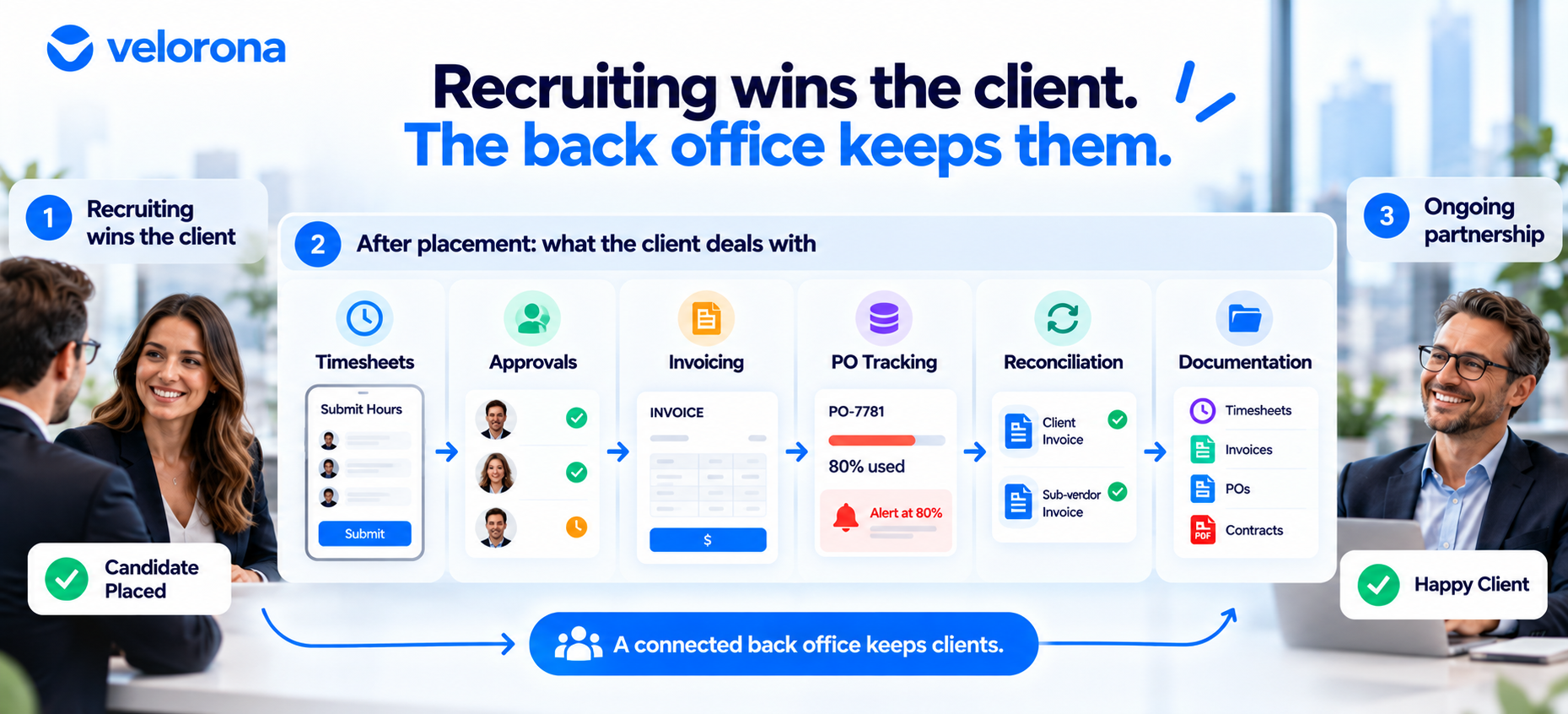
Beyond Recruiting: Why Your Staffing Back Office Matters to Clients
Recruiting wins the client. Your staffing back office shapes what the client lives with afterward: timesheet approvals, invoices, PO questions, and record requests. This guide covers what clients deal with after placement, what they notice when the back office is hard to work with, and how a connected workflow makes your firm easier to work with.
A client just approved your candidate. Your recruiting team did its job: the right skills, the right rate, the right start date. Now the client starts dealing with your back office instead of your recruiters.
They need to approve hours. They’re waiting on an invoice. They have a billing question. They want to know how much of their purchase order is left. Later, they may ask for documentation they assumed you had ready.
This is where the ongoing relationship lives, and it has less to do with your recruiting pitch than most firms expect.
Why Is Winning the Candidate Only the Beginning?
When a client picks your firm over three other agencies, they’re usually reacting to candidate quality, speed to fill, recruiter knowledge, and rates. That’s fair. Recruiting gets the relationship started.
It doesn’t keep it going. Once the candidate starts, the client’s question shifts from “how good are your recruiters?” to “how easy is it to work with your company?” That shift happens whether you’ve planned for it or not.
The client’s experience in that phase can give them another reason to stay. It can also give them a quiet reason to look at other agencies when a contract nears renewal. Operations don’t replace recruiting as the reason clients choose you. They help explain why clients keep choosing you.
What Does the Client Deal With After Placement?
A few terms first. A purchase order (PO) is the client’s approved budget for your services. Accounts payable (AP) is the client’s finance team, which processes your invoices. Reconciliation means checking that billing records match what was worked and approved. C2C (corp-to-corp) is a billing arrangement between two companies. A sub-vendor is another firm supplying some of the talent.
| Touchpoint | What the Client Experiences | Where It Goes Wrong |
|---|---|---|
| Timesheets | Approving hours submitted by the consultant | Clunky approval means both sides chase signatures |
| Invoicing | Receiving a bill built from approved hours | Hand-built invoices carry the wrong rate, hours, or PO number |
| PO tracking | Seeing how much of the budget is used | Nobody notices a PO is nearly spent until a payment is rejected |
| Reconciliation | Trusting that billing matches work done | A sub-vendor adds a second set of hours that must line up |
| Documentation | Asking for the timesheet behind an invoice | Records scattered across inboxes and drives |
| Sub-vendor billing | Getting one invoice that hides a longer chain | More parties mean more places to fall out of sync |
For each, a manual process and a connected one look identical to the client until something goes wrong. See Velorona’s timesheets and invoices for the first two, and the vendor hub for the sub-vendor layer.
What Do Clients Notice When the Back Office Is Hard to Work With?
Consider three ordinary requests.
“Can you resend the invoice with the correct PO number?” In a manual process, someone searches email threads and spreadsheets, finds the mistake, fixes it, and resends. That can take a day or more. In a connected process, records are easier to verify before the invoice goes out the first time. We cover the PO side in how digital PO tracking prevents billing surprises.
“How much of our PO is left?” Manually, someone adds up several invoices or asks finance. With PO usage visible in one place, the answer needs no back-and-forth. Velorona alerts when usage reaches 80% of the limit.
“Can you send the timesheets behind this invoice?” Manually, someone searches an inbox, a shared drive, and a spreadsheet tab. With records tied together, they come up faster. We explain why that matters in How to Resolve a Wage Dispute in Minutes, Not Weeks.
No platform makes every situation painless. But how quickly and accurately you answer ordinary questions is part of what the client experiences as working with your firm, just as much as the consultant you placed.
How Does a Connected Workflow Make a Firm Easier to Work With?
There’s a difference between having software and having a connected workflow.
A firm can use one tool for timesheets, email for approvals, another system for invoices, a spreadsheet for PO tracking, and a manual check for reconciliation. Every step has software, yet someone retypes the same numbers three times. Software at each step doesn’t mean the steps talk to each other.
A connected workflow moves hours from timesheet to approval, invoice, PO tracking, and reconciliation without re-entry at each handoff. That reduces the places an error can enter and the number of people you have to find to answer a client.
This is where digitalization earns its value. It isn’t about looking modern. It removes handoffs and manual checks that otherwise eat into someone’s week. For the broader tool picture, see 15 staffing agency tools for back-office operations.
Does a Connected Back Office Improve the Client Experience Too?
Internal efficiency is the obvious benefit. Your team spends less time reconciling and chasing approvals. A second benefit is easy to overlook: the client experiences a smoother process.
A connected process can reduce invoice corrections, billing back-and-forth, and the time to answer a PO question. It can make records easier to pull and communication more consistent from one cycle to the next.
It doesn’t guarantee retention or renewals. Clients don’t stay because of a piece of software. They notice, cumulatively, whether working with you is straightforward or takes effort every invoice cycle.
How Do You Turn Your Back Office Into a Differentiator?
When several firms offer comparable talent, your operational process is one of the few things that’s yours to explain. Before the next client conversation, check whether you can answer these without pulling in finance:
- Can you explain how timesheets get submitted and approved?
- Can you explain how approved hours become an invoice?
- Can you show how invoice accuracy gets checked before sending?
- Can you explain how PO usage is tracked and communicated?
- Can you quickly find supporting documentation?
- Can you explain how billing discrepancies get resolved?
- Can you describe how your process reduces work on the client’s side?
- Can your sales team walk through this without finance?
The goal isn’t to sell the client software. It’s to show there’s a reliable process behind the recruiting. For a short demo script, see How to Show Clients Your Staffing Back Office. For the procurement view, see what clients evaluate beyond recruiting.
What If You Already Have a Back-Office System?
Many firms already use software and still have gaps. Timesheets may be digital while approvals run through email, invoices live in a separate system, PO tracking sits in a spreadsheet, and reconciliation happens by hand at month-end.
The useful question isn’t “do you have software?” It’s “are the important steps connected?” A firm can check every box on its tool list and still have someone bridging the gaps by hand. The client then feels the same delays and corrections a fully manual process would produce.
Where Does Velorona Fit?
Velorona connects the steps above for US IT staffing firms with 30–300 consultants:
- Timesheets route through multi-level approvals.
- Approved hours generate invoices automatically.
- PO tracking alerts at 80% of the limit.
- The vendor hub matches sub-vendor invoices against approved hours, so mismatches are flagged before payment.
- Invoices deliver through a branded client portal, with opened, viewed, and approved timestamps.
- Margin and billing status show without a spreadsheet rebuild.
No platform makes every touchpoint effortless, and none replaces the relationship your recruiters built. Velorona covers the work that starts after the candidate is placed.
What Should You Honestly Expect From Velorona?
The Team plan costs $10/month per user ($7 on annual billing), with no setup fees. Firms typically go live in 5 to 14 days. See the pricing page.
However, Velorona does not do the following today. QuickBooks Online synchronization sits on the roadmap, with CSV export covering the handoff. Stripe Connect payment through the portal also sits on the roadmap. SSO is in development. Payroll execution via Gusto Embedded targets Q4 2026, as does 1099-NEC auto-generation. The FAQ page has current status.
One month free trial. No credit card required.
FAQ: Back Office and the Client Experience
Why would a client care about my back office?
After placement, the client deals with your timesheets, invoices, and billing answers daily. That experience shapes how easy you are to work with.
Does a connected back office improve renewals?
Not by itself. It can reduce friction, and clients notice friction over time. Renewals also depend on talent, price, and relationships.
What is a PO, and why do clients track it?
A purchase order is the client’s approved budget for your services. Clients want to know how much is used so billing doesn’t stall at the limit.
What if we already have software?
Check whether the steps connect. If someone retypes data between systems, the client still feels the delays.
Does this apply to C2C and sub-vendor placements?
Yes, and more so. An extra billing layer adds places for hours and rates to fall out of sync. See Multi-Tier Sub-Vendor Support: Win Deals Competitors Turn Away.
How fast can a firm connect its workflow?
Firms typically go live with Velorona in 5 to 14 days with no setup fees.
Your Recruiting Gets the Client. Your Back Office Is What They Live With.
A staffing firm’s value doesn’t stop at finding the right candidate. The client experiences your company through timesheets, approvals, invoices, PO tracking, and billing questions, often for the length of the engagement.
A connected back office makes those interactions more organized, more visible, and easier to manage on both sides. It doesn’t replace the human relationship. It removes friction that relationship otherwise has to work around.
Book a 15-minute demo to see the workflow connected from timesheet to invoice. Or start a free 30-day trial, no credit card required.
Related reading:
- Staffing Back Office: What Clients Evaluate Beyond Recruiting
- How to Show Clients Your Staffing Back Office
- How Digital PO Tracking Prevents Billing Surprises for Staffing Firms
- 15 Staffing Agency Tools for Back-Office Operations
- The Staffing Firms Winning RFPs Aren’t Winning on Price
- How to Stop Losing Clients Over Lost Invoices