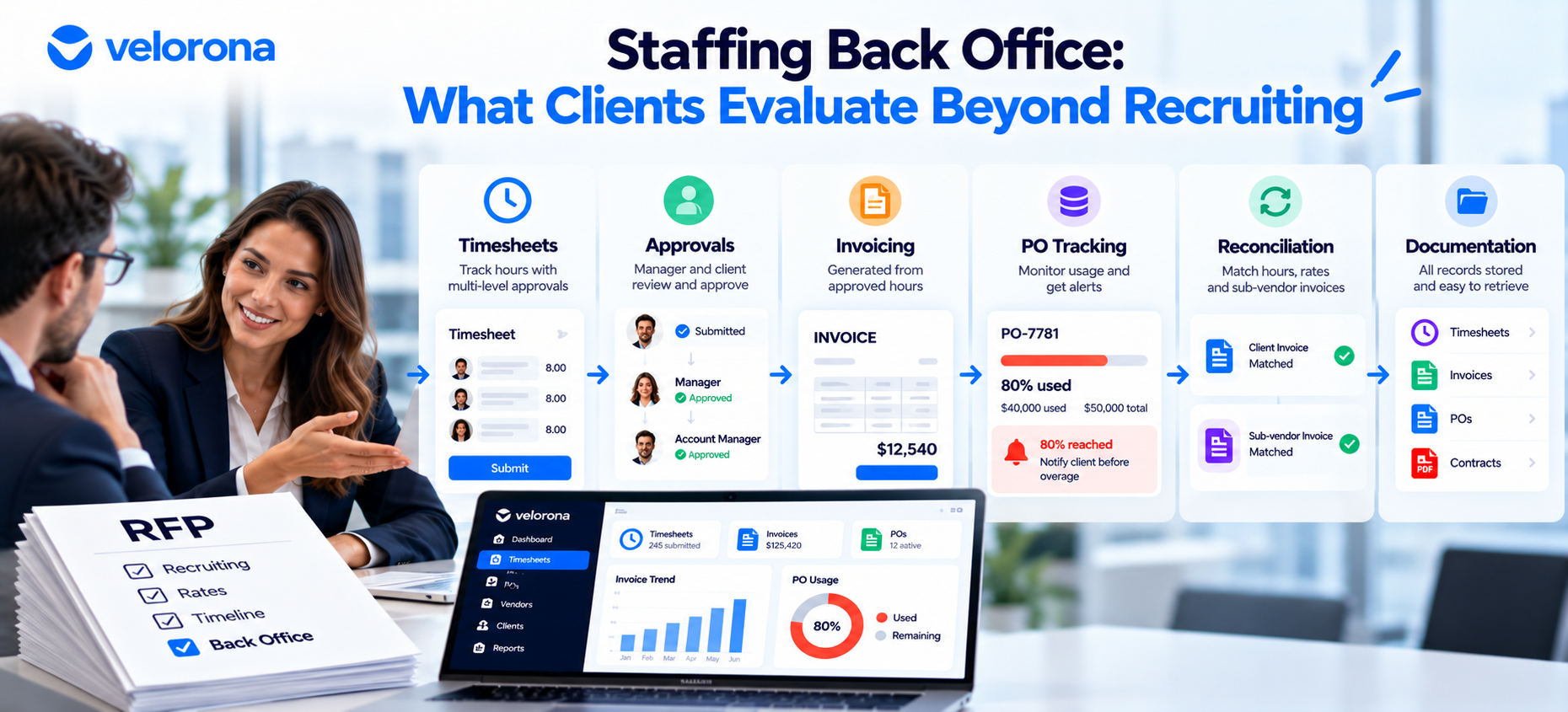
A staffing RFP back office review goes beyond recruiting. Clients may check invoice accuracy, PO usage, documentation, and approval speed. Firms lose ground when those answers need a scramble. This guide covers what clients evaluate, why manual processes slow the answers, and what a stronger response sounds like.
Most staffing firms prepare hard for the recruiting side of an RFP. They bring candidate bios, placement history, rate cards, and a clear vetting answer.
Then the client’s procurement team asks something different. How do you check invoices before you send them? How much of our PO have you used so far?
Those questions come from the back office. Many firms can answer them, but not quickly and not with much proof.
What Might Clients Evaluate Beyond Recruiting?
A request for proposal (RFP) is a formal document a client sends to compare vendors side by side. Procurement teams score every vendor against the same questions.
Recruiting quality gets the most attention because it is the service you sell. Once a client trusts your talent, other questions often follow:
- Invoice accuracy. Do invoices match approved hours and agreed rates? Clients want to know whether a bill will need correcting before payment.
- PO tracking. A purchase order (PO) sets a spending limit. Clients want to know how much is used and whether billing could stall at the limit.
- Documentation. Can you produce timesheets, invoices, rate agreements, and PO records on request?
- Approval process. Who approves hours, how long it takes, and what happens when a manager is out.
- Billing consistency. Do invoices arrive on the same schedule and format each month?
- AP workload. Accounts payable (AP) pays vendor invoices. Every correction or resend adds work for that team.
- Audit readiness. Can you produce records quickly during a review? The IRS recordkeeping guidance for small businesses shows how reviewers think about records.
Not every client uses the same criteria. Before an RFP, ask which of these matter most to that buyer.
Why Do Manual Processes Make These Questions Harder to Answer?
Consider one question: “How much of our PO has been used?” If hours sit in one tool, invoices in another, and the PO limit in a spreadsheet updated on Fridays, the honest answer becomes “let me check and get back to you.”
That answer isn’t wrong. It is slow. During a sales process, a slow answer makes the client wonder what else takes time.
A PO Example
Compare two responses. “We’ll check and get back to you” is the first. “We can see current PO usage and identify when it nears the limit” is the second.
The second answer doesn’t require one particular tool. It requires the number to exist, update as work happens, and surface without a scramble. A disciplined spreadsheet can get close. The difference is reliability and speed.
Other Questions That Stall
Approved timesheets buried in email make it hard to confirm every approved hour was invoiced. A rate change agreed in one place but not updated in billing can explain why two invoices for one consultant differ. We cover how hours and invoices drift apart in How to Catch the Sub-Vendor Invoice Errors Quietly Draining Your Margin.
None of this means the team does a bad job. Most small and mid-sized firms built their back office one tool and one spreadsheet at a time. Nobody designed the pieces to connect.
What Is the Difference Between Having Software and Having a Connected Process?
Many firms own a time tracker, an invoicing tool, an accounting package, and a shared drive. That can still leave a manual process behind.
The flow a client really asks about runs from timesheets to approval, invoice, PO, reconciliation, and documentation. Each step hands information to the next. If a person exports hours, copies them into an invoice, checks the PO in another file, and saves the PDF to a folder, every handoff can drift. Each handoff also adds time to every answer.
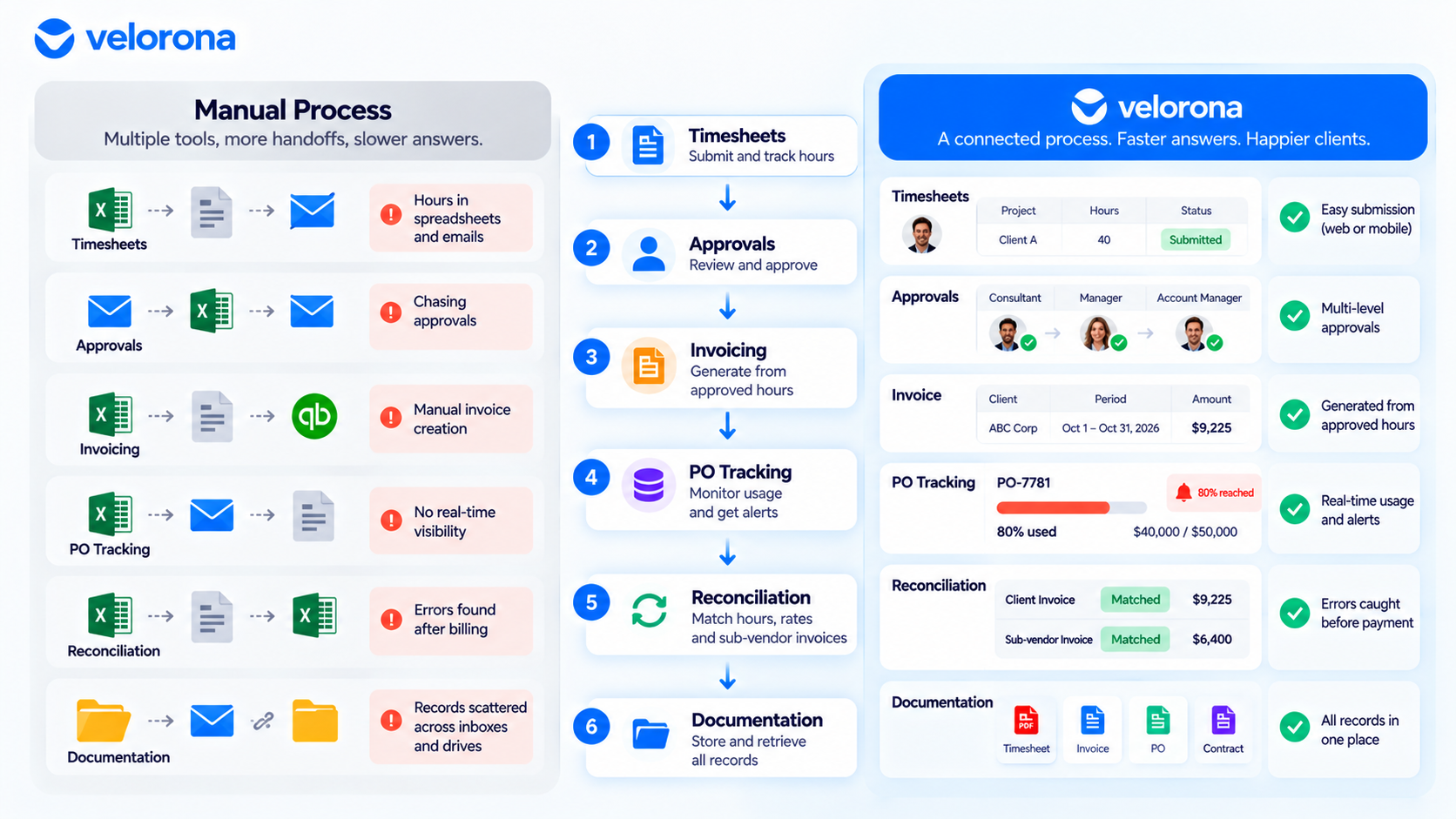
A connected process moves information through those steps without re-typing. Approved hours feed the invoice. PO usage updates as invoices generate. Records stay in one place.
You don’t need one tool to get there. Try this exercise: trace one consultant’s hours from timesheet to payment, and count every time someone copies data by hand.
What a Connected Flow Looks Like in Velorona
Velorona is one example, built for firms that manage contractors and sub-vendors. It covers:
- Timesheets with multi-level approvals
- Invoices generated automatically from approved hours
- PO tracking with an alert when usage reaches 80% of the limit
- Sub-vendor invoices matched against approved hours before payment, through the vendor hub
- Delivery through the client portal, with opened, viewed, and approved tracking
- Timestamped audit logs on approvals
Velorona tracks payroll details for your payroll partner. It does not run payroll.
What Does a Stronger Answer Look Like?
The weak answers below aren’t wrong. They’re general. Stronger answers name the step, the check, and the output.
| Client Question | Weak or Manual Answer | Stronger Connected Answer |
|---|---|---|
| How do you ensure invoice accuracy? | “A team reviews invoices before they go out.” | “Client invoices generate from approved hours and agreed rates. Sub-vendor invoices are matched against the same hours before payment.” |
| How do you track PO usage? | “We’ll pull that together for you.” | “We can show current PO usage and get an alert at 80% of the limit.” |
| How do you handle approved timesheets? | “Managers approve by email and we enter hours.” | “Timesheets route through a defined approval chain. Approved hours feed billing directly, so nothing is re-keyed.” |
| Can you provide documentation? | “Give us a day or two.” | “Timesheets, invoices, and approvals sit in one system with timestamps. Records come from a search.” |
| How do you catch billing discrepancies? | “Month-end review catches issues.” | “Mismatches are flagged before payment, not found at month-end.” |
Clear answers also help your own team. The sales lead no longer has to find the controller before every call. For the sales side, see The Staffing Firms Winning RFPs Aren’t Winning on Price.
How Can Your Back Office Become Part of the Sales Story?
Clients don’t buy your back-office tools. They buy a staffing relationship that runs smoothly. Your process can still be part of the conversation:
- Walk through the workflow. Show how a timesheet becomes an approved entry, then an invoice.
- Explain invoice checks. Describe what gets compared to what, and what happens on a mismatch.
- Show PO tracking. Pull up the balance on a sample engagement.
- Describe retrieval. Explain how a records request would be handled and how long it takes.
Remove real client or consultant data from any sample invoice before the meeting.
What Not to Promise
A clean process doesn’t guarantee an RFP win. Procurement weighs price, experience, references, and fit alongside operations. A connected process reduces friction and shows the client that working with you creates less work for their team.
What Back-Office Readiness Checklist Should You Run Before the Next RFP?
Check whether your team can answer each question in plain terms:
- Can we explain how timesheets are submitted and approved?
- Can we explain how approved hours become invoices?
- Can we show how invoice accuracy is checked?
- Can we quickly identify PO usage?
- Can we retrieve supporting documentation?
- Can we identify billing discrepancies?
- Can we explain how our process reduces AP back-and-forth?
- Can our sales team demonstrate the workflow?
If you answer “not really” to more than two or three, start with the question clients ask most. Write down what your team does today. Then decide which handoffs should stop depending on manual work.
What Should You Honestly Expect From Velorona?
The Team plan costs $10/month per user ($7 on annual billing), with no setup fees. Firms typically go live in 5 to 14 days. See the pricing page.
However, Velorona does not do the following today. QuickBooks Online synchronization sits on the roadmap, and CSV export covers the handoff until it ships. Stripe Connect payment through the portal also sits on the roadmap. SSO is in development. Payroll execution via Gusto Embedded targets Q4 2026, as does 1099-NEC auto-generation. The FAQ page has current status.
One month free trial. No credit card required.
FAQ: Back-Office Questions in Staffing RFPs
Do all clients ask back-office questions in an RFP?
No. Large enterprises with formal procurement often send scoring sheets. Mid-sized clients may ask the same things on a call with their finance lead.
Does a connected back office guarantee an RFP win?
No. Procurement weighs price, experience, and references too. A connected process reduces friction and speeds up your answers.
Do I need new software to answer these questions well?
Not always. A disciplined spreadsheet can work at small scale. The test is whether answers stay reliable and quick as volume grows.
What do clients usually ask about POs?
How much of the limit is used, and whether billing could stall when it runs out. Velorona alerts at 80% consumption.
How does this connect to sub-vendor invoices?
Clients want to know billing is accurate, and that depends on checking vendor costs against approved hours. See Bidirectional Invoice Reconciliation.
How fast can a firm get this process in place?
Firms typically go live with Velorona in 5 to 14 days.
Your Recruiting Gets You Considered. Your Back Office Helps You Stay.
Recruiting likely put you on the shortlist. Your operational process shapes how the relationship feels once work begins, and procurement notices that before signing.
Book a 15-minute demo and walk through your own timesheet-to-invoice flow. Or start a free 30-day trial, no credit card required.
Related reading:
- The Staffing Firms Winning RFPs Aren’t Winning on Price
- How to Pass a Vendor Security Review as a Staffing Firm
- How to Catch the Sub-Vendor Invoice Errors Quietly Draining Your Margin
- How to Stop Losing Clients Over Lost Invoices
- How to Turn a 12-Hour Friday Into 90 Minutes With Bulk Approval
- How to Resolve a Wage Dispute in Minutes, Not Weeks
- The Complete Guide to Staffing Agency Back Office Software