Workforce Management Software for Staffing Control
Quick answer: Workforce management software gives a staffing firm control over hours, attendance, billing, and subvendor reconciliation from one platform. Velorona connects those steps so approved hours drive invoicing and pay data. As a result, the owner gains visibility without manual chasing. To stay honest, kiosk face match attendance is a 2026 roadmap item, not a live feature.
Why Is Workforce Control So Hard Without the Right Tools?
Managing a workforce gets messy fast. Administrative tasks pile up. Meanwhile, communication scatters across departments.
For a staffing firm, the challenge is sharper. The firm runs W2 employees, 1099 contractors, and Corp to Corp arrangements at once. The IRS treats each type differently, so the mix matters.
Therefore, workforce management software has to centralize the work. Otherwise, the owner spends the week chasing updates instead of running the firm.
What Should Workforce Management Software Centralize?
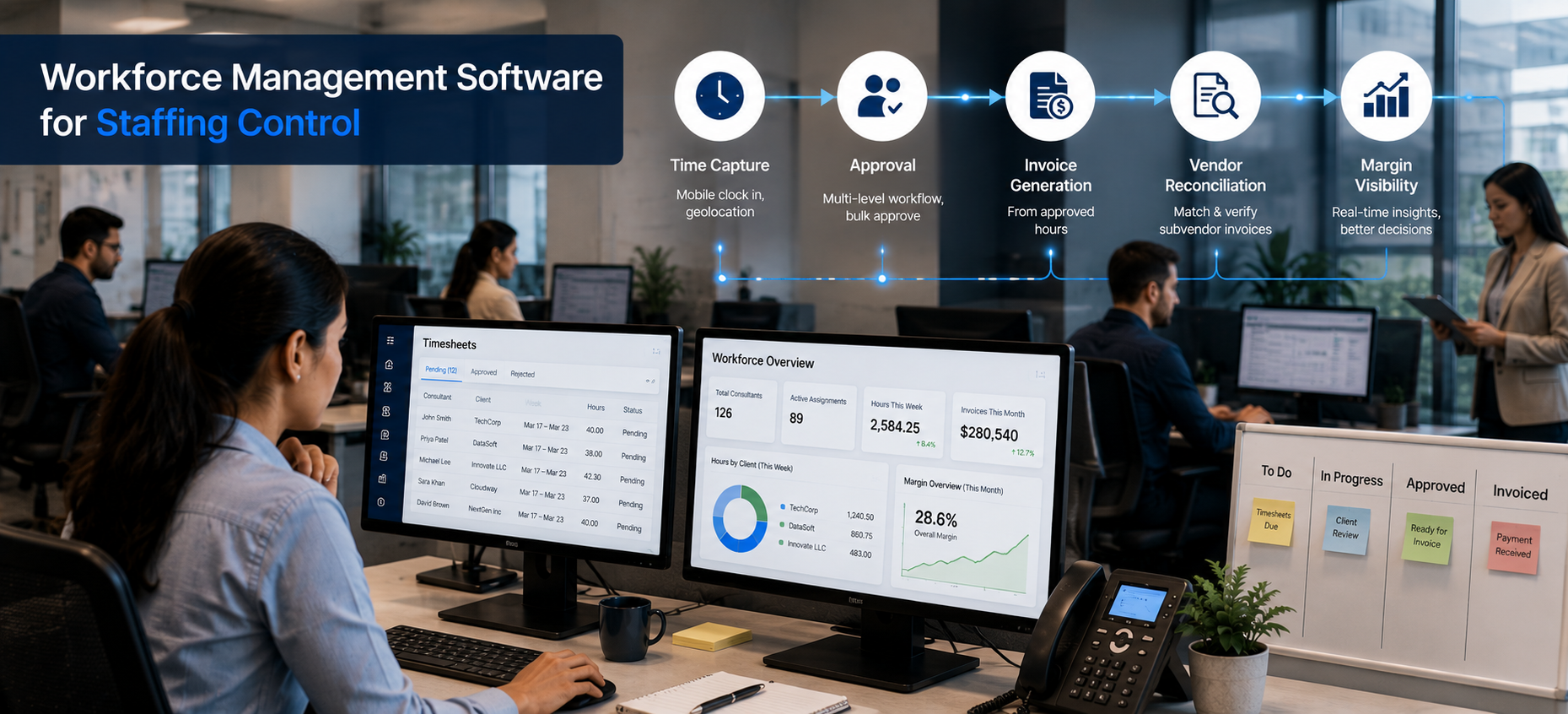
The goal is one platform for the steps a firm repeats every week. First, it should capture time and attendance. Then it should route approvals. Finally, it should turn approved hours into billing and reconciliation.
Velorona does exactly this. A consultant submits a timesheet or clocks in through timelogs with geolocation on clock in.
Next, a multi level approval workflow routes entries automatically. Then approvers clear up to 50 in a single click. As a result, the busywork shrinks dramatically.
How Does It Automate Daily Tasks?
Repetitive tasks drain a small team. So automation matters most here.
Velorona automates the routing of timesheets and the generation of invoices. In addition, it reconciles inbound subvendor invoices through the Vendor Hub.
Consequently, the owner can redirect time to strategy. Moreover, accuracy improves because the same approved hours drive every step.
What About AI Face Recognition for Attendance?
This is where honesty matters. Shared device kiosk attendance with photo, face match, and PIN is on Velorona’s roadmap. Specifically, it is targeted for Q3 2026. Therefore, it is not available today.
If a vendor claims AI face recognition is already live, ask them to demonstrate it in your environment first. According to the Federal Trade Commission, biometric features also carry real privacy obligations that buyers should weigh carefully.
For now, Velorona’s live anti time theft controls are mobile clock in, geolocation capture, and the audit trail. In short, the kiosk face match layer is the next step, not the current one.
How Does Real Time Data Improve Decisions?
Scattered data makes decisions slow. So a single source helps.
With workforce management software, hours, attendance, and billing live in one place. Therefore, the owner sees current information rather than a month old spreadsheet.
For example, the view shows hours by client, margin per assignment, and who is overloaded against the work schedule. As a result, decisions rest on evidence, not guesswork.
How Does It Help With Onboarding and Records?
Onboarding a new consultant should be quick. So a connected system helps here too.
You can set up a worker, assign rates, and start capturing hours without paperwork sprawl. In addition, every entry and approval is stored in a timestamped audit trail with two factor authentication. Consequently, a wage dispute resolves in minutes from the record.
What Does Velorona Do, and Not Do?
| Live today | On the 2026 roadmap or out of scope |
|---|---|
| Time, attendance, geolocation, bulk approval | Kiosk face match attendance (Q3 2026) |
| Client invoicing and subvendor reconciliation | Payroll execution (2026 roadmap) |
| Payroll Details and audit trail | QuickBooks Online sync (2026 roadmap) |
| Multi currency rate cards and FX lock | Performance scoring or surveillance (not a Velorona function) |
To be precise, Velorona is staffing back-office software. It is not an ATS, an HRIS, or a payroll bureau. It produces Payroll Details for transparency, and it does not run payroll. Until QuickBooks Online sync ships, data moves via CSV.
What Does It Cost and How Fast Is Go Live?
Starter is $6 per user per month, and Team is $10 per user per month. Furthermore, annual billing saves 30 to 33 percent. There is also a one month free trial with no credit card, no setup fee, and a 5 to 14 days go live.
In contrast, enterprise platforms take 6 to 12 weeks to implement. They also charge $8,000 to $15,000 to set up. The American Staffing Association publishes further benchmarks on staffing operations.
For related reading, see how to run your staffing back office on one platform. You can also read about reliable employee time tracking software.
FAQ: Workforce Management Software
Does Velorona have AI face recognition today?
No. Kiosk attendance with photo, face match, and PIN is targeted for Q3 2026. Today’s controls are mobile clock in, geolocation, and the audit trail.
Does it monitor or score employee performance?
No. It gives managers visibility into hours and workload. However, it does not surveil or score staff.
Can it handle a mixed workforce?
Yes. It supports W2, 1099, and C2C arrangements, with rates configured per assignment.
Does it run payroll?
No. It produces Payroll Details. Payroll execution is on the 2026 roadmap.
See Workforce Management Software for Staffing
See how Velorona connects time, attendance, billing, and reconciliation into real workforce control.
Book a personalized demo: velorona.com/demo