Why Invoice Accuracy Matters for Staffing Agency Cash Flow
Your client’s accounts payable (AP) team has had your invoice for nine days. Nobody has disputed the engagement or questioned the consultant’s work. The invoice is simply sitting in review.
It is tempting to assume the client is delaying payment. Sometimes, that is the case. Payment terms, procurement requirements, and internal approval chains can all affect when money arrives.
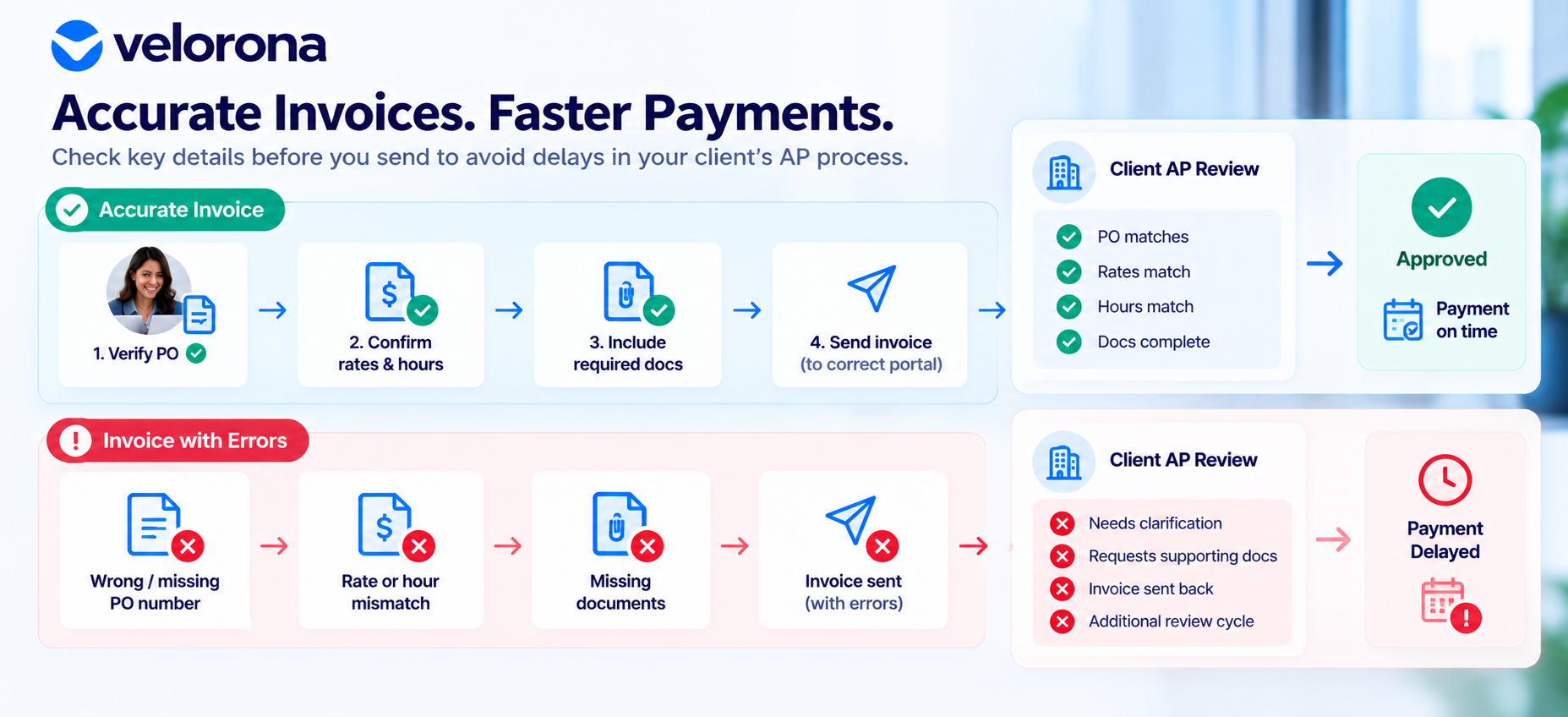
But sometimes, the invoice itself is contributing to the delay. A purchase order (PO) number may not match the client’s records. The billing rate may differ from the approved rate card. Or the invoiced hours may not match the approved timesheet.
These discrepancies can send an invoice into a clarification or exception process before it reaches the person who can approve it. Even when the issue is resolved quickly, the additional steps can add time to the process.
An accurate invoice does not guarantee immediate approval or payment. It does, however, help prevent avoidable errors from creating additional work for your team and the client’s AP department.
Before assuming a client is sitting on your money, ask a more basic question: Is the invoice accurate, complete, and ready for review?
Why Invoice Accuracy Matters for Staffing Agency Cash Flow
Staffing firms depend on a predictable billing process to manage their cash flow. They need to invoice clients for eligible consultant hours, track outstanding payments, and meet their own financial obligations.
When an invoice contains an error, the problem may extend beyond correcting a number. The team may need to investigate the discrepancy, retrieve supporting documentation, contact the client, revise the invoice, and resubmit it.
Until the issue is resolved, the invoice may remain unapproved.
This creates an important distinction: invoice accuracy can help reduce preventable processing delays, but it cannot eliminate every cause of late payment.
A client may still take the full time allowed by its payment terms. The objective is to avoid adding unnecessary delays before the invoice enters or completes the client’s normal approval process.
Why Some Staffing Invoices Require More Review Than Others
Every client has requirements for invoice submission, validation, and approval. These may depend on the contract, procurement process, accounts payable system, or internal approval policy.
When an invoice does not meet those requirements, the client may need additional information before processing it.
Common causes include the following.
1. Missing or Incorrect Purchase Order Numbers
Many clients use purchase orders to match invoices against approved spending.
If an invoice contains an incorrect PO number, or does not include one when required, the AP team may need confirmation before proceeding. The invoice may also need to be checked against the remaining authorized amount.
What to check: Verify the PO number against the current client record and confirm that the authorization supports the invoice amount, where applicable.
2. Billing Rates That Do Not Match Approved Rates
A difference between the invoiced rate and the approved rate can trigger a review, even when the difference appears small.
For staffing firms managing multiple clients, consultants, and rate changes, using an outdated rate record can lead to repeated corrections.
What to check: Confirm the applicable approved rate, including any changes and their effective dates, before generating the invoice.
3. Invoiced Hours That Do Not Match Approved Timesheets
An invoice should reflect the hours that are eligible for billing under the relevant agreement.
If the invoiced hours differ from the approved timesheet, the discrepancy needs to be investigated. Possible explanations include an omitted line item, a correction that was not reflected, or hours belonging to a different billing period.
What to check: Compare invoice line items against the relevant approved, billable timesheets before submission.
4. Incorrect Calculations or Line Items
A line-item calculation may be incorrect, or the invoice total may not equal the sum of its individual items.
These errors can create additional work for both the staffing firm and the client’s AP team.
What to check: Review quantities, rates, line-item totals, and the final invoice amount.
5. Missing Supporting Documentation
Some clients require supporting records, such as approved timesheets, approval evidence, or expense documentation.
An invoice may contain the correct amount but still be incomplete if required documents are missing.
What to check: Confirm the client’s documentation requirements for the particular engagement and billing period.
6. Manual Data Entry and Re-Entry
Invoice details may originate in timesheet records, rate spreadsheets, prior invoices, and accounting software.
When employees manually transfer information between these systems, they may enter an outdated rate, transpose a number, or omit a line item.
What to check: Compare the final invoice with the original records rather than relying solely on the manually entered information.
7. Incorrect Submission Method or Format
Some clients require invoices to be submitted through a designated portal or in a specific format.
An accurate invoice may still encounter processing issues if it is sent through the wrong channel or does not meet the required format.
What to check: Confirm the client’s submission instructions before sending the invoice.
Requirements vary by client and contract. A process that works for one client may not satisfy another client’s AP requirements.
How Invoice Errors Can Affect Payment Timing
A typical invoice review process may follow these steps:
- The staffing firm submits the invoice.
- The client’s AP team or designated approver checks it against the PO, approved rate, timesheets, and applicable requirements.
- A discrepancy or missing detail is identified.
- The invoice is held, returned, or sent for clarification.
- The staffing firm investigates and corrects the issue or supplies the requested information.
- The invoice re-enters the relevant review or approval process.
Not every client follows this exact sequence. Some use automated checks, while others rely on manual reviews or scheduled processing cycles. However, a discrepancy can create an additional round of communication and review.
Invoice Accuracy and Payment Terms Are Different
Suppose a client contract specifies net 45 payment terms. An invoice that passes review without discrepancies will generally still be subject to those agreed terms.
Correcting invoice errors does not automatically change the due date, shorten the contractual payment period, or guarantee faster approval.
Instead, accurate invoicing helps reduce avoidable issues that can arise before or during processing.
This distinction matters when investigating slow payments. A delay caused by an incorrect PO requires a different response from a payment that is still within the agreed terms.
For more context, read How Automated Invoicing Affects Staffing DSO.
The Three Invoice Checks That Matter Most
A practical pre-submission review can focus on three areas: hours, rates, and PO details.
1. Verify Hours and Timesheets
Compare invoice hours with the relevant approved, billable timesheets for the billing period.
Look for:
- Approved hours that are missing from the invoice.
- Differences between approved and invoiced totals.
- Corrections that have not been reflected in the invoice.
- Hours assigned to the wrong billing period.
Resolve discrepancies before submission wherever possible.
2. Verify Rates and Calculations
Confirm that the invoice uses the applicable approved billing rate. If a rate has changed, check that the correct rate applies to the period being invoiced.
Then review each line-item calculation and verify that the invoice total is correct.
Do not assume that the rate used on a previous invoice is necessarily the correct rate for the current period.
3. Verify PO Details and Supporting Information
Confirm that the PO number is correct and current, and that the remaining authorization supports the invoice amount where applicable.
Check that required supporting documents are included and that the invoice follows the client’s specified submission method and format.
Pre-Submission Invoice Checklist
- Use this checklist before sending an invoice to a client.
2. Invoiced hours match the relevant approved, billable timesheets.
3. Billing rates match the applicable approved rate card.
4. Line-item calculations and the invoice total are correct.
5. The PO number is correct and current, where required.
6. The remaining PO authorization supports the invoice amount, where applicable.
7. Required supporting documentation is attached.
8. The invoice follows the client’s required format and submission method.
A consistent checklist helps turn invoice validation into a repeatable process rather than a task that happens only after a client reports a problem.
Why Manual Re-Entry Creates Additional Billing Risk
In many staffing firms, the path from consultant hours to a submitted invoice involves several tools.
Timesheets may be recorded in one system, approved rates in a spreadsheet, and final invoices in an accounting or billing application. Someone then has to transfer information between these records.
Each manual transfer introduces an opportunity for error.
A rate may be outdated. A line item may be omitted. A correction may be made in one system but not another.
This is not necessarily a problem with employee diligence. It is a process risk created when teams must repeatedly move the same information between disconnected tools.
Using digital timesheets or accounting software does not automatically remove that risk. If the systems are not connected, the manual handoff may remain.
A connected timesheet-to-invoice workflow can reduce the need to export, copy, and re-enter approved hours and associated billing details.
The objective is to make the information used for invoicing more consistent while preserving the checks required for rates, contractual terms, and exceptions.
What Pre-Submission Invoice Reconciliation Looks Like
Reconciliation means comparing invoice details with the records that support them before the invoice reaches the client.
A practical process generally includes the following steps:
- Gather the approved, billable hours for the billing period.
- Confirm the applicable client and contractor billing rates.
- Verify PO details and remaining authorization, where applicable.
- Compare invoice line items with the underlying timesheet and rate records.
- Investigate and resolve discrepancies before submission wherever possible.
- Confirm that required supporting documentation is included.
- Submit the invoice through the client’s specified channel and format.
- Track submission, follow-up questions, approval, and payment status.
This process does not guarantee an earlier payment date. It can, however, help reduce clarification requests caused by avoidable invoice errors.
Staffing firms that manage sub-vendors also need to validate invoices received from those vendors. Incoming sub-vendor invoices should be reconciled against approved consultant hours before payment.
See Sub-Vendor Invoice Reconciliation: Best Practices for more on this process.
Client Portal Delivery: Why the Submission Method Matters
Some clients require invoices to be submitted through a designated vendor portal rather than by email. Others specify particular formats or supporting documents.
Following those instructions helps the invoice reach the appropriate AP workflow in the expected format. However, invoice preparation, delivery, approval, and payment are separate stages.
| Stage | What it means | What the staffing firm can do |
|---|---|---|
| Invoice preparation | The invoice contains the correct rates, hours, PO details, and supporting information. | Validate the invoice against source records. |
| Invoice delivery | The invoice reaches the client through the required channel and format. | Follow submission instructions and retain delivery records. |
| Invoice review and approval | The client reviews the invoice according to its internal process. | Respond to questions and provide requested clarification. |
| Payment | The client pays according to the applicable terms and payment process. | Track the due date and follow up on overdue invoices. |
Getting the first two stages right helps remove avoidable obstacles. It does not guarantee that the client will review or approve the invoice immediately, or pay before the agreed due date.
Why Invoice Visibility Helps
When a client says an invoice was never received, the staffing firm needs to establish when and how it was submitted.
Maintaining a record of submission and subsequent activity can help clarify the invoice’s status and guide follow-up.
A client portal that provides visibility into whether an invoice was sent, opened, reviewed, or approved can help teams understand where the process stands. It does not, by itself, ensure that the client will approve or pay the invoice sooner.
How to Investigate Your Own Payment Delays
If multiple invoices are running late, review a group of invoices rather than focusing on one recent example.
Look for patterns across clients, billing periods, and issue types. Categorizing delays helps distinguish preventable invoice problems from delays caused by client-side processes or contractual payment terms.
| Issue | What to check | Possible next action |
|---|---|---|
| Invoice held for clarification | Whether the issue involves the PO, rate, hours, or documentation | Correct the underlying record and resubmit or provide clarification. |
| Repeated PO mismatches for one client | Whether the PO information is current and the authorization is sufficient | Confirm the correct PO with the relevant client contact. |
| Invoice paid later than expected, with no dispute | The contractual due date and the client’s processing cycle | Compare the payment date with the agreed terms before concluding it is overdue. |
| Client says the invoice was never received | The submission method and available delivery records | Confirm whether the client requires portal submission and verify delivery. |
| Delays vary significantly by client | Whether the issue is concentrated in one client’s requirements or occurs across the firm’s workflow | Investigate the specific client process or review the firm’s internal invoicing steps. |
Reviewing several invoices across different clients can reveal whether the problem is recurring within your own workflow or concentrated in a particular client’s process.
That distinction helps determine where corrective action is most useful.
How Velorona Fits Into the Invoice Workflow
Velorona is back-office software for staffing firms managing contractors, sub-vendors, and client billing. Several of its capabilities relate directly to the invoice checks discussed in this article.
Generate Invoices From Approved Consultant Hours
Velorona supports invoice generation from approved consultant hours, reducing the need to rebuild invoice details through a separate spreadsheet and manually re-enter the same information.
Its structured timesheet workflow includes Open, Submitted, Approved, and Rejected statuses, with approval and rejection actions timestamped.
This supports a clearer connection between timesheet approval and invoice preparation. Teams must still verify applicable rates, contractual billing requirements, and exceptions.
Explore Velorona Invoicing and Timesheet Management.
Track Purchase Order Balances
Velorona tracks PO balances and alerts teams when 80% of the authorized amount has been reached.
This gives teams an opportunity to review the remaining authorization before a potential overage becomes an invoicing issue. It does not replace the need to confirm that a PO is current and applicable to the engagement.
Read How Digital PO Tracking Prevents Billing Surprises for Staffing Firms.
Reconcile Incoming Sub-Vendor Invoices
A staffing firm must also ensure that the invoices it receives from sub-vendors match the approved consultant hours.
Velorona’s Vendor Hub compares incoming sub-vendor invoices against approved hours and flags mismatches for review before payment. This supports the reconciliation process without relying entirely on manual comparisons.
Learn more about Velorona Vendor Hub.
Improve Visibility Into Client Invoice Activity
Velorona delivers invoices through a client portal alongside email and provides visibility into invoice activity, including when invoices are sent, opened, reviewed, and approved.
This can help staffing teams establish where an invoice stands when following up with a client.
It does not change contractual payment terms, guarantee approval, or eliminate client-side processing delays.
What Velorona Does Not Replace
A structured workflow can reduce manual handoffs and make invoice records easier to review, but staffing firms still need to:
- Maintain accurate and current rate information.
- Confirm applicable PO details and authorization.
- Follow each client’s invoice submission requirements.
- Review discrepancies and contractual exceptions.
- Communicate with clients about approval issues and overdue payments.
The goal is to reduce preventable errors and improve process visibility, not to assume that every payment delay can be solved through software alone.
Make Every Invoice Easier to Process
Staffing firms cannot control every part of a client’s payment process. Procurement requirements, internal approval chains, contractual terms, and payment schedules may all influence when cash arrives.
What firms can control is the quality of their own invoicing process.
Before submitting an invoice, verify the hours, confirm the applicable rate, check the PO details, include the required documentation, and use the correct submission method.
When payment is delayed, investigate the cause instead of assuming every delay has the same explanation. An invoice error, a client-side approval backlog, and a payment that is still within its contractual terms require different responses.
Accurate invoicing will not eliminate every delay, but it can help reduce avoidable clarification cycles and make payment follow-up more informed.
If you want to see how approved timesheets, PO tracking, and sub-vendor reconciliation fit into a connected staffing back-office workflow, explore Velorona’s invoicing features.
Frequently Asked Questions
1. Why does invoice accuracy matter for staffing agency cash flow?
Invoice accuracy helps staffing firms avoid preventable discrepancies that can trigger clarification requests, corrections, and additional review. These steps can delay invoice processing and make cash-flow planning more difficult. Accurate invoices do not guarantee faster payment, since contractual terms and client-side processes still apply.
2. What are the most common invoice errors in staffing agencies?
Common issues include missing or incorrect PO numbers, billing rates that differ from approved rates, hours that do not match approved timesheets, calculation errors, missing supporting documents, and incorrect submission methods or formats.
3. Can invoice errors delay client payments?
Yes. A discrepancy may cause an invoice to be held, returned for correction, or routed through an exception process. Resolving the issue can add another round of communication and review. The impact depends on the client’s workflow and how quickly the discrepancy is resolved.
4. How can staffing firms improve invoice accuracy?
Staffing firms can introduce a consistent pre-submission checklist. They should compare invoiced hours with approved, billable timesheets, verify the applicable rates, check PO details and calculations, attach required documents, and follow the client’s submission instructions.
5. Does accurate invoicing guarantee faster payment?
No. Accurate invoicing can reduce delays caused by preventable errors, but it does not change contractual payment terms or guarantee immediate client approval. Client procurement procedures, internal approval chains, and payment schedules can still affect when funds arrive.
6. How do purchase order errors affect staffing invoices?
If a PO number is incorrect, missing, or inconsistent with the client’s records, the AP team may need clarification before processing the invoice. Staffing firms should verify the applicable PO and confirm that the remaining authorization supports the invoice amount where required.
7. Why can digital invoicing systems still have errors?
Digital tools do not automatically eliminate errors when information must be manually transferred between disconnected systems. If approved hours, rates, and invoice records are maintained separately, employees may still re-enter outdated or incorrect information. Connecting the relevant workflow can reduce these manual handoffs.
8. How can staffing firms identify the cause of late payments?
Review several invoices and classify the delays by cause. Check for missing information, PO discrepancies, rate or timesheet mismatches, submission problems, client-side approval delays, and standard payment cycles. Comparing patterns across clients can help distinguish internal process issues from client-specific delays.
9. How does Velorona support invoice accuracy?
Velorona supports invoice generation from approved consultant hours, structured timesheet approvals, PO balance tracking with alerts at 80% of the authorized amount, and Vendor Hub reconciliation of incoming sub-vendor invoices against approved hours. It also provides visibility into client invoice activity through its portal. These features support the invoicing workflow but do not guarantee faster approval or payment.
10. What should a staffing agency do when an invoice is overdue?
First, check the contractual payment terms and determine whether the invoice is actually overdue. Then review the submission record, invoice status, and any client requests for clarification. If a discrepancy exists, resolve it and provide the required information. If the invoice is accurate and overdue, follow up with the client about its approval or payment status.
Related Reading
- How Automated Invoicing Affects Staffing DSO
- How Digital PO Tracking Prevents Billing Surprises for Staffing Firms
- Sub-Vendor Invoice Reconciliation: Best Practices
- Staffing Client Invoice Portal: Stop Losing Cash to Lost Invoices