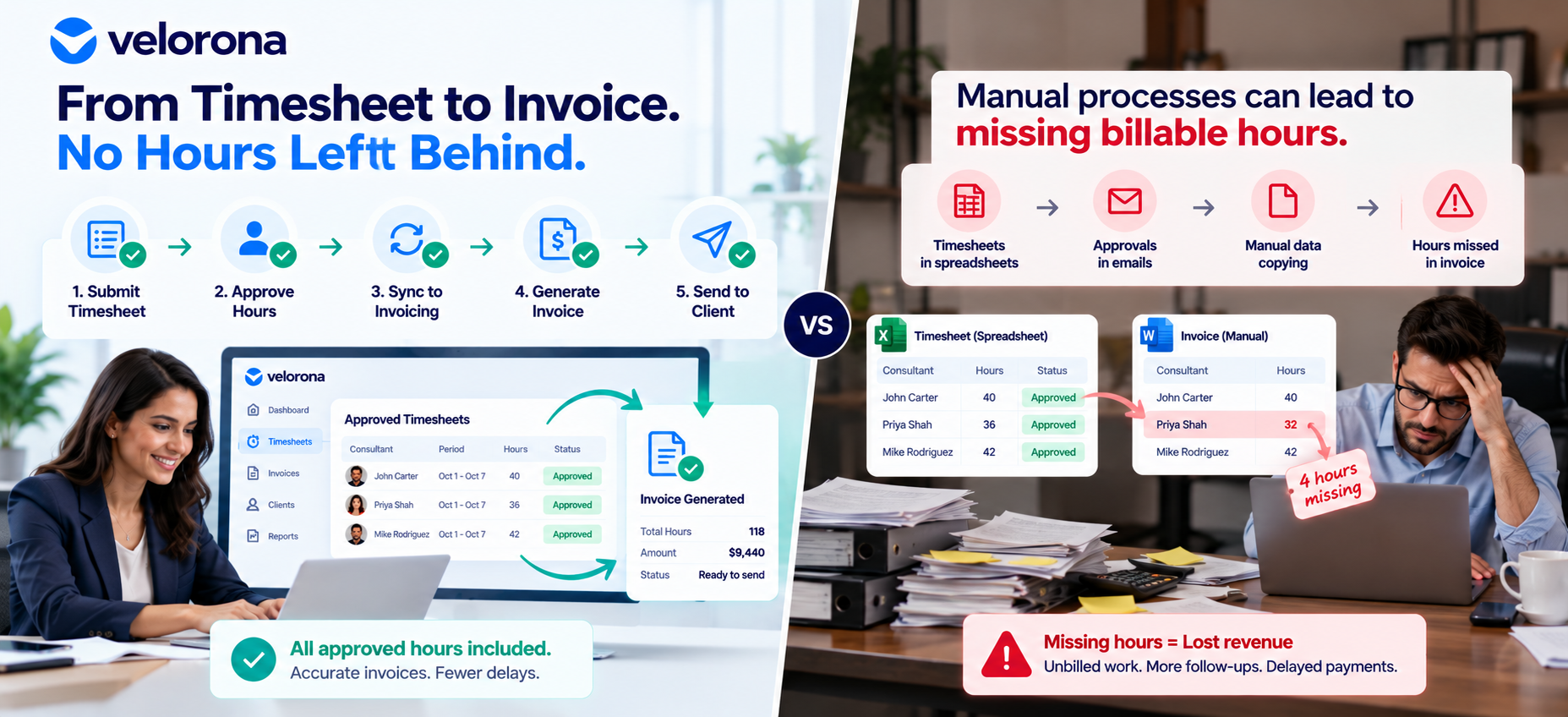
Staffing Timesheet to Invoice: How to Catch Missing Hours
Every month, staffing firms face a critical billing question: Did every approved contractor hour make it onto the client’s invoice?
When timesheets and invoicing are handled across separate spreadsheets, emails, and systems, the answer is not always easy to verify. A consultant may submit their hours, a manager may approve them, and the operations team may record them—but those hours can still be missed during invoice preparation.
The result is a gap between the work completed and the revenue billed.
Missing billable hours can be difficult to detect because the timesheet may appear complete while the invoice is already finalized. Finding the discrepancy later means tracing records, checking approvals, and determining whether the hours were omitted, deferred, or never billable in the first place.
A reliable staffing timesheet-to-invoice workflow helps firms identify these gaps before they become recurring month-end problems.
Why Do Staffing Firms Miss Billable Hours?
Missing hours are not always caused by an incorrect timesheet. Often, the problem occurs between timesheet approval and invoice creation.
1. Approved Hours Are Not Transferred to Invoicing
A consultant submits a timesheet, and the relevant manager approves it. However, if the approved hours must be manually exported, copied, or entered into another system, the process creates another opportunity for an omission.
The timesheet can be correct while the invoice remains incomplete.
2. Spreadsheet Copying Introduces Errors
When teams use spreadsheets to reconcile hours and prepare invoices, they may accidentally skip a row, use an outdated file, or overlook a correction.
These errors can be especially difficult to identify when a firm manages multiple consultants, clients, billing rates, and approval timelines.
3. Timesheet and Billing Records Fall Out of Sync
Timesheet records and invoice records may be updated at different times. A late approval or revised timesheet might not be reflected in the invoice draft.
Without a consistent way to compare approved hours against billed hours, the discrepancy can remain unnoticed.
4. Approvals Arrive After the Billing Cycle Closes
Some hours may remain pending when the finance team prepares invoices. Those hours might be billed in a later cycle, but without clear tracking, the team may not know whether they were intentionally deferred or accidentally missed.
A pending timesheet should not automatically be treated as a missing invoice line. The team needs to confirm its status and the applicable billing period.
5. Operations and Finance Use Different Records
Operations may track consultant submissions and approvals, while finance maintains a separate invoice spreadsheet or accounting record.
When these teams rely on different versions of the data, they can spend time investigating discrepancies that a connected workflow could help prevent.
How Missing Hours Affect Staffing Revenue
When approved hours do not appear on an invoice, a staffing firm may bill less than expected for the work completed.
For example, imagine a consultant has four approved hours that were eligible for billing but were accidentally omitted from an invoice. At a billing rate of $80 per hour, the unbilled amount would be $320.
That is an illustrative example, not a reported client result. The actual financial impact depends on the hours, applicable billing terms, and whether the amount can still be invoiced.
The larger concern is repetition. If similar omissions occur across several consultants or billing periods, the finance team may need to spend additional time investigating records, correcting invoices, and following up on outstanding amounts.
The goal is not simply to find missing hours after the fact. It is to establish a process that makes discrepancies easier to identify before invoices are finalized.
How to Catch Missing Hours Before Sending Invoices
A consistent reconciliation process helps staffing firms distinguish genuine billing gaps from hours that are pending, deferred, or not contractually billable.
Step 1: Start With the Approved Timesheets
Collect the timesheets associated with the billing period and verify their statuses.
Identify which timesheets are:
- Open and not yet submitted
- Submitted but awaiting approval
- Approved and ready for billing review
- Rejected and requiring correction
This helps the team avoid treating every outstanding timesheet as an invoicing error.
Step 2: Compare Approved Hours Against Invoice Line Items
For each consultant, compare the approved hours with the hours recorded on the corresponding invoice.
Check for:
- Approved hours that have no matching invoice entry
- Differences between approved and invoiced totals
- Corrections that were not reflected in the invoice draft
- Hours assigned to the wrong billing period
A mismatch should trigger a review rather than an automatic invoice adjustment. The team still needs to verify the relevant billing terms and determine whether the hours are eligible for invoicing.
Step 3: Review Pending Approvals and Deferred Hours
Not every approved hour must necessarily appear on the current invoice. Some hours may fall outside the billing cutoff or require additional review.
For each discrepancy, establish whether the hours are:
- Approved and eligible for billing but missing from the invoice.
- Approved but not contractually billable.
- Expected to be invoiced in a later billing cycle.
- Still awaiting approval or correction.
This classification helps finance teams focus on genuine omissions without creating incorrect invoice entries.
Step 4: Investigate the Source of Each Mismatch
When the hours and invoice totals do not match, trace the discrepancy back to the source record.
Confirm the timesheet status, approval history, billing period, and corresponding invoice line item. Where corrections have been made, verify that the latest approved information was used.
Documenting the reason for each mismatch also makes it easier to identify recurring process problems.
Step 5: Reconcile Before Finalizing the Invoice
Make timesheet-to-invoice reconciliation part of the regular billing process rather than a task reserved for month-end investigations.
Before finalizing an invoice, confirm that approved hours have been reviewed, discrepancies have been resolved or documented, and any deferred hours have a clear next step.
This creates a more consistent handoff between operations and finance.
Why Digital Timesheets Alone May Not Solve the Problem
Moving timesheets online can make submissions and approvals easier to manage. However, digital timesheets do not automatically guarantee complete invoicing if the approved data still has to be exported and manually re-entered elsewhere.
The important question is what happens after approval.
If the team must transfer hours between disconnected systems, the manual handoff remains a potential source of error. A stronger workflow connects approval with invoice preparation and makes it easier to compare the source hours with the resulting billing records.
For staffing firms, the objective is to reduce unnecessary manual steps while keeping exceptions visible for human review.
How Velorona Helps Connect Timesheets and Invoicing
Velorona supports a structured workflow for staffing timesheets, invoicing, and vendor reconciliation.
Track Timesheet Statuses and Approvals
Velorona supports four timesheet statuses: Open, Submitted, Approved, and Rejected. Approval and rejection actions are timestamped, giving teams a record of those decisions.
This helps staff understand where a timesheet stands and review its approval history when investigating a billing discrepancy.
Explore Velorona Timesheets.
Generate Invoice Line Items From Approved Hours
Approved consultant hours can generate corresponding invoice line items without requiring a manual export and re-entry step.
Custom invoice templates and billing schedules can use the same approved data, helping reduce the handoffs between timesheet processing and invoice preparation.
This does not determine whether every hour is contractually billable. Teams still need to review billing terms and handle exceptions appropriately.
Explore Velorona Invoices.
Compare Sub-Vendor Invoices Against Approved Hours
Missing or mismatched hours can also affect the vendor side of a C2C staffing workflow.
Velorona’s Vendor Hub compares incoming sub-vendor invoices against approved consultant hours and flags mismatches for review before payment. The workflow also provides an audit trail for the matching process.
This helps teams identify discrepancies between the hours they have approved and the hours a sub-vendor invoices.
Learn more about Velorona Vendor Hub.
Improve Visibility for Finance Teams
When timesheet approvals, invoice preparation, and vendor reconciliation follow a more structured workflow, finance managers can review approved hours, billing status, and margin information with greater visibility into the underlying records.
The purpose is to make discrepancies easier to investigate—not to remove the need for financial review.
A Practical Month-End Timesheet-to-Invoice Checklist
Use this checklist before closing the billing period:
- Confirm which timesheets belong to the billing period.
2. Identify timesheets that are open, submitted, approved, or rejected.
3. Compare approved hours against the relevant invoice line items.
4. Investigate approved hours that are missing from invoices.
5. Verify whether disputed or deferred hours belong in a later billing cycle.
6. Check that approved corrections are reflected in the invoice draft.
7. Reconcile incoming sub-vendor invoices against approved hours.
8. Record the reason for each unresolved mismatch and assign a follow-up.
9. Complete the review before finalizing invoices wherever possible.
The checklist works best when it becomes a repeatable part of the billing process rather than an occasional exercise after a discrepancy has already been discovered.
Build a More Reliable Staffing Timesheet-to-Invoice Workflow
Missing billable hours are not always easy to spot. The timesheet may be approved, the invoice may look complete, and the discrepancy may remain hidden until someone compares the records.
Staffing firms can reduce that risk by establishing a clear connection between timesheet approval, invoice preparation, and reconciliation. Consistent status tracking, comparisons between approved hours and invoice entries, and documented exception handling help teams identify problems earlier.
The key is to make every handoff visible and every mismatch reviewable.
Velorona helps staffing firms connect approved timesheets with invoice line items and compare sub-vendor invoices against approved hours, reducing the need for manual transfers in these workflows.
Explore Velorona to learn more about its staffing back-office workflows.
Frequently Asked Questions
1. What is a staffing timesheet-to-invoice workflow?
A staffing timesheet-to-invoice workflow connects consultant time reporting and approval with invoice preparation. It helps teams verify that approved hours have been reviewed and correctly reflected in billing records, while allowing exceptions to be investigated before invoices are finalized.
2. Why do approved hours go missing from staffing invoices?
Common causes include manual data entry, spreadsheet copy errors, disconnected timesheet and billing systems, late approvals, and corrections that are not reflected in invoice drafts. A missing invoice entry does not always mean the hours are billable; the team must also check the applicable billing terms and billing period.
3. How can staffing firms identify missing billable hours?
Compare approved timesheets with invoice line items for the same consultant and billing period. Investigate approved hours without a matching invoice entry, differences between approved and invoiced totals, and corrections that have not been reflected. Confirm whether each discrepancy represents a genuine billing omission, a contractual exception, or hours deferred to a later cycle.
4. Do digital timesheets prevent missing hours automatically?
Not necessarily. Digital timesheets can improve submission and approval tracking, but manual exports or re-entry between timesheet and invoicing systems can still create gaps. Connecting approved hours with invoice preparation can reduce those handoffs, although teams still need to review exceptions and billing eligibility.
5. Should every approved timesheet hour appear on the current invoice?
Not always. Some approved hours may fall outside the billing cutoff, be deferred to a later cycle, or not be billable under the applicable agreement. Finance teams should verify the billing period and contractual terms before treating a difference as an invoicing error.
6. How does Velorona help reduce timesheet-to-invoice discrepancies?
Velorona supports structured timesheet statuses and timestamped approval or rejection actions. Approved consultant hours can generate corresponding invoice line items without manual export and re-entry. Its Vendor Hub also compares incoming sub-vendor invoices against approved consultant hours and flags mismatches for review.
7. Can Velorona determine whether every approved hour is contractually billable?
No. Although Velorona supports the workflow between approved hours and invoice preparation, the team must still review contractual billing terms and handle exceptions. An approved timesheet alone does not establish that every hour must be invoiced in the current cycle.
8. What should staffing firms check before finalizing monthly invoices?
Confirm the billing period, review timesheet statuses, compare approved hours with invoice line items, investigate discrepancies, verify corrections, and reconcile sub-vendor invoices against approved hours. Document unresolved issues and assign follow-up actions before closing the billing period wherever possible.
Related Reading
- Timesheet Software for Staffing: Turn Hours into Invoices
- Staffing Timesheet to Payroll Integration
- How Digital PO Tracking Prevents Billing Surprises for Staffing Firms
- Staffing Client Invoice Portal: Stop Losing Cash to Lost Invoices