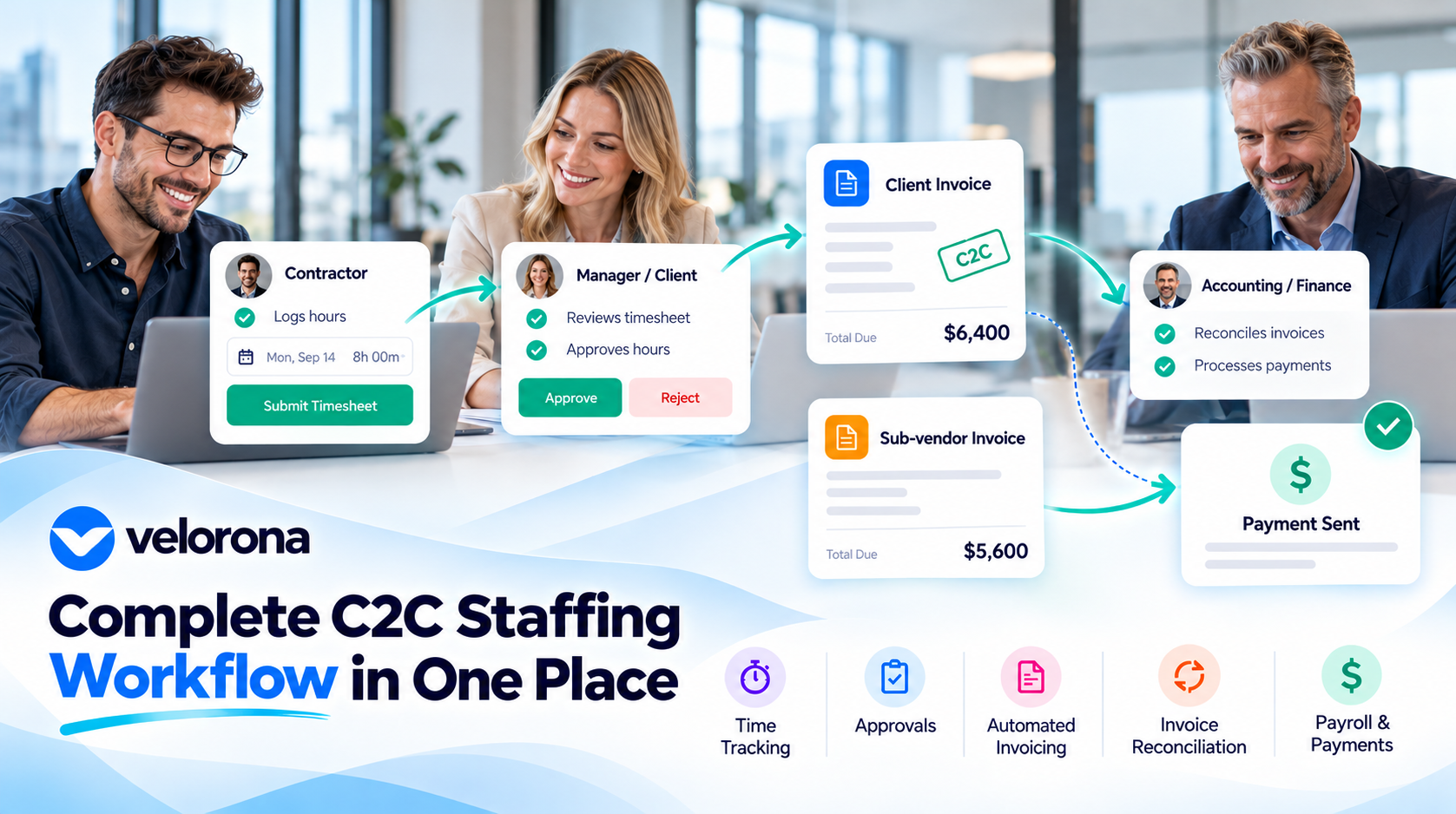
How to Show Your C2C Staffing Workflow to Clients in 60 Seconds
Don’t Just Explain the Workflow – Show It
Picture a typical client call. The client wants to understand how your firm handles Corp-to-Corp, or C2C, arrangements before they sign off on a new engagement. Your sales rep starts explaining: there’s your firm, there’s a sub-vendor, there’s the consultant actually doing the work, and there are invoices moving between all three.
Three sentences in, the client is nodding politely but isn’t really following anymore. That’s not because the workflow is badly designed. It’s because a multi-party billing process is genuinely hard to describe with words alone.
This is where a short visual walkthrough can help. Instead of describing the process, you show it – on one slide, one screenshot, or one screen. The goal isn’t to impress anyone with a slick product tour. It’s to give the client something concrete to look at, so the conversation moves faster and the right questions get answered.
Why C2C Staffing Workflows Are Hard to Explain Out Loud
A C2C arrangement (Corp-to-Corp) is a billing structure where one business entity invoices another business entity for staffing services, rather than placing a worker directly on a client’s payroll. A simplified version often looks like this:
Client → Staffing firm → Sub-vendor → Worker
In practice, it’s rarely that clean. A single engagement might involve more than one sub-vendor, different billing rates per role, and invoices that pass through several hands before anyone gets paid. That creates a few points of natural confusion for a client trying to follow along:
- Who is actually involved in this specific engagement
- Which sub-vendor is tied to which worker
- How an invoice moves from the sub-vendor to the staffing firm to the client
- Where invoice records live and who can access them
- How a discrepancy – say, hours billed that don’t match hours worked – gets caught and resolved
Explaining all of this verbally means asking the client to hold five or six moving parts in their head at once. A visual view of sub-vendor management does that work for them.
It’s worth noting that no two staffing firms run C2C exactly the same way. Some work with a single layer of sub-vendors; others manage sub-sub-vendor chains. The point isn’t to force every engagement into one diagram – it’s to be able to show your specific version of the process when a client asks.
What Should a 60-Second C2C Demonstration Include?
If you decide to build a short walkthrough, it helps to have a rough shape in mind. The following breakdown is illustrative – a starting point, not a script you have to follow exactly. Show only the parts of your process that are real and that you actually use.
First 10 Seconds: Show Who’s Involved
Start with the relationship map for this specific engagement. Which client, which staffing firm entity, which sub-vendor (or sub-vendors), and which worker or workers are connected to it. This is the orientation step – before any numbers or invoices appear, the client should understand the cast of characters.
Next 15 Seconds: Show the Invoice Workflow
Walk through how a C2C invoice is generated and where it goes next. Does the sub-vendor submit an invoice that your firm reviews before rebilling the client? Is there a structured invoice workflow that moves hours into an invoice automatically once they’re approved? This is usually the part clients are most curious about, since it’s the step most often handled over email and spreadsheets at other firms.
Next 15 Seconds: Show Tracking and Reconciliation
This is where you demonstrate – to the extent your systems support it – how an incoming sub-vendor invoice is checked against approved hours, and how a mismatch would be flagged before payment goes out. Reconciliation, in plain terms, just means confirming that what was billed matches what was actually worked and approved. If your firm tracks approved hours as the source of truth for billing, this is a natural moment to show that connection.
Next 10 Seconds: Show Where the Records Live
Clients often want to know where they’d go if they had a question later – an invoice history, an approval log, a payment status. Even a quick glimpse of where that information is stored builds confidence that it isn’t scattered across someone’s inbox.
Final 10 Seconds: Explain the Benefit
Close by connecting the dots in one sentence: this is how your firm keeps C2C billing accurate and keeps the client’s own finance team from chasing down discrepancies later. Keep this brief. The workflow itself should have already made the case.
Again, treat this as a template to adapt, not a universal requirement. If your firm doesn’t currently automate reconciliation, skip that section rather than implying a capability you don’t have.
What Clients Actually Want to Understand
Not every client will ask the same questions, and not every engagement calls for a live walkthrough. But in conversations about C2C arrangements, a few questions tend to come up often enough to prepare for:
- Which sub-vendors are involved in this engagement?
- How are C2C invoices generated and delivered?
- How can invoice status be checked without emailing someone?
- How are billing discrepancies identified and resolved?
- Where can supporting documentation be found if there’s a dispute?
- How are vendor and worker relationships organized and kept current?
A visual workflow doesn’t have to answer every one of these in 60 seconds. What it does is give the client a reference point – something to point at and ask “okay, but what happens here?” That’s usually a better outcome than a client who nods along without really following, because at least now you know where the real questions are.
Slide, Screenshot, or Live Portal – Which Should You Use?
There isn’t one right format. Each has trade-offs worth weighing against your audience and what you’re trying to explain.
A single-slide diagram is good for explaining the overall shape of the process – the relationships between client, firm, sub-vendor, and worker. It’s easy to drop into a sales deck or proposal. The downside is that a diagram shows the concept, not the actual software behind it.
A screenshot is useful for giving a client a sense of what a portal or dashboard looks like day to day. If you use this approach, make sure any client, worker, or financial information shown is either authorized for that purpose or properly anonymized. A screenshot is still a snapshot – it won’t capture the full, end-to-end process.
A live portal demonstration is the most concrete option, since it shows real functionality in real time. It also requires the most preparation: a reliable connection, a clean test environment or properly scoped sample data, and a clear plan for what you will and won’t click into. Confidential client, worker, and financial data needs to be protected at every step.
Which one makes sense depends on the meeting. A first conversation with a prospective client might only need the diagram. A finance team doing vendor due diligence might want the live portal. Match the format to the question being asked.
How to Prepare Your C2C Workflow for a Client Meeting
A short, useful checklist before you present anything:
- Identify the specific question the client wants answered – don’t try to cover everything
- Choose one workflow to demonstrate, not your entire platform
- Strip out detail that doesn’t serve that question
- Use sample data or properly authorized information only
- Double-check that what you’re about to show is accurate and current
- Confirm the screens or features you plan to use actually work before the meeting starts
- Make sure nothing confidential is visible on screen
- Prepare a short, plain-language explanation of what the client is looking at
- Be ready to be honest about any steps that are still manual
The goal here is clarity, not a full product demo. A five-minute walkthrough that answers the client’s actual question will land better than a twenty-minute tour of every feature you have.
What If Your C2C Process Is Still Managed Manually?
If your firm’s C2C workflow currently runs on spreadsheets, email threads, and a few separate systems, that’s a common starting point – not something to disguise. Pretending a manual process is automated tends to backfire the moment a client asks a follow-up question.
A more useful first step is mapping how the process actually works today, warts and all. That exercise tends to surface a few recurring issues:
- The same data being entered more than once across systems
- No clear owner for who maintains invoice or vendor records
- Invoice checks that depend on someone manually comparing numbers
- Difficulty pulling up supporting documentation when a client asks
- Gaps between what a sub-vendor reports and what actually gets billed
Understanding where these gaps live is useful on its own, independent of any sales conversation. It’s also the groundwork for deciding what, if anything, is worth automating first.
How Velorona Supports a Visible C2C Workflow
Velorona is a back-office platform built for staffing firms managing C2C arrangements, vendor relationships, and the billing that connects them. A few areas relevant to building a workflow like the one described above:
- Vendor and sub-vendor management in one system, so staffing firms can manage client, consultant, and sub-vendor relationships without relying on disconnected spreadsheets and email threads.
• C2C billing and invoicing, where approved consultant hours generate client invoices and support sub-vendor reconciliation from one set of numbers-reducing manual re-entry between timesheets, billing, and vendor payments. - Sub-vendor invoice validation and reconciliation, where incoming sub-vendor invoices are matched against approved consultant hours and mismatches are flagged before payment.
- Consultant timesheets and bulk approval workflows that create an approved record of hours, which then drives client invoicing, sub-vendor reconciliation, and payroll.
• Workflows designed for US staffing firms managing C2C arrangements, including multi-party billing between clients, staffing firms, sub-vendors, and consultants.
The Bottom Line
A C2C arrangement can involve several companies, several invoices, and several steps that aren’t obvious from the outside. A clear, short visual walkthrough can help a client follow how those pieces connect – which sub-vendors are involved, how invoices move, and how discrepancies get caught.
The point isn’t to put on an impressive software tour. It’s to answer a reasonable client question in a way they can actually follow, using whatever format – slide, screenshot, or live screen – fits the conversation you’re having.
Want to see how a connected staffing back office can support vendor management, C2C billing, and invoice workflows? Explore a Velorona demo