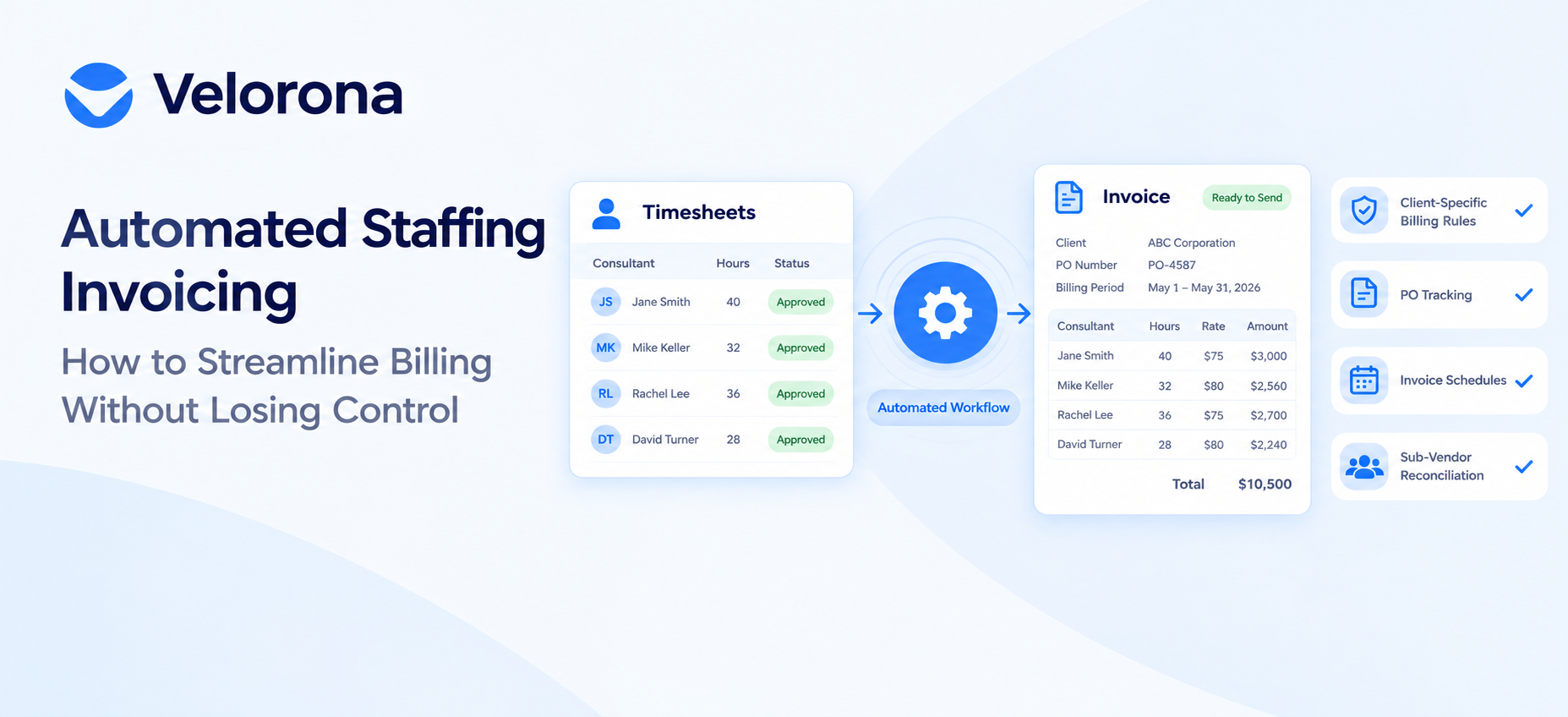
Automated staffing invoicing turns approved timesheets directly into client invoices, applies each client’s own template, PO rules, and billing schedule, and flags sub-vendor mismatches before you pay them.
You keep control by configuring each client’s billing rules once, then letting the system apply those rules automatically on every invoice, instead of re-entering the same details by hand every billing cycle.
That’s the short version. The rest of this guide walks through how the automation actually works, where agencies lose control if they automate the wrong way, and what to check before you switch.
What Does It Actually Mean to Automate Staffing Invoicing?
In a manual setup, a biller exports hours from a time-tracking tool, rebuilds them in a spreadsheet, applies each client’s rate card and formatting by memory, and retypes the result into QuickBooks or a Word template. Every client with a different PO rule, invoice layout, or billing week adds another manual branch to that process.
Staffing invoice software for small agencies replaces that branch logic with configuration. Rate cards, invoice templates, PO ceilings, and billing cadence are set up once per client inside the system. From there, timesheet-to-invoice automation for staffing means: a consultant’s hours are approved, the system generates the invoice using that client’s stored rules, and the biller reviews the result instead of building it from scratch.
This is different from generic invoicing software (FreshBooks, Wave, basic QuickBooks Online) because staffing billing isn’t a flat line-item total. It has to account for who worked, for which client, on which project, at what bill rate, inside what time period and in contract staffing, it often has to reconcile what you bill the client against what a sub-vendor bills you for the same hours.
Why Does Manual Invoicing Break Down as a Staffing Agency Grows?
At 10 consultants, a spreadsheet-and-email process is annoying but survivable. At 40-80 consultants across a dozen clients, each with its own PO rule, invoice format, and billing week, the same process starts producing errors: a sub-vendor invoice that doesn’t match approved hours, a PO that quietly goes over budget, an invoice that sits in the wrong inbox for two weeks.
For a sense of scale, the American Staffing Association’s industry statistics show just how many agencies are running exactly this kind of multi-client, multi-PO billing every week this isn’t an edge case.
The cost shows up as days sales outstanding (DSO) the average time between invoicing and getting paid. In the 2025 Atradius Payment Practices Barometer of 240 US companies, average B2B payment terms ran 45 days, and 43% of invoice value went overdue, with 52% paid on time and 5% written off as bad debt. The same barometer found that a third of suppliers pointed to a cause that has nothing to do with money: delays inside the customer’s own payment-approval process a problem that clear invoice formatting, PO matching, and delivery tracking can directly reduce.
For a staffing agency specifically, the admin version of that same problem is the sub-vendor side: when a sub-vendor’s invoice doesn’t match what your own consultants logged, someone has to catch it before it’s paid, not after. At $500K of sub-vendor spend, a 3-5% invoice error rate is a real and recurring cost, and it’s invisible until someone reconciles the hours by hand.
None of this is solved by working faster inside the same process. It’s solved by removing the manual re-entry steps where the errors get introduced in the first place.
Source: Atradius Payment Practices Barometer, US 2025, as summarized August 2026.
How Does Staffing Invoice Automation Actually Work?
Most staffing invoicing software splits into two paths, and choosing the right one per client matters:
- General invoices for one-time or fixed-fee billing manual services, flat fees, or expenses not tied to tracked hours. The amount is entered directly.
- Employee-hours invoices for billing that must reflect approved work hours. This path connects the employee, client, project, and work period, and pulls in only hours that have been approved unapproved time is excluded from the total.
For recurring client billing, invoice schedules replace the manual “build it every period” step. A schedule groups billable hours into a billing period weekly (Monday-Sunday), biweekly, semi-monthly (1st-15th and 16th-end of month), or monthly and finalizes automatically once every time entry in that period is approved. If entries are still unapproved 15 days after the period ends, the system force-finalizes using only the approved hours, so one straggling timesheet doesn’t block every other client’s invoice.
From there, every invoice moves through the same lifecycle, whether it’s a one-time invoice or one generated from a schedule:
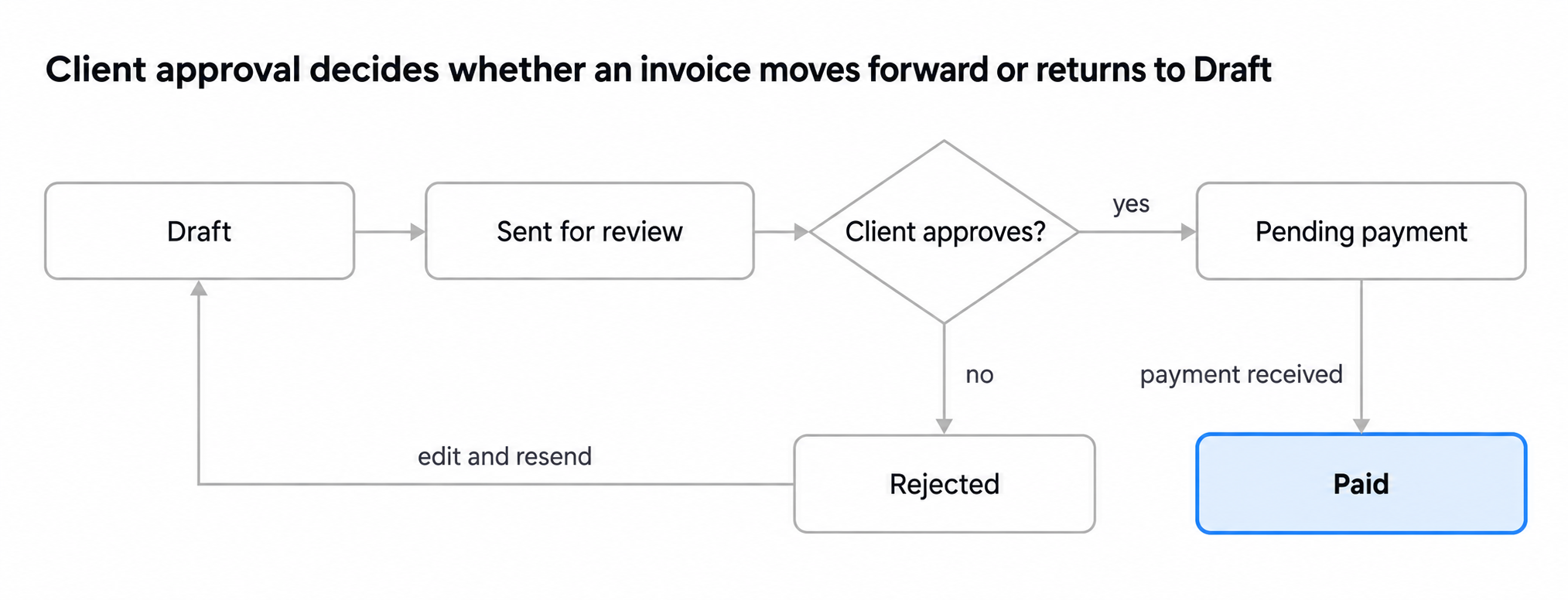
invoice status lifecycle · 6 states, 1 decision
This mirrors the lifecycle Velorona documents for its own invoices: Draft, In Review, Pending, Pending Confirmation, Paid, with Rejected routing back to Draft and Overdue or Archived as separate end states. The point for a growing agency: the status, not a person’s memory, decides what can happen to an invoice next so a new hire can tell at a glance whether something is editable or already locked.
Manual vs. Automated Staffing Invoicing: What Changes
| Manual process | Automated staffing invoicing | |
| Building the invoice | Export hours, rebuild in a spreadsheet, retype into the invoice | Approved hours generate the invoice directly from the timesheet |
| Per-client rules | Biller remembers (or looks up) each client’s format and PO rule | Template, PO ceiling, and billing cadence are stored per client and applied automatically |
| Sub-vendor hours | Reconciled by eye against consultant timesheets, after the fact | Mismatches are flagged before the invoice goes out, not after |
| Recurring billing | Rebuilt from scratch every week, biweek, or month | Invoice schedules finalize automatically once hours are approved |
| Delivery and status | Emailed; “did you get it?” becomes a recurring conversation | Delivered through a portal with opened, approved, and paid status visible |
| Late payment | Someone has to remember to follow up, client by client | Reminders go out automatically at set intervals past due |
| Where you stand on collections | Rebuilt by hand at month-end | AR aging is available on demand |
The common thread: automation doesn’t remove client-specific rules it just stops asking a person to re-apply them correctly, by memory, every single time.
How Do You Keep Control Over Client-Specific Billing Requirements?
This is the part agencies worry about most: automating invoicing usually means picking a system, and a system can feel like it forces every client into the same mold. In practice, control comes from configuring four things once per client, not from doing less automation.
Custom invoice templates per client. Some clients want a line per consultant; others want one consolidated total per project. Staffing invoicing software that supports a custom invoice template per client lets you set that layout once and reuse it on every invoice for that client, instead of reformatting by hand.
PO tracking with a utilization alert. When a client issues a PO, your billing has to stay inside it. Automated PO tracking flags the account once it reaches a set utilization threshold commonly 80% of the PO’s value so finance sees the ceiling coming instead of discovering an overage after the invoice is already sent.
Invoice per consultant vs. per client. This is a configuration choice, not a limitation. General invoices handle one-time or fixed-fee billing with manually entered line items; employee-hours invoices generate from approved hours for a specific employee, client, and project. An agency can run both side by side a consolidated monthly invoice for one client, a per-consultant invoice for another without changing the underlying workflow.
Billing cadence. Weekly, biweekly, semi-monthly, and monthly invoice schedules exist because clients don’t all pay on the same rhythm. Setting the cadence per client, once, is what lets the agency stop rebuilding each client’s invoice from memory every period.
The agencies that lose control after automating usually did one thing wrong: they picked one invoice format and one cadence for every client because it was simpler to set up, instead of configuring each client’s actual requirements. The software isn’t what removes the control skipping the per-client setup is.
How Does Velorona’s Client Portal Work for Invoice Approval?
Velorona is back-office software built for US IT staffing and contract staffing firms managing 20 or more consultants the group that outgrows spreadsheets and email but doesn’t need (or want to pay for) an enterprise ATS platform. Its invoicing is built around the two paths described above: general invoices for one-time billing, and employee-hours invoices generated from approved timesheets, with weekly, biweekly, semi-monthly, and monthly schedules available per client.
On the client-facing side, invoices can be delivered through a branded client portal carrying your agency’s branding, not Velorona’s or by email for clients who’d rather not log in to another system. From there:
- Clients review and approve submitted hours through a client timesheet approval portal, with inline comments available if something needs a correction before it’s billed.
- Invoice delivery tracking opened, approved, and paid is visible on your side, timestamped, so “we never received it” stops being a dispute you can’t check.
- Custom invoice templates and PO tracking (with alerts at a set utilization threshold) apply automatically per client, so the format a client is used to seeing doesn’t change just because the backend did.
- Past-due invoices trigger automated invoice reminders at set intervals Velorona’s defaults are 7, 14, and 30 days past due instead of relying on someone remembering to follow up.
- An accounts receivable aging report and sub-vendor invoice reconciliation (matching sub-vendor billing against your consultants’ approved hours before you pay) are both available in the system, not built in a spreadsheet after the fact.
Velorona doesn’t currently handle real payroll execution or recruiting/ATS workflows it’s billing, hours, and client-facing delivery, built specifically around the sub-vendor and C2C patterns common in IT staffing. If your billing has no sub-vendor or hours-based component at all, a simpler invoicing tool may suit you better; this is built for the agencies where that complexity is the actual problem.
Frequently Asked Questions
Does automating invoicing mean every client gets the same invoice format? No that’s a configuration choice, not a constraint of automation. Staffing invoice software built for agencies lets you set a custom template, PO rule, and billing cadence per client, then applies those settings automatically on every invoice for that client.
What’s the difference between a general invoice, an employee-hours invoice, and a flat-fee invoice? A general or flat-fee invoice is for one-time or fixed-fee billing where you enter the amount directly. An employee-hours invoice generates from approved timesheet hours for a specific employee, client, and project. An agency can run both side by side, using whichever type fits each client’s arrangement.
Can I set different invoice schedules for each client? Yes. Weekly, biweekly, semi-monthly, and monthly invoice schedules can be configured per client, so each client’s invoices generate automatically on their own billing cycle instead of needing a manual follow-up every period.
How does PO tracking prevent overages? The system tracks cumulative billing against the PO’s value and flags the account once it crosses a set threshold commonly 80% utilized so finance sees the ceiling approaching before an invoice pushes past it, rather than discovering the overage after the fact.
What happens when a sub-vendor invoice doesn’t match the approved hours? Mismatches between the invoice amount, billed hours, and approved timesheets are flagged so your team can review the variance and resolve it before the invoice is paid, while invoices that do match can move through the workflow without manual intervention.
What happens if a client’s hours aren’t approved when a billing period ends? An invoice schedule typically waits for a short grace period (15 days is common) and then finalizes using only the hours that have been approved by then. Unapproved time doesn’t get billed automatically, and doesn’t block every other client’s invoice from going out.
Do clients need to log in to a portal to receive invoices? No. Invoices can be delivered through a client portal or by email, so clients who prefer email aren’t required to access another login just to get billed delivery stays flexible while the underlying billing workflow stays automated.
Will automated reminders annoy clients who already pay on time? Reminders are tied to the invoice’s due date and status, so a client who pays before the first reminder interval (commonly 7 days past due) never sees one. The automation targets invoices that are actually overdue, not every client on a schedule.