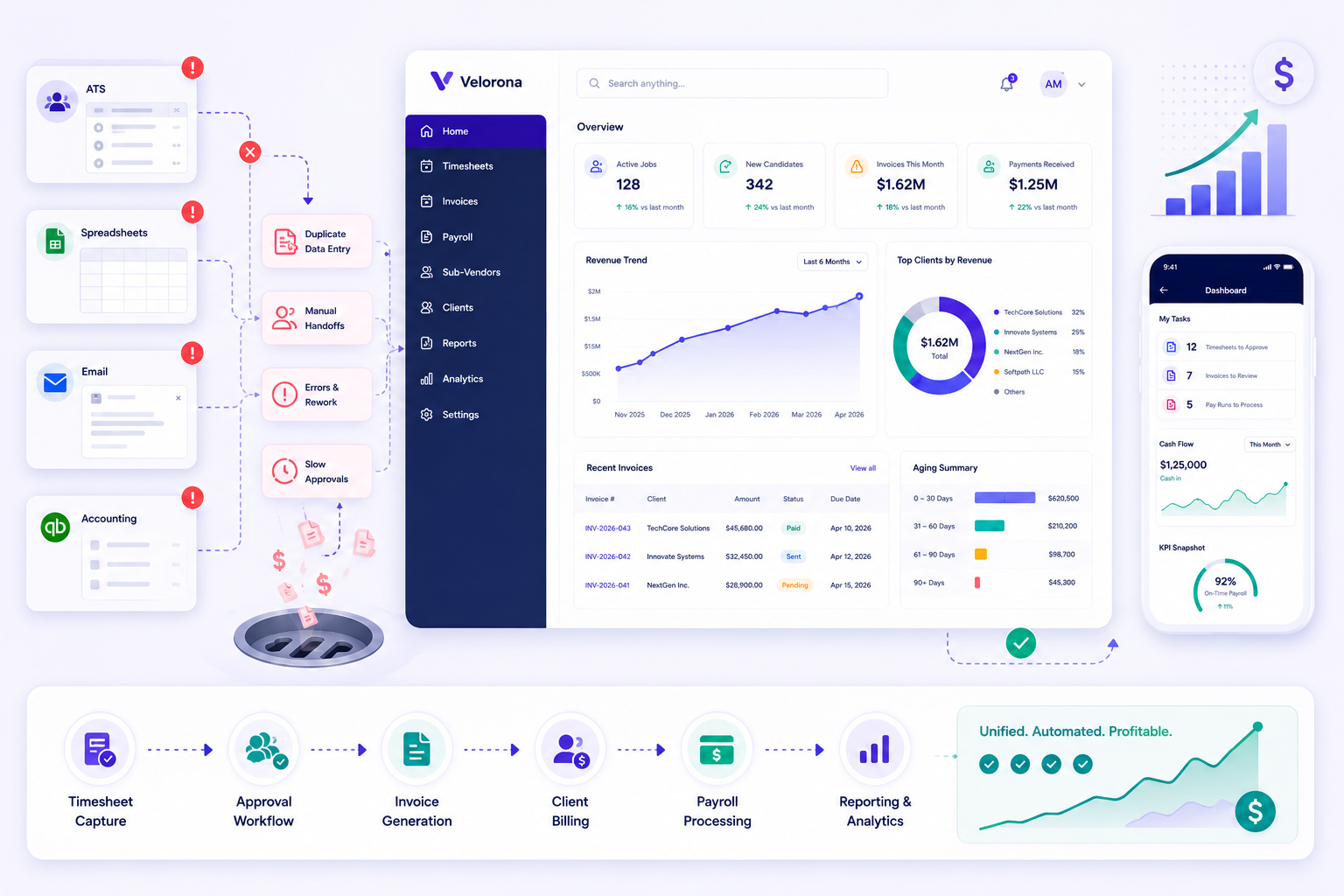
The High Cost of Operational Fragmentation: A 2026 Staffing Back-Office Benchmark
The High Cost of Operational Fragmentation:
A 2026 Staffing Back-Office Benchmark
Spreadsheets, siloed tools, and disconnected systems — what each operational model costs, and what fixing it looks like
What This Benchmark Measures
This report analyses the operational cost of back-office fragmentation across four staffing firm profiles: spreadsheet-only, tools-plus-spreadsheets, siloed tools, and platform-with-gaps. Data points are drawn from G2 Research, Bullhorn’s 2026 State of Staffing, Staffing Industry Analysts, and ADP workforce studies. Where Velorona data is cited, it is marked as such. The goal is a clean-eyed look at where the costs live — before any platform is evaluated.
The global workforce management software market reached $11.5 billion in 2026 (SIA). Despite this scale of investment, a significant portion of the staffing industry remains on manual processes that quietly erode the bottom line. This benchmark names what that erosion costs — by operational profile, by failure mode, and by metric.
Spreadsheets vs Siloed Tools vs Integrated Platform: What Each Model Actually Costs
Before diagnosing your firm’s specific failure mode, the table below shows how the three main operational models compare across the metrics that matter most to staffing margins. Red = a known cost. Amber = a partial solution. Green = the resolved state.
| Dimension | Spreadsheets Only | Siloed Tools | Integrated Platform (Velorona) |
| Pay Cycle Speed | 7+ days (60% of firms) | 3–5 days — transfers between tools add latency | Same-day to next-day — approved hours auto-populate |
| Payroll Error Rate | 1.2% per pay period — manual reconciliation | Lower but not eliminated — re-keying still occurs | Near-zero — single source of truth eliminates re-entry |
| Sub-vendor Invoice Accuracy | Unverified — no matching against approved hours | Partial — depends on whether tools share data | Auto-matched before payment — $12–25K/yr recovered at $500K spend |
| Client Invoice Delivery | PDF via email — no read receipt, no audit trail | Often still email — invoicing rarely covered by ATS | Client portal — opened, viewed, approved. DSO drops 15–30 days |
| Margin Visibility | None in real time — requires 2-day Excel rebuild | Partial — pull from multiple systems manually | Live per client, updated on every approved timesheet |
| Compliance / Audit Trail | No enforcement — formula logic is invisible | Depends on each tool — rarely consolidated | Every approval timestamped and traceable to source record |
| Key-Person Risk | Very high — institutional knowledge lives in one person | High — each tool requires separate expertise | Low — logic encoded in platform, not in a person |
The sections below explain each row in detail — the source of the cost, what it looks like operationally, and what fixing it requires.
Section 1: The Real Cost of Spreadsheet-Dependent Staffing Operations
Spreadsheets are a comfortable starting point for growing agencies. They are free, familiar, and flexible. But as contractor volume grows and client billing arrangements become more complex, that flexibility becomes the source of the margin problem — not the solution to it.
Why Does Manual Payroll Take 7+ Days? The Processing Delay Explained
Approximately 60% of organisations relying on manual methods take seven or more days to process a single pay cycle (G2 / ADP). In a market where 67% of staffing workers are paid weekly (SIA), a 7-day processing window means the pay cycle is always behind the work cycle. The downstream effect: increased Days Sales Outstanding (DSO) and friction with clients who expect invoice delivery aligned to approval.
What this looks like in practice: A 40-consultant IT staffing firm runs its pay cycle manually each Monday. The ops manager collects timesheets by email, reconciles hours in Excel, and re-enters approved figures into a separate invoicing tool. The cycle that should take 90 minutes routinely takes four to five hours — and any discrepancy discovered mid-run rolls into the following week’s cycle, compounding the delay.
What Is the Manual Payroll Error Rate? The 1.2% Tax
1.2% average payroll error rate per pay period for organisations using manual/disconnected systems — G2 Research
For an agency managing 100 contractors at an average weekly bill rate of $2,000, a 1.2% error rate translates to approximately $2,400 in billing discrepancies per pay period — $124,800 annually in errors that require investigation, correction, and in some cases, client credit. The sources of this error are consistent:
- Formula fragility: a single broken cell in a spreadsheet can propagate errors across an entire pay run silently
- Time leakage: without integrated verification, buddy punching and inaccurate time entries have no automatic detection mechanism
- Re-entry errors: every manual transfer of data from one system to another is a point where figures can change
- Audit failure: spreadsheets have no built-in enforcement of labour rules — compliance gaps only surface during regulatory review
The Key-Person Risk No One Budgets For
The most underestimated cost of spreadsheet dependency is institutional knowledge concentration. When the person who maintains the formulas, knows the rate card exceptions, and understands the sub-vendor billing logic leaves — the firm spends months rebuilding that knowledge. That reconstruction happens while the billing cycle is still running.
The fix is encoding back-office logic in a platform rather than in a person. Multi-level approval chains, client-specific rate cards, and sub-vendor reconciliation rules configured in a system run whether the original operator is present or not.
Section 2: Disconnected Staffing Systems — The Hidden Cost of Siloed Tools
Many firms have moved beyond spreadsheets only to encounter a second-order problem: siloed tool syndrome. A dedicated ATS for sourcing. A time-tracking app. A standalone billing platform. A payroll processor. Each tool is individually competent — but the firm pays the integration tax on every handoff between them.
What Does 75% of Staff Time on Data Entry Actually Mean?
87% of organisations still struggle with disconnected data sources in 2026 — G2 Research / IBM
75% of staff time spent on manual data entry and data cleaning in firms with disconnected tools — G2 Research
That 75% figure is not a productivity stat — it is a margin stat. Every hour a payroll admin spends exporting, reformatting, and re-importing data between systems is an hour not spent on exception handling, client relationships, or error investigation. It also means every analyst at a staffing firm with siloed tools is working on a slightly different version of the same numbers.
What this looks like in practice: A firm’s finance director pulls the monthly billing report. Marketing reports 50 placements. Finance sees 45. The five-placement discrepancy takes two days to trace — it turns out two tools counted a contractor differently based on their start-date definition. Strategic decisions were already made on the wrong number.
Why Is Manual Payroll Processing Risky? The Compliance Gap
The deeper risk of siloed systems is not inefficiency — it is compliance. When payroll data and time tracking live in separate systems, labour rule enforcement requires a human to manually apply the logic at the transfer step. That human introduces inconsistency. For staffing firms managing W-2, 1099, and C2C workers across multiple states, the 53% of companies that have incurred compliance penalties in the last five years (G2 Research) are predominantly firms where the compliance logic was never automated.
Section 3: Which Operational Profile Is Your Firm? A Self-Diagnostic Framework
Understanding your firm’s current operational profile is the prerequisite to selecting the right fix. The four profiles below cover the majority of staffing firms — each has a different friction point and a different priority action.
| Profile | Where Friction Lives | Priority Fix | Relevant Velorona Page |
| Spreadsheet-only | Every downstream process is error-prone and unauditable. Key-person risk is extreme. | Replace manual billing workflow entirely | IT staffing page |
| Tools + spreadsheets | Manual seam between systems is where errors live and audit trails break. | Remove the seam — connect timesheet approval directly to invoice generation | Payroll & Billing Feature |
| Siloed tools | 87% of firms in this state struggle with inconsistent data across departments. | Consolidate onto one platform with a shared source of record | Invoices Feature |
| Platform with gaps | Missing C2C sub-vendor invoicing or client review portal — workarounds become expensive at scale. | Evaluate specifically for the gap — C2C reconciliation or client portal | Sub-vendors Feature |
The common thread across all four profiles is the same root cause: data moving through manual handoffs between disconnected systems. Each handoff is where the error enters, the delay is introduced, or the audit trail breaks. The fix — regardless of starting point — is removing those handoffs by connecting data at the source.
Section 4: Where Velorona Fits — Back-Office Operations After Placement
AI recruitment tools handle the front-end hiring workflow: sourcing, screening, scheduling, and candidate communication. What they do not address is what happens after placement — timesheet management, invoice generation, sub-vendor billing, and payroll. For staffing firms where the operational friction lives in the back office, Velorona is built for that problem specifically.
The three operational capabilities that distinguish the platform:
1. Bidirectional Sub-Vendor Invoice Reconciliation — Recovering $12–25K Per Year
Every incoming sub-vendor invoice is auto-matched against approved consultant hours before payment. Every outgoing client invoice is generated from those same approved hours automatically. Mismatches — where a sub-vendor invoiced for 40 hours and the consultant worked 36 — are flagged in a review queue before money leaves the account.
For a staffing firm with approximately $500K in annual sub-vendor spend, this process typically identifies $12–25K per year in invoice discrepancies that manual eyeballing misses. That figure is the margin recovery in year one — before any other operational improvement is counted.
What this looks like in practice: A firm running 25 active C2C sub-vendor relationships had never systematically reconciled sub-vendor invoices against approved hours. In the first billing cycle after switching to Velorona, three invoices were flagged — a total gap of $1,400 in overbilled hours. Over 12 months, the firm recovered $16,200 in errors that had previously been paid without question.
2. Client Portal Auto-Delivery — Why DSO Drops 15–30 Days
Invoices go directly to a branded client portal — not email. You see when the client opened it, viewed it, and approved it. The ‘I never received it’ dispute stops being possible. Accepted invoices auto-finalise with due dates set per the payment terms configured at the client level.
For a firm billing $200K per month, the difference between 30-day and 60-day DSO is $40K of working capital permanently stuck in the payment cycle instead of available for operations. Staffing firms using Velorona typically see DSO drop 15–30 days within the first quarter.
3. Multi-Tier Sub-Vendor Support — Foundational Architecture for C2C
Velorona handles three-party C2C chains natively: client, staffing firm, sub-vendor, and sub-sub-vendor. The vendor hub manages the full relationship layer — rate cards, payment terms, and approval workflows — so the billing logic is encoded in the platform rather than managed manually for each relationship.
For IT staffing firms running C2C arrangements at scale, this is foundational architecture — not a feature add-on. It is the difference between a platform that handles your actual billing model and one that requires a manual workaround for every non-standard arrangement.
What Velorona Does Not Do
Velorona is not an ATS. It does not source candidates, manage job orders, or track the recruiting pipeline. It is back-office software for IT staffing firms — from timesheet approval to client invoice to sub-vendor reconciliation to payroll details. If you need an ATS, CEIPAL and Bullhorn cover the front office. Velorona handles what comes after the placement.
Pricing
$10/user/month ($7 annual). No setup fees. No per-consultant or per-vendor fees. Live in 5–14 days. See full pricing →
Section 5: Compliance Implications of Operational Fragmentation
Compliance risk in staffing is not primarily a front-office AI problem — it is a back-office data integrity problem. When payroll figures, timesheet approvals, and invoice records live in disconnected systems, the audit trail that regulators and clients require is either incomplete or requires manual reconstruction.
The table below maps the five most significant compliance exposure areas for IT staffing firms to the operational fix that addresses each one.
| Compliance Area | Risk if Unaddressed | How an Integrated Platform Responds |
| Payroll misclassification (W-2 vs 1099 vs C2C) | IRS penalties, back taxes, state employment law violations — especially CA 2025 law changes | Payroll type configured per employee — W-2, 1099, and C2C each handled with the correct treatment in one system |
| Overtime and wage-and-hour accuracy | FLSA violations; state overtime rules vary — manual systems cannot enforce these automatically | Approved timesheets feed payroll directly — no re-entry step where overtime can be dropped or miscalculated |
| Invoice audit trail | Client disputes and financial audits require proof of who approved what hours and when | Every approval timestamped and traceable back to the originating timesheet record |
| EU AI Act / NYC Local Law 144 (if using AI hiring tools) | High-risk classification for AI in hiring — fines up to €35M or 7% global revenue; annual bias audits required in NYC | Applies to front-office AI tools, not to Velorona. Evaluate AI recruitment vendors separately on bias audit and human-in-the-loop requirements |
| Data retention and privacy | GDPR Article 5 data minimisation; US state privacy laws on candidate and employee records | Audit-ready reporting built in — exportable records per employee, per pay period, per client |
The through-line across all five areas: compliance enforcement requires the logic to live in the system, not in a person’s head or a spreadsheet formula. When the data is connected at the source, the audit trail is automatic.
Section 6: Three Strategic Recommendations for 2026
1. Eliminate the Manual Seam First
The highest-ROI action for any staffing firm on spreadsheets or tools-plus-spreadsheets is removing the manual seam between approved timesheets and invoice generation. That single handoff is where the 1.2% error rate, the DSO drag, and the audit trail gap all originate. Fixing it does not require a full platform migration — it requires connecting those two steps.
2. Unify Sub-Vendor and Client Billing in One System
Firms running C2C arrangements need both outgoing client invoices and incoming sub-vendor invoices managed in the same system. Platforms that handle only one direction require the other to be managed manually — which is where the $12–25K annual sub-vendor overbilling occurs. The vendor hub and sub-vendor reconciliation need to be a single unified view, not two separate tools.
3. Encode the Logic in the Platform — Not in a Person
Every staffing firm that depends on one controller, one ops manager, or one spreadsheet owner for institutional memory is carrying a key-person risk that does not appear on the balance sheet until that person leaves. Multi-level approval workflows, client rate cards, and payroll configurations stored in a platform run whether the original operator is in or not.
Frequently Asked Questions
How does an automated payroll system benefit a staffing business?
Automated payroll processing reduces processing errors by eliminating the re-entry step between approved timesheets and payroll records. When both live in the same system, the payroll figure is derived from the same source as the client invoice — so the two always match. The 1.2% per-pay-period error rate associated with manual systems (G2 Research) is primarily a re-entry error — and it is eliminated when there is no re-entry.
What are the specific risks of using spreadsheets for staffing payroll?
Four risks compound over time: formula fragility (a broken cell propagates silently), key-person dependency (only one person understands the logic), no compliance enforcement (overtime and tax rules require manual application), and no audit trail (disputes require manual reconstruction across multiple files). For IT staffing firms managing W-2, 1099, and C2C workers simultaneously, the audit trail gap is the most operationally dangerous.
Why is it critical to integrate time tracking with payroll and invoicing?
Disconnected systems produce an average payroll error rate of 1.2% per pay period. More importantly, they make it impossible to answer the question ‘do this week’s invoice and this week’s payroll trace back to the same approved hours?’ — which is the question a client dispute or compliance audit will ask. Connecting timesheets, invoices, and payroll in one system makes that answer automatic, not investigative.
What essential features should staffing firms look for in back-office software?
Seven non-negotiables: (1) timesheet-to-invoice automation with no manual transfer step; (2) client review portal — not email delivery; (3) sub-vendor invoice reconciliation against approved hours; (4) payroll tied to the same records as billing; (5) audit-ready approval trail per timesheet; (6) support for W-2, 1099, and C2C payroll types in one system; (7) multi-company access under a single login for firms managing multiple entities.
What is staffing margin leak and how does an integrated platform fix it?
Staffing margin leak refers to the quiet erosion of profitability caused by operational inefficiencies — sub-vendor overbilling that is never caught, DSO inflated by email-based invoicing, payroll errors requiring manual correction, and time spent on admin that generates no revenue. An integrated platform fixes it by removing the manual handoffs where those leaks occur: approved hours flow to invoices automatically, sub-vendor invoices are matched before payment, and the same record populates both billing and payroll.
How does Velorona compare to other staffing back-office tools?
Velorona is the only platform under $15K ACV that handles both directions of C2C billing simultaneously — outgoing client invoices auto-generated from approved timesheets, and incoming sub-vendor invoices auto-matched against those same hours before payment. Most platforms handle one side; the other requires a manual workaround. See all features → or compare at the IT staffing page →
How quickly can a staffing firm go live on Velorona?
Live in 5–14 days. No setup fees. No implementation cost. Historical data imports via CSV. See pricing → or book a demo →
Stop the margin leak. Start with a 15-minute demo.
Timesheets, invoices, sub-vendor reconciliation, and payroll — connected in one system, live in 5–14 days.
Book a demo | See pricing | Request a quote
$10/user/month. No setup fee. No per-consultant or per-vendor fees.